EasyManua.ls Logo

Dell OptiPlex 320 - General Installation Guidelines; Connecting Drive Cables; Drive Interface Connectors

Dell OptiPlex 320
140 pages
Print Icon
To Next Page IconTo Next Page
To Previous Page IconTo Previous Page
Loading...
Back to Contents Page
Drives
Dell™OptiPlex™320User'sGuide
Drives
General Installation Guidelines
CD/DVD Drive
Floppy Drive
Hard Drive
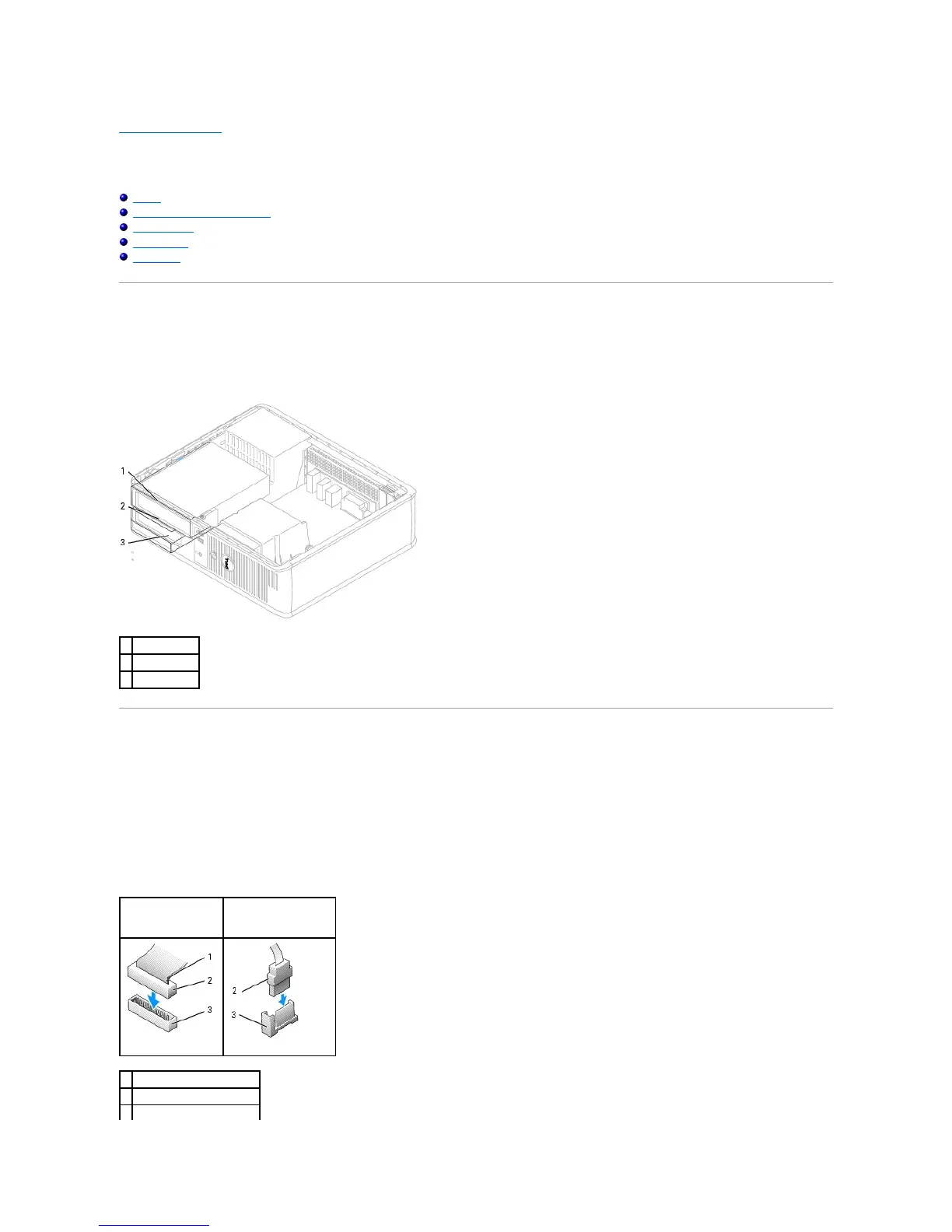
Your computer supports:
l One SATA (serial ATA) hard drive
l One optional floppy drive
l One optional CD or DVD drive
General Installation Guidelines
Connecting Drive Cables
When you install a drive, you connect two cablesa DC power cable and a data cableto the back of the drive and to the system board.
Drive Interface Connectors

1
CD/DVD drive
2
floppy drive
3
hard drive
IDE Drive Connector
Serial ATA Connector
1
colored stripe on IDE cable
2
interface cable connector
3
interface connector

Table of Contents

Other manuals for Dell OptiPlex 320

Related product manuals