EasyManua.ls Logo

Dell OptiPlex 320 - DC Power Connectors

Dell OptiPlex 320
140 pages
Print Icon
To Next Page IconTo Next Page
To Previous Page IconTo Previous Page
Loading...
11. Replace the CD/DVD drive (see Installing a CD/DVD Drive).
12. Connect the AC power cable to the connector.
13. Replace the computer cover (see Replacing the Computer Cover).
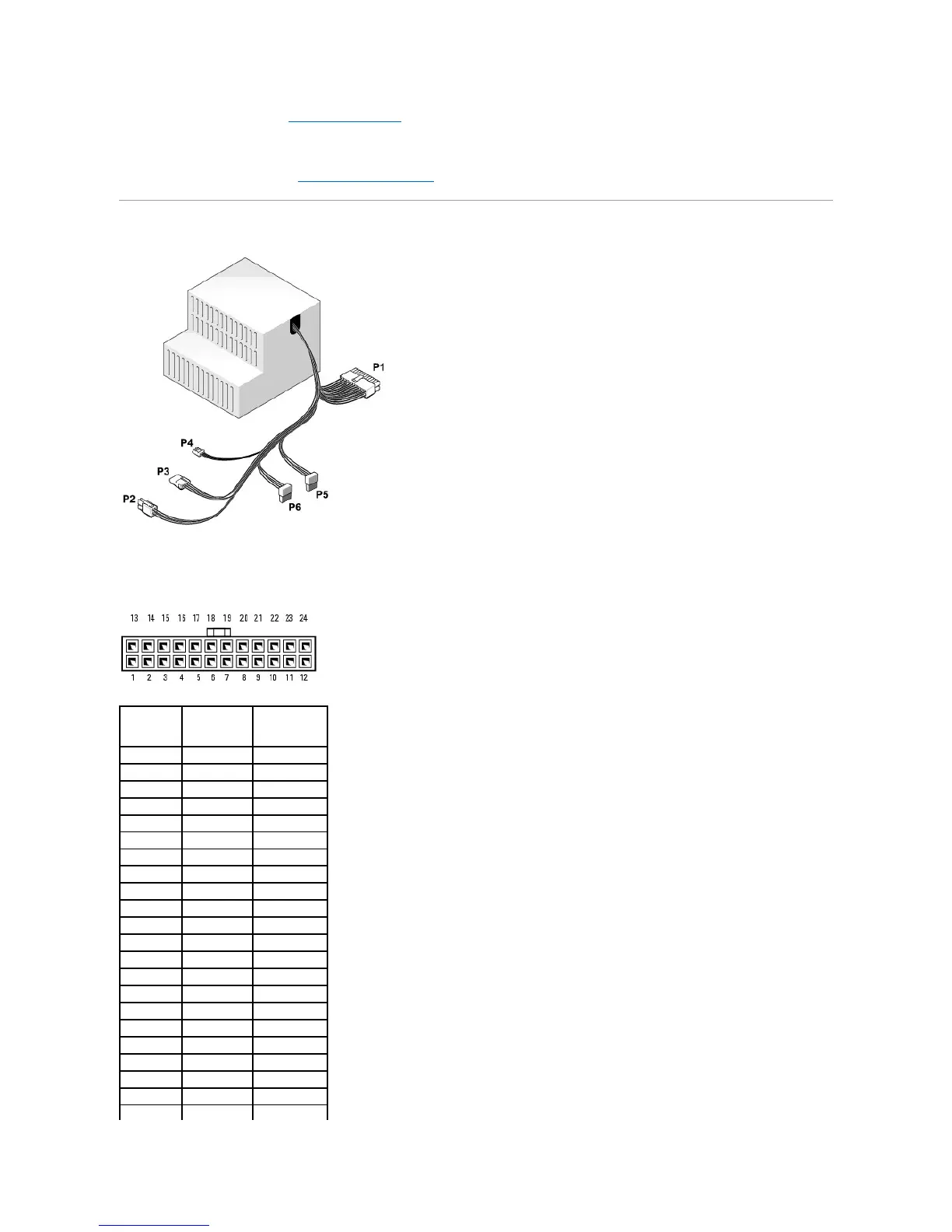
DC Power Connectors
DC Power Connector P1
Pin Number
Signal name
18-AWG Wire
1
+3.3 VDC
Orange
2
+3.3 VDC
Orange
3
GND
Black
4
+5 VDC
Red
5
GND
Black
6
+5 VDC
Red
7
GND
Black
8
PS_PWROK*
Gray
9
P5AUX
Purple
10
+12 VDC
White
11
+12 VDC
White
12
+3.3 VDC
Orange
13
+3.3 VDC
Orange
14
-12 VDC*
Blue
15
GND
Black
16
PWR_PS_ON*
Green
17
GND
Black
18
GND
Black
19
GND
Black
20
NC
N/C
21
+5 VDC
Red
22
+5 VDC
Red

Table of Contents

Other manuals for Dell OptiPlex 320

Related product manuals