EasyManua.ls Logo

Dell OptiPlex 320 - Removing the Floppy Drive

Dell OptiPlex 320
140 pages
Print Icon
To Next Page IconTo Next Page
To Previous Page IconTo Previous Page
Loading...
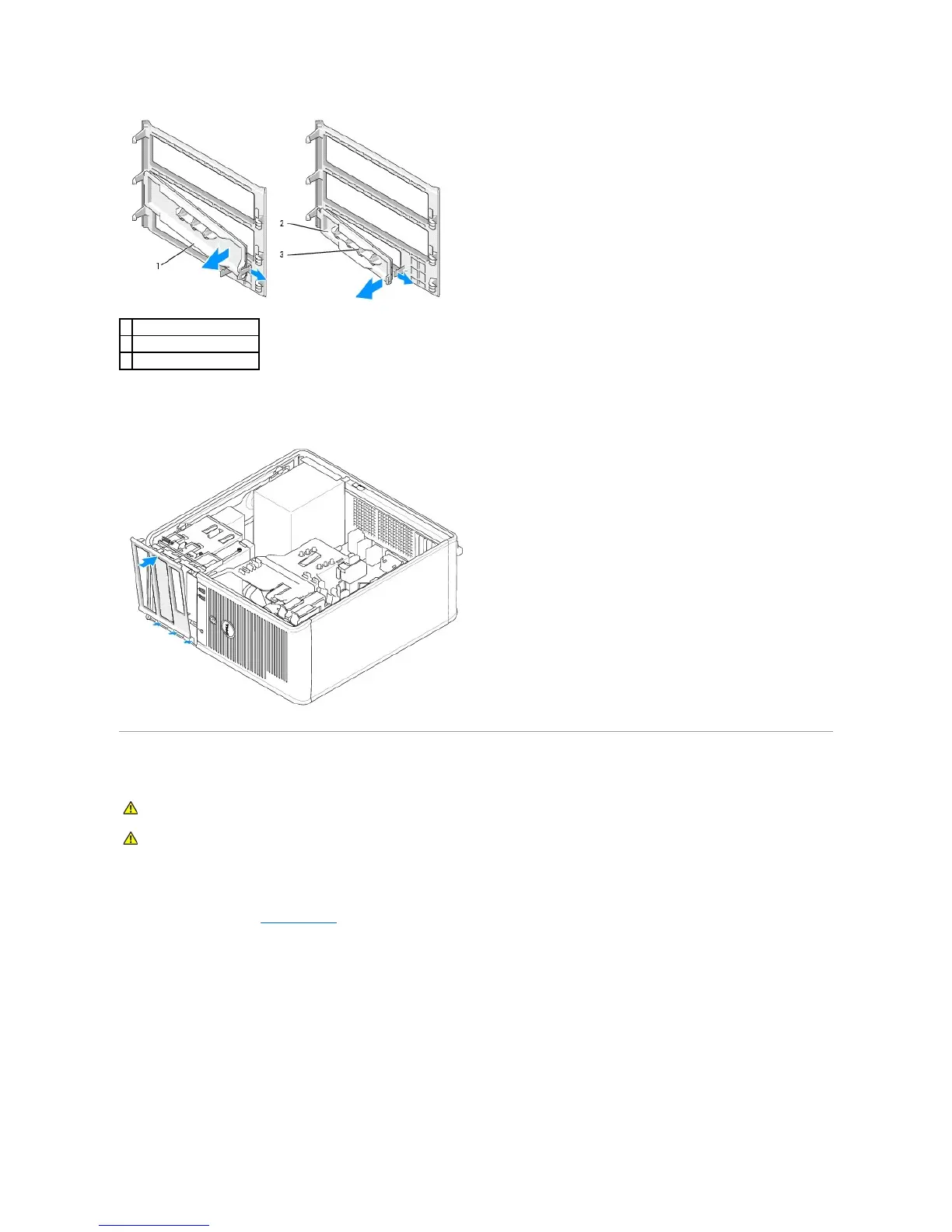
5. Reattach the drive panel to the front of the computer.
The drive panel only fits when it is correctly oriented.
Floppy Drive
Removing the Floppy Drive
1. Follow the procedures in Before You Begin.
2. Remove the drive panel by sliding the drive release latch downward to open the panel, and then remove it from the hinges.
3. Disconnect the power and data cables from the back of the floppy drive.
4. Slide the drive release latch downward and hold it in place. Without releasing the latch, slide the floppy drive out of the computer.

1
CD/DVD-drive panel insert
2
floppy-drive panel insert
3
holder for shoulder screws
CAUTION: Before you begin any of the procedures in this section, follow the safety instructions located in the Product Information Guide.
CAUTION: To guard against electrical shock, always unplug your computer from the electrical outlet before removing the computer cover.

Table of Contents

Other manuals for Dell OptiPlex 320

Related product manuals