b. Connect the network cable to the network adapter card's connectors. Do not connect the network cable to the integrated network connector on
the back panel of the computer.
16. Install any drivers required for the card as described in the card documentation.
Removing an Expansion Card
1. Follow the procedures in Before You Begin.
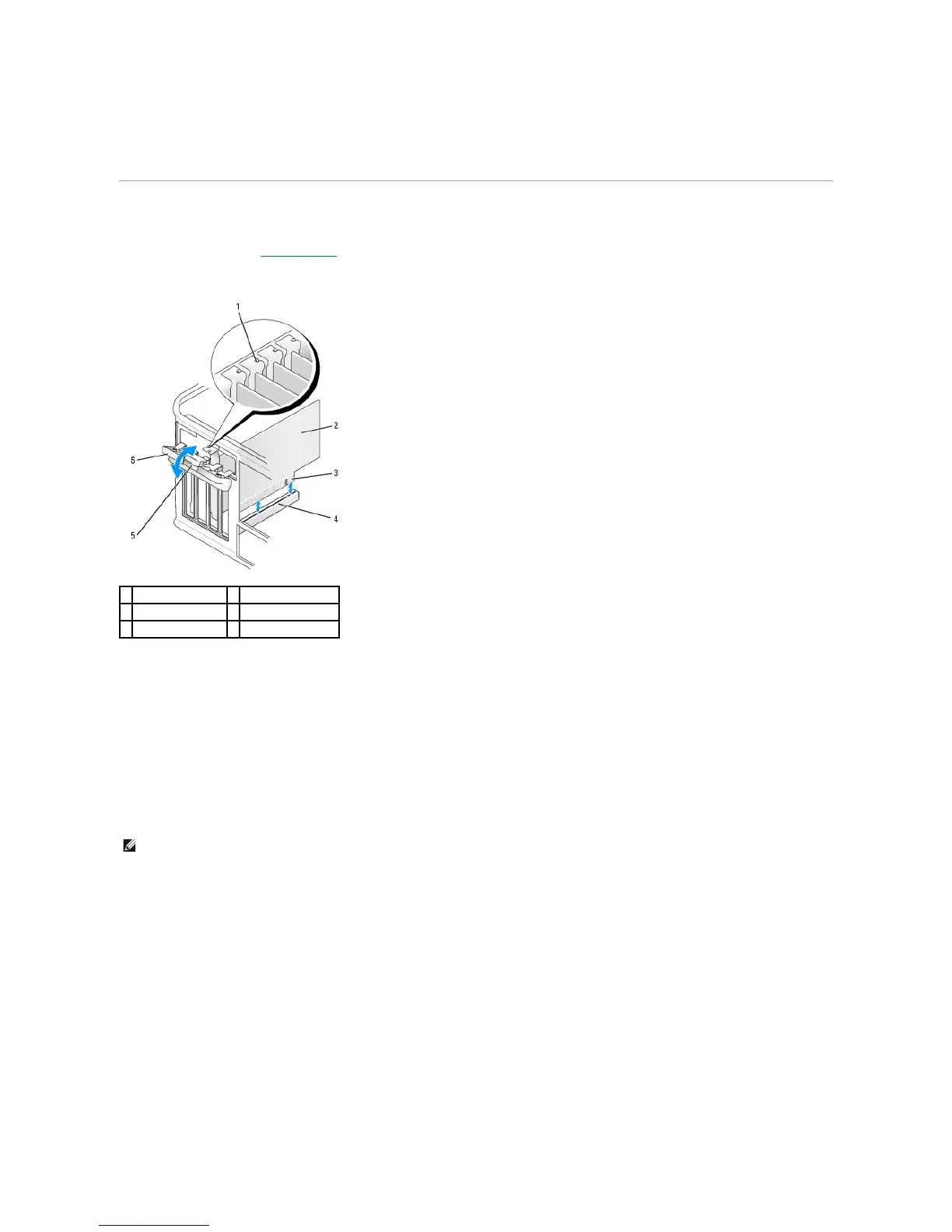
2. Gently push the release tab on the card retention latch from the inside to pivot the latch open. The latch will remain in the open position.
3. Open the card retention mechanism that secures the card in place from the top:
a. Place your thumb on the top of the card retention mechanism and grip the bottom of the retention mechanism with your fingers.
b. With your free hand, gently squeeze the sides of the card retention mechanism to release it from the tab slots holding it in place.
c. Pivot the card retention mechanism upward to release it from the two tab slots.
4. If necessary, disconnect any cables connected to the card.
5. Grasp the card by its top corners, and ease it out of its connector.
6. If you are removing the card permanently, install a filler bracket in the empty card-slot opening.
7. Before you replace and lower the card retention mechanism, ensure that:
l The tops of all cards and filler brackets are flush with the alignment bar.
l The notch in the top of the card or filler bracket fits around the alignment guide.













 To Next Page