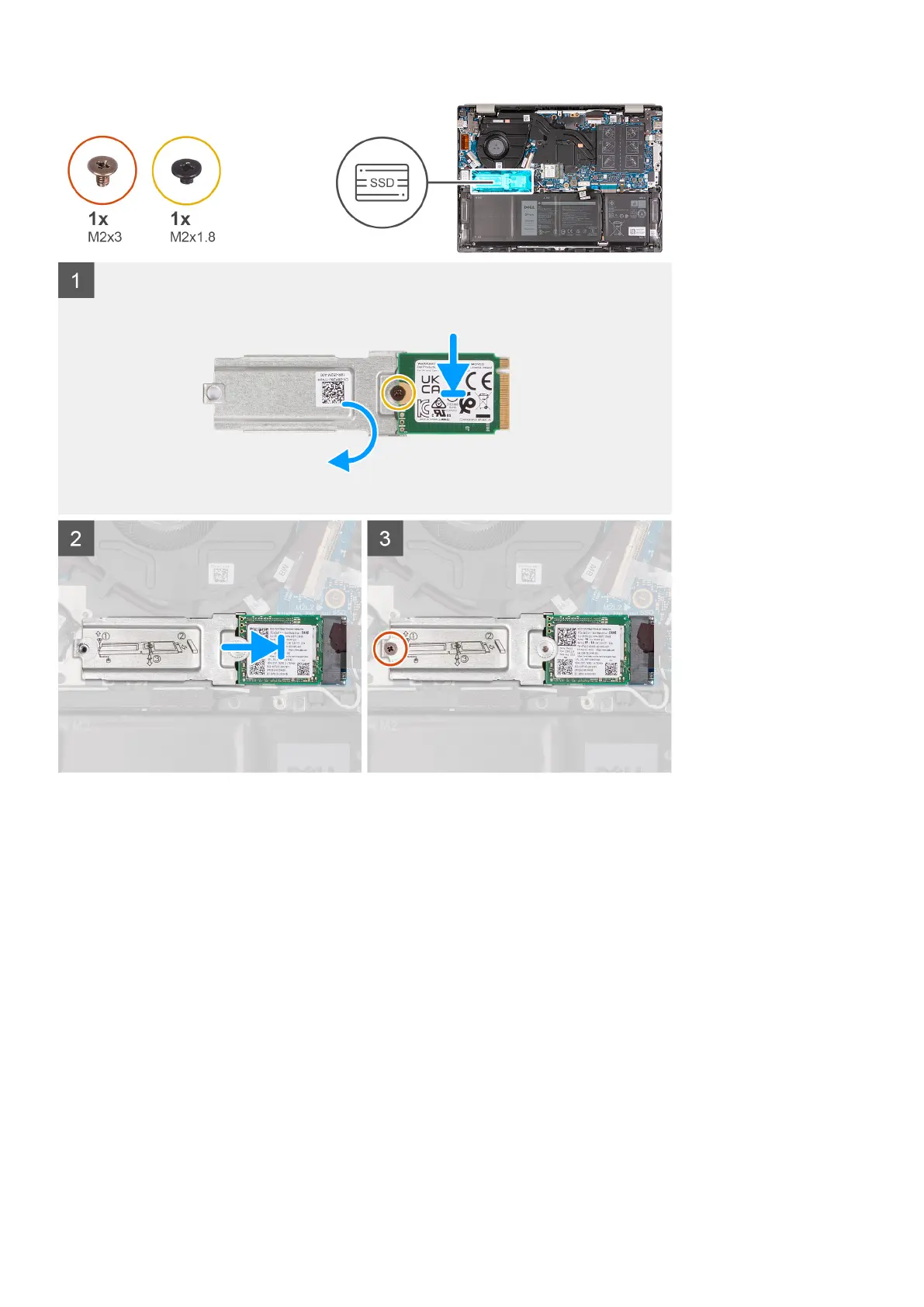
Steps
1. Align the round notch on the M.2 2230 solid-state drive with the screw (M2x2) on the M.2 2230 solid-state drive bracket.
2. Tighten the screw (M2x1.8) that secures the M.2 2230 solid-state drive to the M.2 2230 solid-state drive bracket.
3. Turn over the M.2 2230 solid-state drive bracket.
4. Slide the M.2 2230 solid-state drive bracket into the M.2 card slot on the system board.
5. Replace the screw (M2x3) that secures the M.2 2230 solid-state drive bracket to the system board.
Next steps
1. Install the base cover.
2. Exit Service Mode.
3. Follow the procedure in After working inside your computer.
Removing the M.2 2280 solid-state drive
Prerequisites
1. Follow the procedure in Before working inside your computer.
2. Enter Service Mode.
3. Remove the base cover.
26
Removing and installing components



 To Next Page