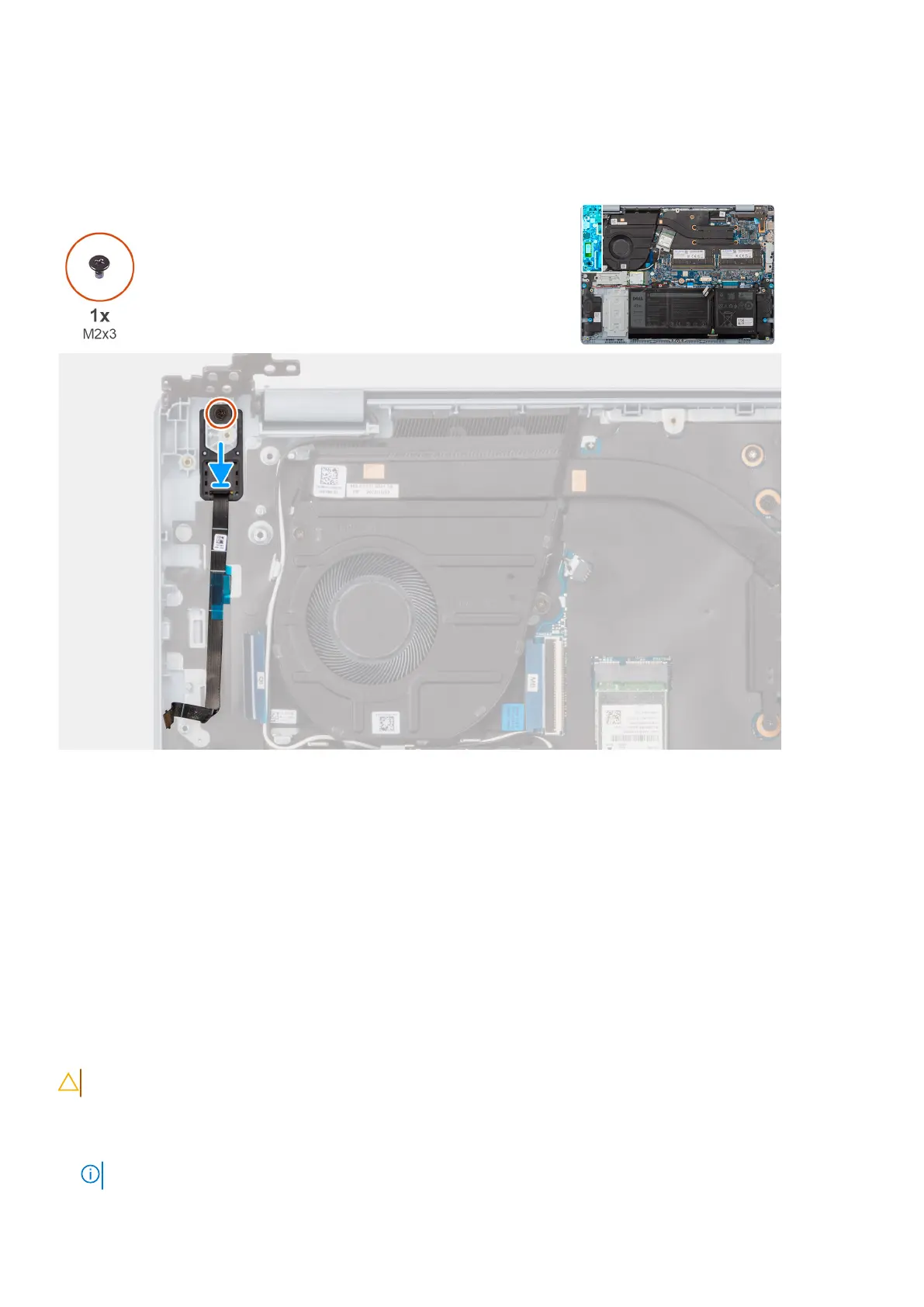
The following image indicates the location of the power-button and provides a visual representation of the installation
procedure.
Figure 57. Installing the power-button with fingerprint reader
Steps
1. Place the power-button into its slot on the palm-rest and keyboard assembly.
2. Align the screw hole on the power-button with the screw hole on the palm-rest and keyboard assembly.
3. Replace the screw (M2x3) that secures the power-button to the palm-rest and keyboard assembly.
Next steps
1. Install the I/O board for computers shipped with a plastic chassis.
2. Install the base cover for computers shipped with a plastic chassis.
3. Follow the procedure in After working inside your computer.
Removing the power-button with fingerprint reader for computers
shipped with an aluminum chassis
CAUTION: The information in this section is intended for authorized service technicians only.
Prerequisites
1. Follow the procedure in Before working inside your computer.
NOTE: Ensure that your computer is in Service Mode. For more information see, Before working inside your computer.
84 Removing and installing Field Replaceable Units (FRUs)



 To Next Page