Replacing the speakers
NOTE: Before working inside your computer, read the safety information that shipped with your computer and follow the
steps in Before working inside your computer. After working inside your computer, follow the instructions in After working
inside your computer. For more safety best practices, see the Regulatory Compliance home page at www.dell.com/
regulatory_compliance.
Procedure
NOTE: If the rubber grommets are pushed out when removing the speakers, push them back in before replacing the
speakers.
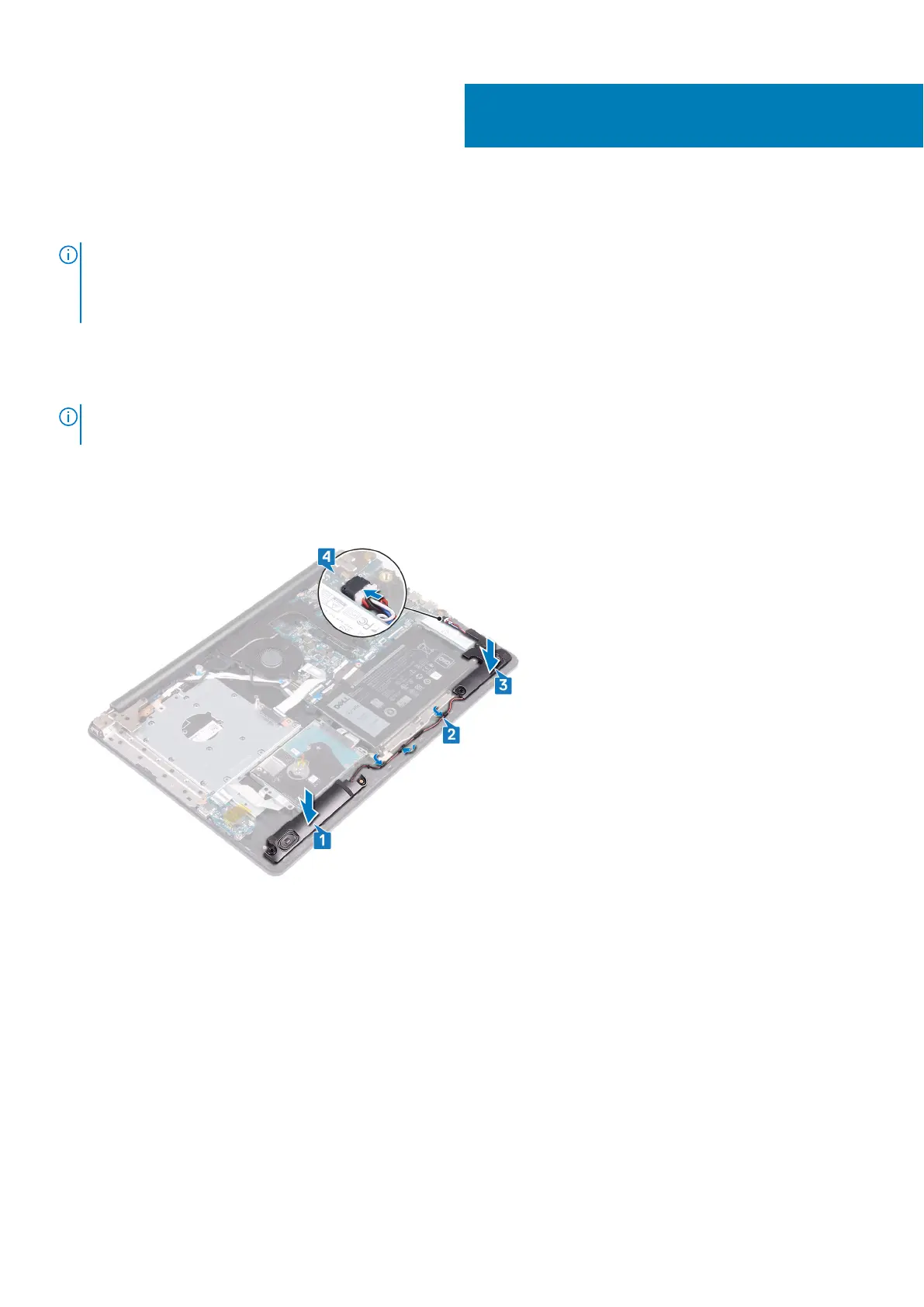
1. Using the alignment posts and rubber grommets, place the left speakers in the slots on the palm rest and keyboard assembly.
2. Route the speaker cable through the routing guides on the palm rest and keyboard assembly.
3. Replace the right speaker.
4. Connect the speaker cable to the system board.
Post-requisites
1. Replace the solid-state drive/Intel Optane.
2. Replace the base cover.
3. Replace the optical drive.
29
54 Replacing the speakers



 To Next Page