Installing Enclosure Components 45
8
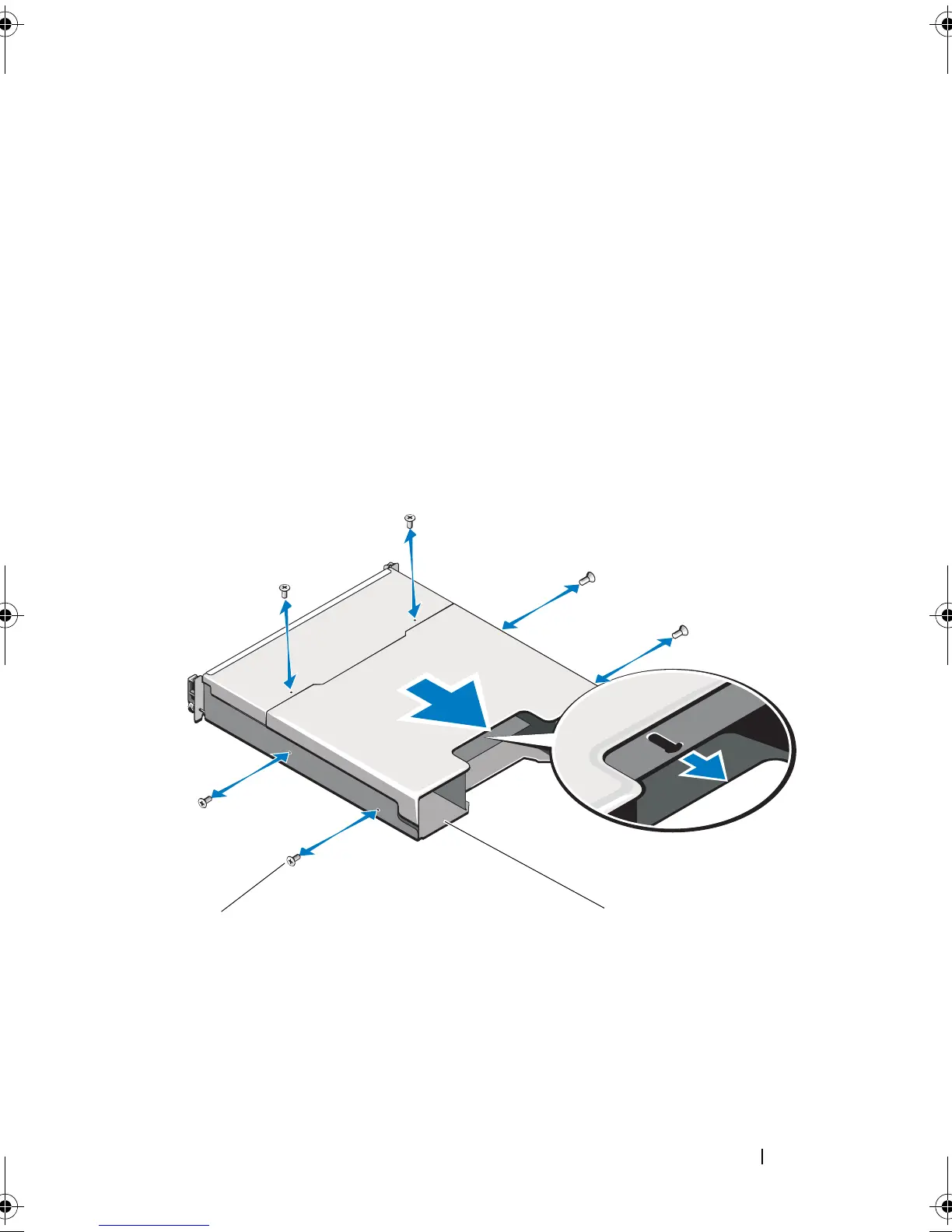
Grasp the cage removal ring at the bottom center of the enclosure and pull
the EMM/power supply cage toward the back of the chassis. See
Figure 3-13.
9
Lift the EMM/power supply cage away from the chassis. See Figure 3-13.
10
Loosen the captive screw that secures the backplane to the chassis. See
Figure 3-14 for PowerVault MD1200 or Figure 3-15 for PowerVault
MD1220.
11
Remove the screws that secure the backplane and pull the backplane out
of the enclosure. See Figure 3-14 for PowerVault MD1200 or Figure 3-15
for PowerVault MD1220.
Figure 3-13. Removing and Installing the EMM/Power Supply Cage
1 EMM/power supply cage 2 screws (6)
book.book Page 45 Monday, December 7, 2009 4:51 PM



 To Next Page