150 |Printing
Selecting the Version of the Google Cloud Print™
Select the version of the Google Cloud Print
TM
from either version 1.1 or version 2.0.
Google Cloud Print
TM
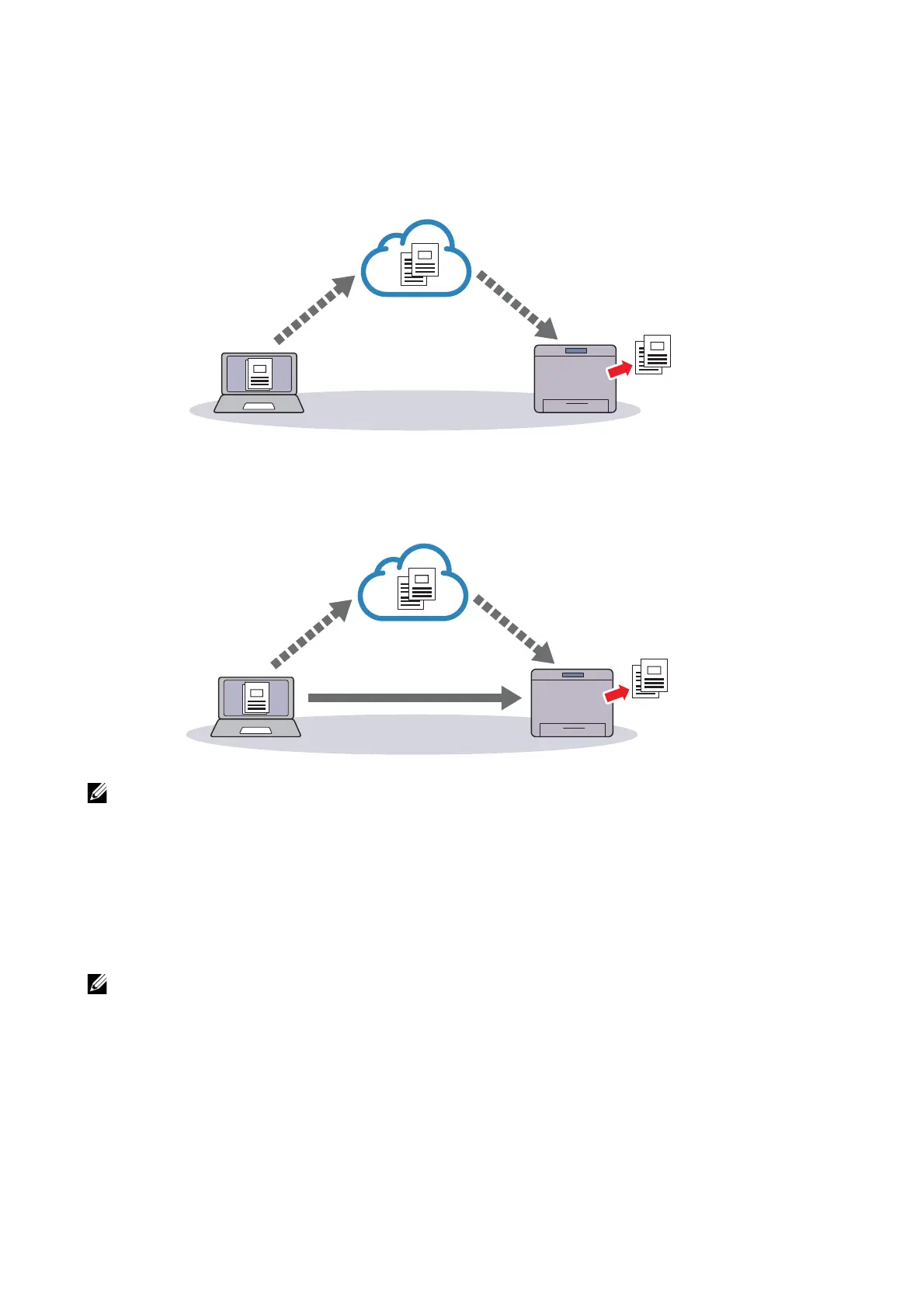
version 1.1 sends the print data to the printer via Internet. For this
version, the printer needs to be connected to the Internet.
Google Cloud Print
TM
version 2.0 sends the print data to the printer either via Internet or
via local network. This version is recommended for the environment where the Internet
connection cannot be used.
• Available options for printing may vary according to your device or the version of the Google Cloud
Print
TM
service.
• You cannot use both version 1.1 and version 2.0 of the Google Cloud Print
TM
service on a printer.
Registering the Printer to the Google Cloud Print™
Before registering the printer to the Google Cloud Print
TM
, prepare the Google
TM
account to which the printer is registered.
• To register the printer to the Google Cloud Print™, the printer needs to be connected to the
Internet.
• The Google
TM
account which is used in the registration procedure will be registered as the owner.
For Google Cloud Print
TM
Version 1.1
1 Start Dell Printer Configuration Web Tool.
See "Starting the Dell Printer Configuration Web Tool".
2 Click Connectivity J Mobile Printing J Google Cloud Print™ J Printer
Registration.





 To Next Page