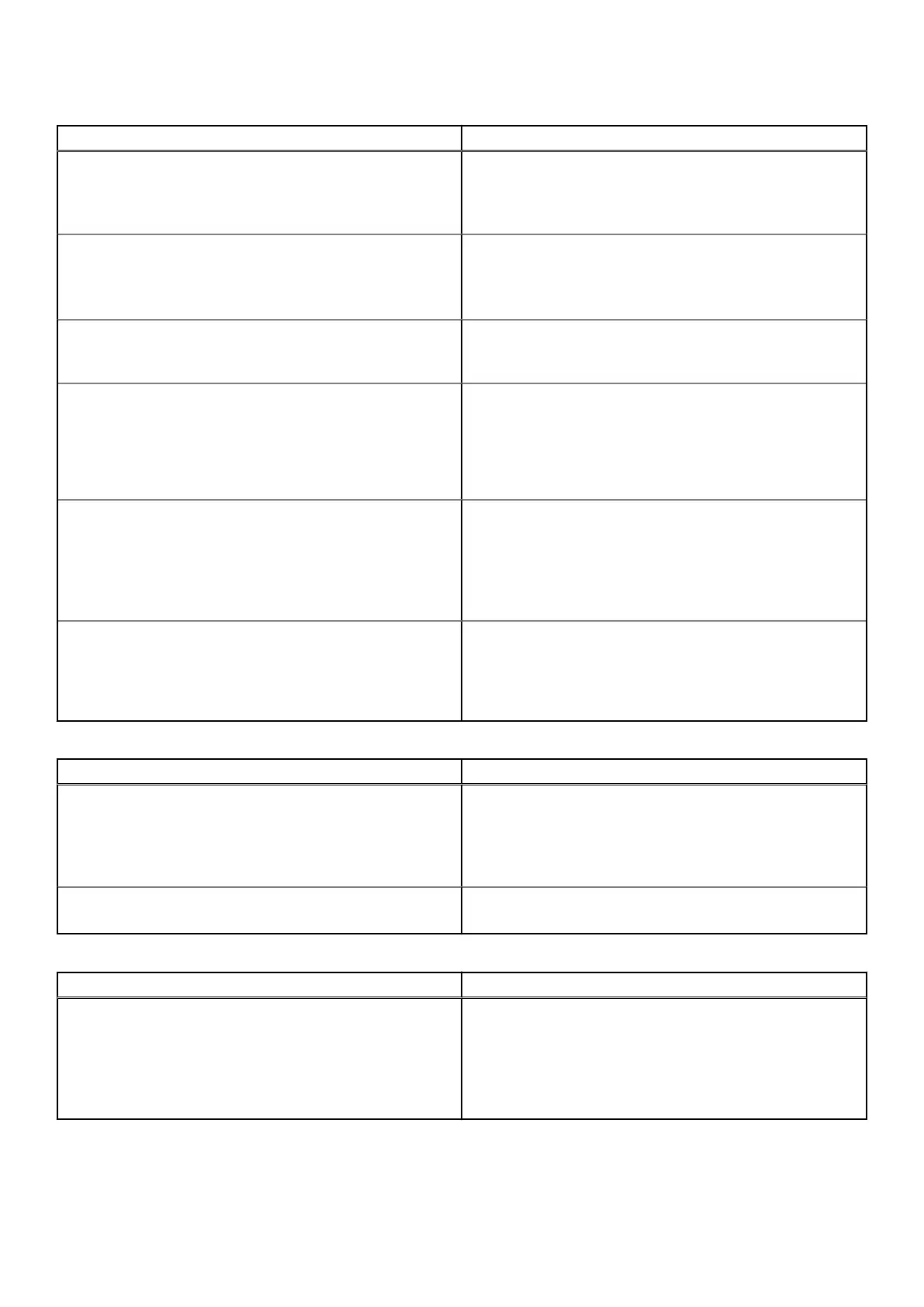
Table 1. S5448F-ON switch LED behavior (continued)
LED Description
● Flashing green—Booting
● Solid yellow—Critical system error
● Flashing yellow—Noncritical system error, fan failure, or
power supply failure
Power LED
● Off—No power
● Solid Green—Normal operation
● Solid yellow—POST is in process
● Flashing yellow—Power supply failed
Primary LED
● Off—Switch is in Stacking Secondary mode
● Solid green—Switch is in Stacking Primary or Standalone
mode
FAN LED
● Off—No power
● Solid green—Normal operation; fan powered and running
at the expected RPM
● Flashing yellow—Fan fault—including incompatible airflow
direction when you insert the PSU or fan trays with
differing airflows
PSU LED
● Off—No power
● Solid green—Normal operation
● Flashing yellow—PSU warning event; power continues to
operate
● Flashing green—4Hz with five times on and off: Mismatch
● Flashing green—Firmware update
LOCATOR LED/System Beacon
● Off—Locator function disabled
● Flashing blue, one second on and one second off—Locator
function enabled
● Flashing blue, two seconds on and one second off—
System is in Standby mode.
Table 2. System management Ethernet port LEDs
LED Description
Link LED
● Off—No module present
● Solid green—Port link is operating at a maximum speed.
● Solid yellow—Port link is operating at a lower speed.
● Flashing yellow, one second on; one second off—Port
beacon
Activity LED
● Off—No activity
● Flashing green—Port activity
Table 3. QSFP56-DD port LEDs
LED Description
Link/Activity LED
● Off—No link/activity
● Solid green—Port link is up
● Flashing green ~30ms—Port activity operating
● Solid yellow—Use CLI to check LED status
● Flashing yellow, one second on; one second off—Port
beacon
10 The S5448F-ON switch




 To Next Page