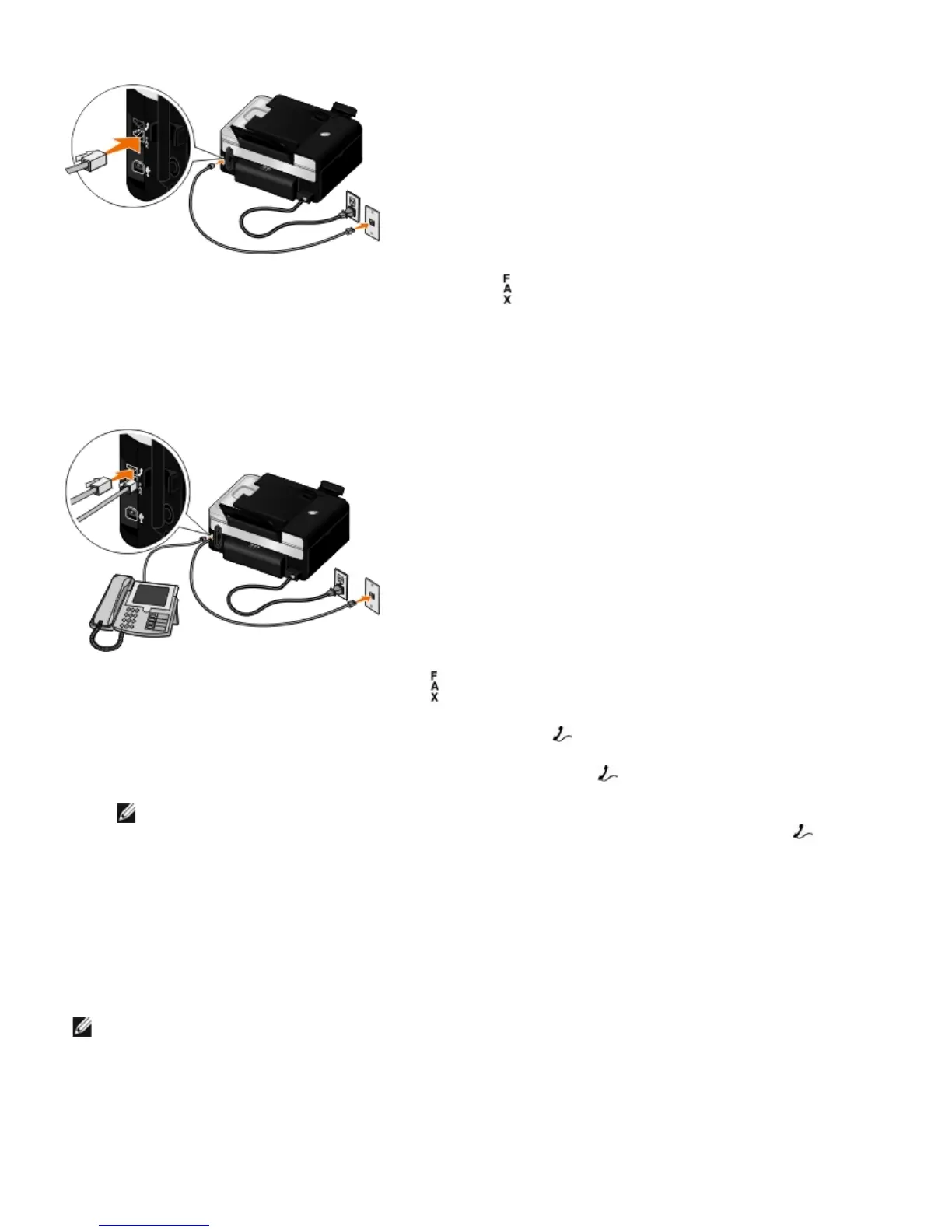
1. Connect one end of the phone cord to the FAX connector ( —lower connector).
2. Connect the other end of the phone cord to an active telephone wall jack.
Connecting to a Telephone
1. Connect a phone cord from the FAX connector ( —lower connector) on the printer to an active telephone wall jack.
2. Remove the blue protective plug from the PHONE jack connector (
—middle connector).
3. Connect a phone cord from the telephone to the PHONE jack connector ( —middle connector).
NOTE: If phone communication is serial in your country (such as Germany, Sweden, Denmark, Austria,
Belgium, Italy, France, and Switzerland), remove the blue plug from the PHONE jack connector (
—middle
connector), and insert the supplied yellow terminator for your fax to work correctly. You will not be able to
use this port for additional devices in these countries.
What if I have a Digital Subscriber Line (DSL)?
DSL delivers digital data to a computer through a telephone line. Your printer is designed to work with analog data. If you
are faxing over a telephone line connected to a DSL modem, install a DSL filter to avoid interference with the analog fax
modem signal.
NOTE: Integrated Services Digital Network (ISDN) and cable modems are not fax modems and are not supported
for faxing.














 To Next Page