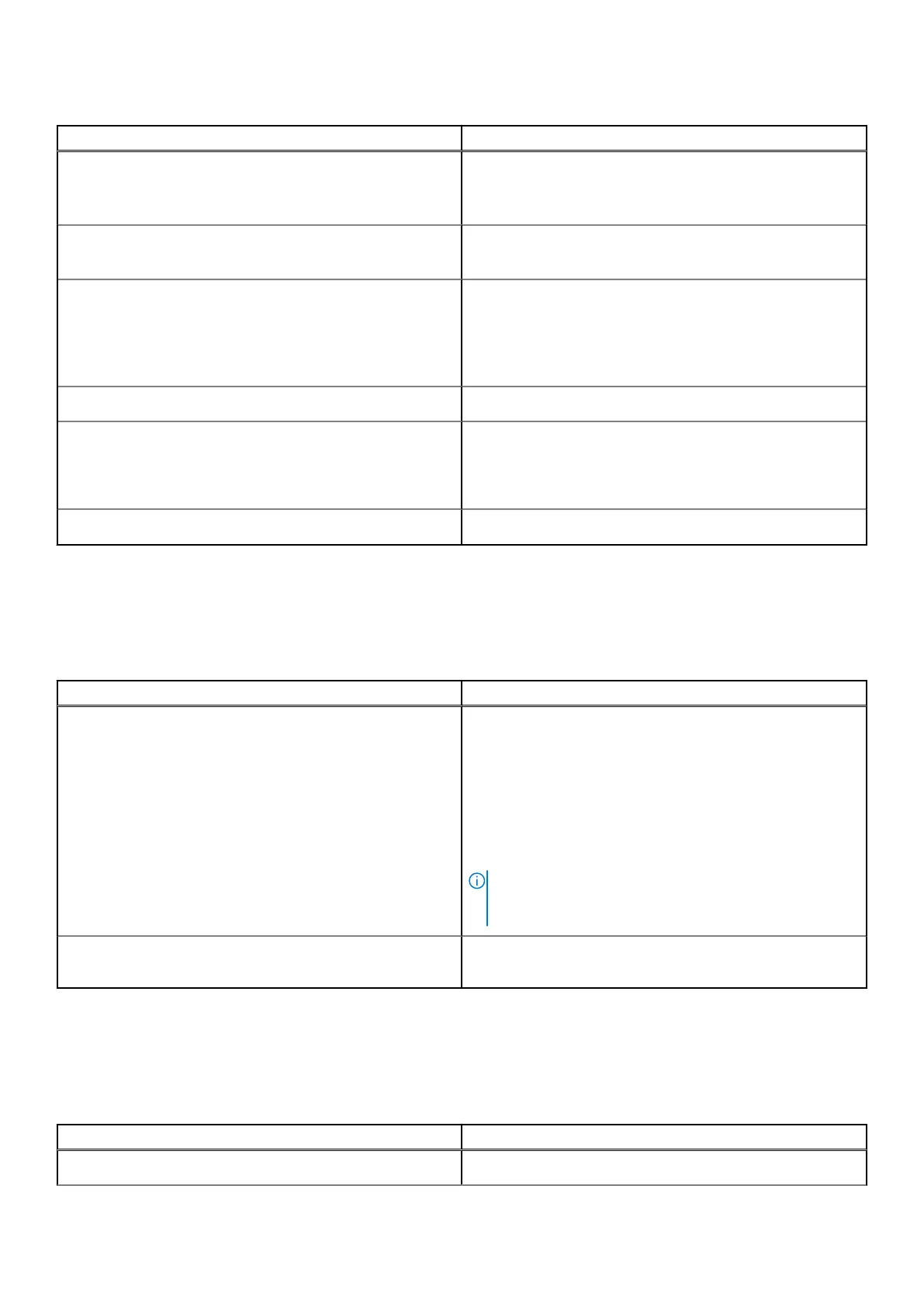
Table 7. External ports(continued)
Description Values
● One USB 3.2 Gen 2 Type-C port
● Two USB 3.2 Gen 2 ports
● Two USB 3.2 Gen 1 ports with Smart Power On
Audio port
● One universal audio port
● One audio line-out port, retaskable
Video port
● One DisplayPort++ 1.4a port
● One HDMI-in 1.4b, only for computers shipped with High
Performance processors
● One HDMI-out 2.1, only for computers shipped with High
Performance processors
Media-card reader
One SD-card slot
Power-adapter port
● One power-adapter port, only for computers shipped with
Energy Efficient processors
● One power-cable connector, only for computers shipped
with High Performance processors
Security-cable slot
One security-cable slot (3 mm x 7 mm, T-Bar design)
Internal slots
The following table lists the internal slots of your OptiPlex All-in-One 7410.
Table 8. Internal slots
Description Values
M.2
For computers shipped with Energy Efficient
processors:
● One M.2 2230 slot for WiFi and Bluetooth combo card
● One M.2 2230/2280 slot for solid-state drive
For computers shipped with High Performance
processors:
● One M.2 2230 slot for WiFi and Bluetooth combo card
● Two M.2 2230/2280 slots for solid-state drive
NOTE: To learn more about the features of different
types of M.2 cards, search in the Knowledge Base
Resource at www.dell.com/support.
SATA
One SATA slot for 2.5-inch hard drive, only for computers
shipped with Energy Efficient processors
Ethernet
The following table lists the wired Ethernet Local Area Network (LAN) specifications of your OptiPlex All-in-One 7410.
Table 9. Ethernet specifications
Description Values
Model number
Intel i219-LM
Specifications of OptiPlex All-in-One 7410 25



 To Next Page