Advanced Troubleshooting 63
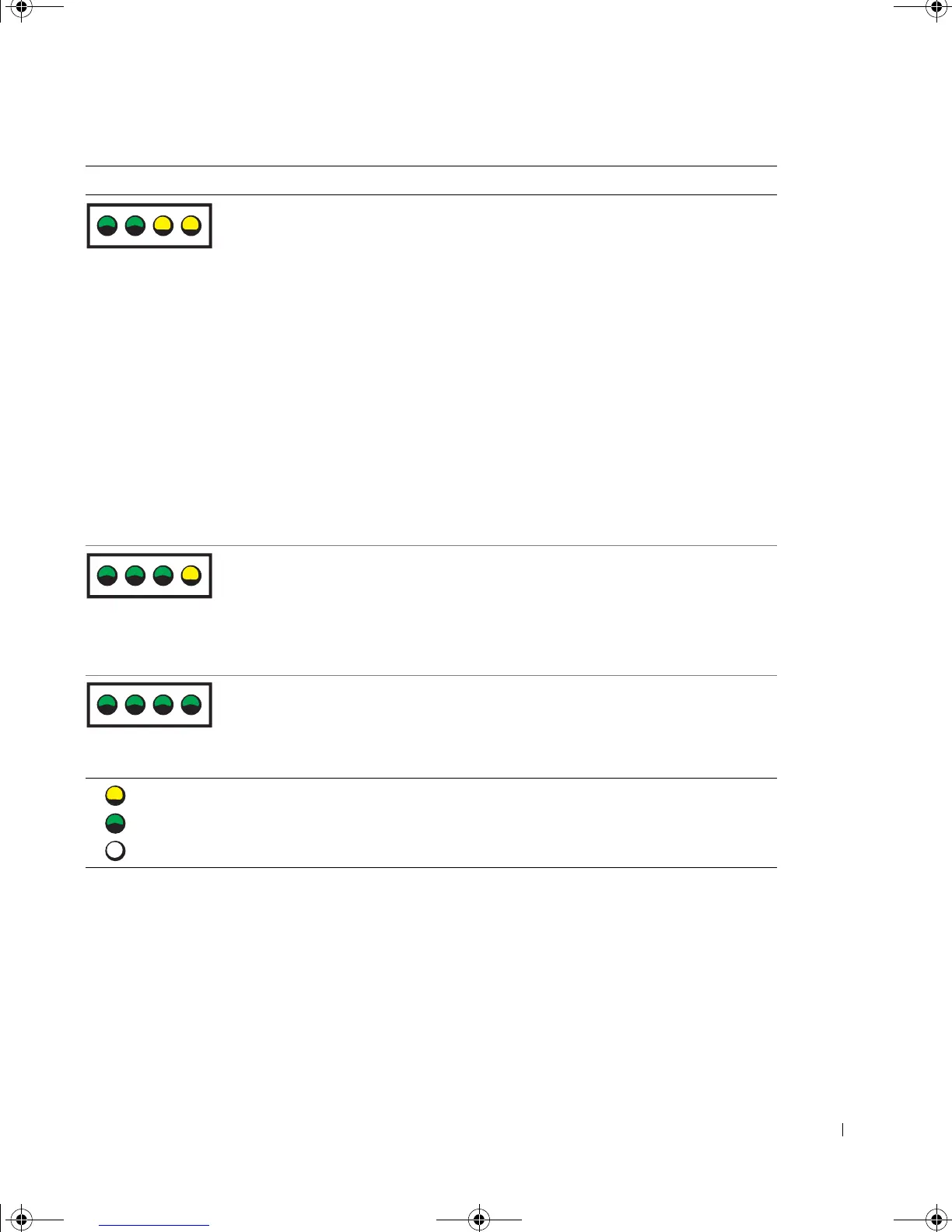
A possible expansion card failure has
occurred.
1 Determine if a conflict exists by
removing a card (not a video card)
(see page 89) and restarting the
computer.
2 If the problem persists, reinstall
the card that you removed, remove
a different card, and then restart
the computer.
3 Repeat this process for each card.
If the computer starts normally,
troubleshoot the last card removed
from the computer for resource
conflicts (see "Resolving Software
and Hardware Incompatibilities"
on page 71).
4 If the problem persists, contact
Dell (see page 129).
Another failure has occurred. • Ensure that the cables are properly
connected to the system board (see
page 85) from the hard drive, CD
drive, and DVD drive.
• If the problem persists, contact
Dell (see page 129).
The computer is in a normal operating
condition after POST.
None.
Light Pattern Problem Description Suggested Resolution
= yellow
= green
= off
ABCD
ABCD
ABCD
G0550bk1.book Page 63 Thursday, July 10, 2003 1:55 PM








 To Next Page