12
• Making Long coee: halfway through preparation, when
prompted by the machine, add one level measure of pre-
ground coee and press "OK".
• Certain drinks cannot be prepared using pre-ground cof-
fee: Doppio+, 2x Espresso, Cappuccino+
1. Press the customization bar (C8) at the bottom of the
image corresponding to the desired coee (e.g. espresso,
g. 19): the parameters that can be selected according to
personal preference appear on the display:
2. Select the quantity, and select pre-ground coee ;
3. Press “Deliver”;
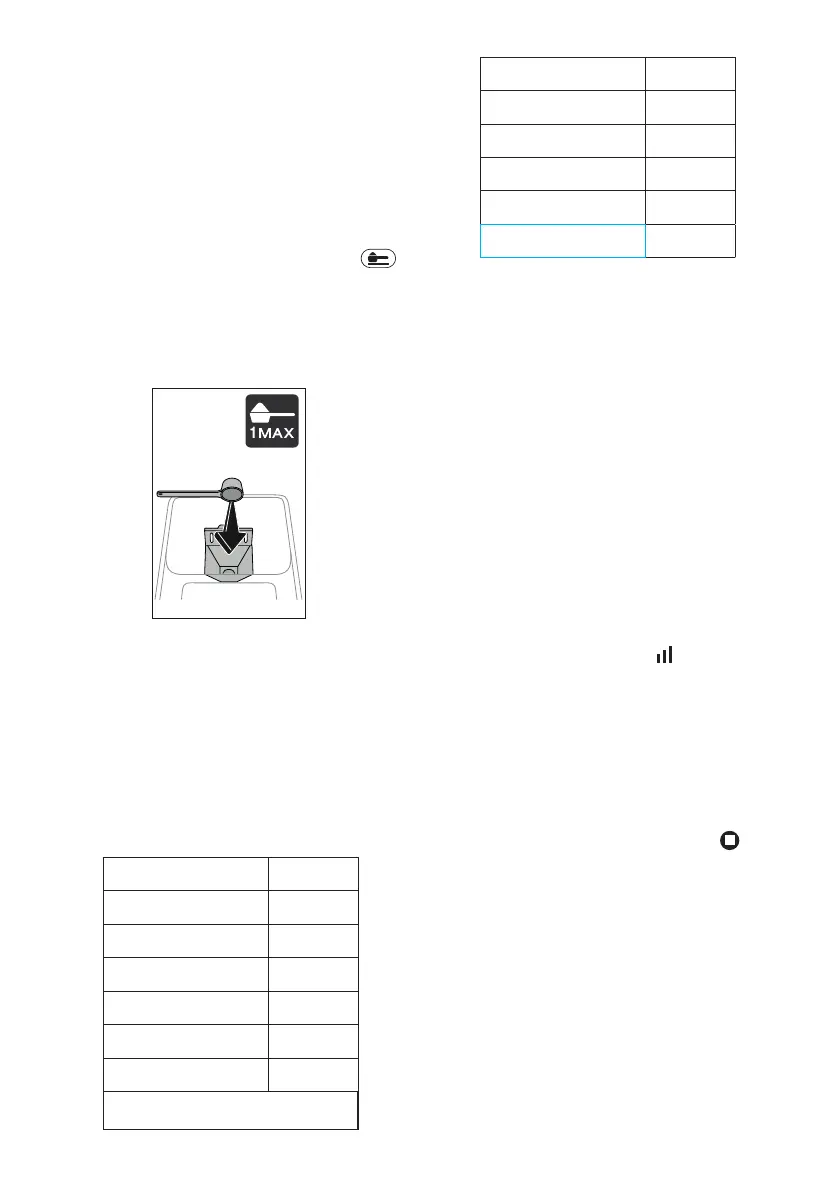
4. Lift the pre-ground coee funnel lid, make sure the funnel
(A3) is not blocked, then add one level measure (D2) of
pre-ground coee (g. 20) and press “OK” to proceed with
preparation;
20
5. The machine proceeds with preparation and a description
of each single step (water heating, delivery of coee) ap-
pears on the display.
Once the preparation has been completed, the machine is ready
for use again.
8.5 Extra shot
In certain cases, another Espresso (30 cc) can be added to give
an extra ‘kick’. The Extra Shot option is available with the fol-
lowing drinks*:
(*Number and type of drinks dier according to model).
Espresso
✓
Espresso Macchiato
✓
Long
✓
Coee (hot only)
✓
Doppio+
✓
Americano (hot only)
✓
Cappuccino
✓
→
Latte Macchiato
✓
Caelatte
✓
Cappuccino Mix
✓
Cortado
✓
Flat White
✓
Cappuccino+
✓
1. Press the customization bar (C8) at the bottom of the
image corresponding to the desired coee (e.g. espresso,
g. 19).
2. Press “Extra Shot”, making sure that cup being used is big
enough, then press “Ok”.
3. Select the desired quantity and intensity. Press “Deliver”.
4. Press “Ok” to conrm.
5. The machine proceeds with preparation and a description
of each single step (grinding, delivery of coee + extra
grinding and delivery) appears on the display.
6. When done, press "Save" to store the new settings, or
"Cancel" to retain the previous parameters.
The appliance is ready to be used again.
Please note:
• If saved, the new settings will be stored ONLY in the se-
lected prole.
• If Extra Shot has been selected, it will not be possible to
change the quantity setting or use pre-ground coee.
• When “Extra Shot” is selected, the symbol appears on
the customization bar.
8.6 General indications for making coee-based
drinks
• When the machine is making coee, delivery can be inter-
rupted at any moment by pressing “Stop” or “Cancel”.
• As soon as delivery has ended, the quantity of coee can
be increased if so desired simply by pressing “Extra”: once
the required quantity has been reached, press “ Stop” or
“Cancel”.
• Certain alarm messages could be displayed while using the
machine (“Fill tank with fresh water up to MAX level”, etc.);
their meaning is explained in section “17. Messages shown
on the display”.
• If the coee emerges drop-by-drop, too weak and not
creamy enough or too cold, refer to the tutorial on adjust-
ing the coee mill (see heading “6.9 Coee mill settings”)
and section “18. Troubleshooting”.
• If “Energy Saving” mode is enabled, there may be a few
seconds delay before the rst coee is delivered.




 To Next Page