9
6.5 Auto-o
Auto-o can be set so that if the appliance is not being used, it
will switch o after 15 or 30 minutes or after 1 or 3 hours have
elapsed.
To programme Auto-o, proceed as follows:
1. Press the settings menu (C6) (g. 14);
2. Scroll through the menu pages until “Set Auto-o” is
displayed;
3. Select the desired time interval (15 or 30 minutes, or 1 or
3 hours).
4. Press "X" to save the new selection and go back to the
homepage (C).
6.6 Coee temperature
To change the temperature of the water used to make coee,
proceed as follows:
1. Press the settings menu (C6) (g. 14);
2. Scroll through the menu pages until "Coee temperature”
is displayed;
3. Press “Set”;
4. Select the required temperature from those suggested;
5. Press “<” to go back to the settings menu.
Please note:
The eect of varying the temperature is most noticeable with
long drinks.
6.7 Statistics
This displays statistics relating to the machine. To view the
statistics:
1. Press the settings menu (C6) (g. 14);
2. Scroll through the menu pages until “Statistics” is dis-
played along with the main statistical data: to view more
data, press “Read more”;
3. Press “<” to go back to the settings menu.
6.8 Languages
To change the language on the homepage, proceed as follows:
1. Press the settings menu (C6) (g. 14);
2. Scroll through the menu pages until “Languages” is
displayed:
3. Press “Set”;
4. Press the ag corresponding to the desired language (scroll
through the pages to see all the languages available). the
display updates immediately and shows the selected
language;
5. Press “<” to go back to the settings menu.
6.9 Coee mill settings
The machine oers a tutorial on how to adjust the grinding and
ensure the best results:
1. Press the settings menu (C6) (g. 14);
2. Scroll through the menu pages until the item “Grinding
adjustment” is displayed;
3. Press “Read more” to see the tutorial on how the coee mill
is adjusted.
Please note:
• After completing the above procedure, at least 3 coees
should be made before making any further adjustment.
If coee delivery is still not correct, repeat the procedure.
• The adjustment dial (A2) must be turned only when the
coee mill is in operation, during the initial step of prepar-
ing the coee.
6.10 Water hardness
To change the default water hardness setting when the machine
is used for the rst time, proceed as follows:
1. Repeat the hardness test as indicated in the section “Meas-
uring water hardness”;
2. Press the settings menu (C6) (g. 14);
3. Scroll through the menu pages until the item “Water hard-
ness” is displayed.
4. Press “Set”.
5. Select the water hardness level on the display according to
the result of the test: the new setting will be stored.
6. Press “<” to go back to the settings menu.
6.11 Empty circuit
To avoid the water in the circuit freezing if the appliance is to be
left idle for an extended period, or before taking it to a service
centre, it is advisable to drain the water circuit.
1. Press the settings menu (C6) (g. 14);
2. Scroll through the menu pages until “Empty circuit” is
displayed:
3. Press "Yes" to start the guided procedure;
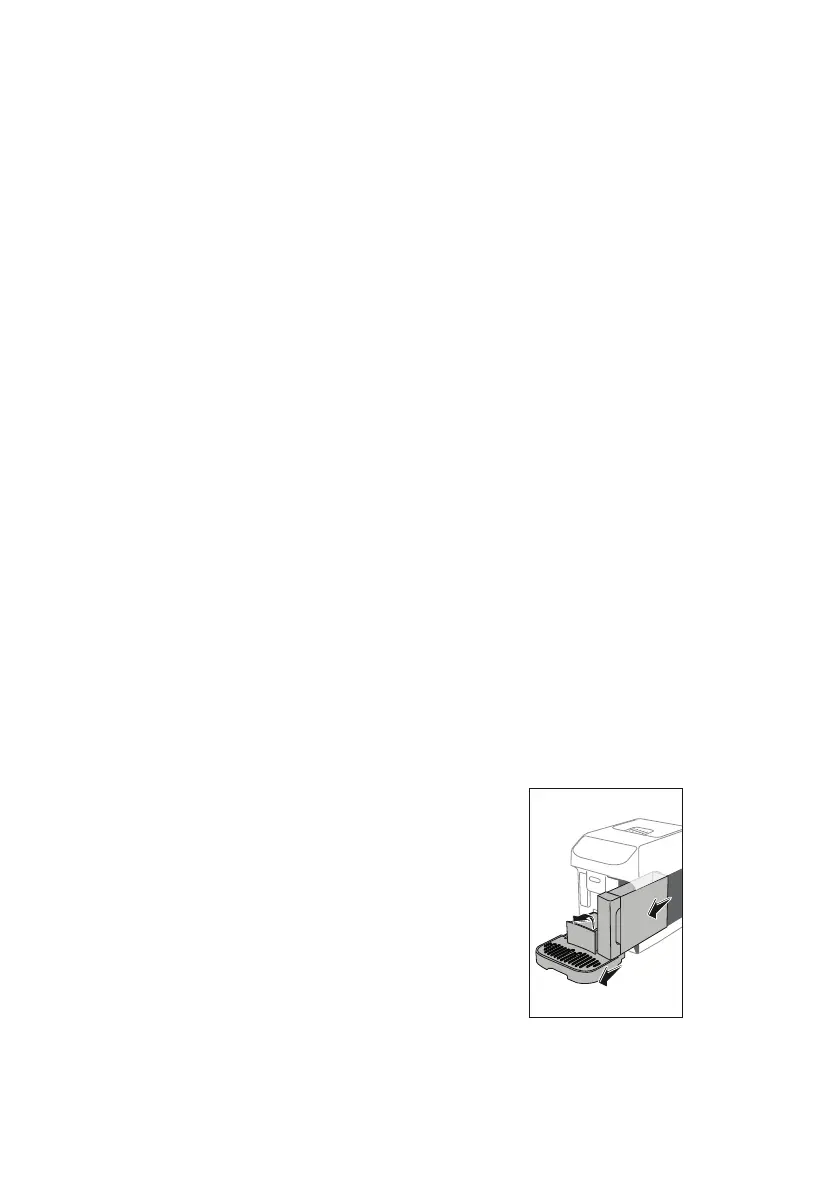
4. Remove, empty and ret the grounds container (A10) and
the drip tray (A14) (g. 15), then press "Next";
15
5. Attach the spout (D5) to the connector (A17) (g. 4);
6. Position a container of 200 ml capacity under the spouts
(g. 6). Press "Next";
7. The appliance performs a rinse cycle, releasing hot water from
the spouts;




 To Next Page