14
Creamy
• Latte Macchiato
• Flat White
• Cortado
Dense
• Cappuccino
• Cappuccino Mix
• Espresso Macchiato
• Cappuccino+
• Hot milk (frothed)
9.5 Making milk-based drinks
On the homepage (C), press directly on the image corresponding
to the required drink (C7).
As in the case of coee drinks, a drink can be customized by
pressing on the customization bar (C8) at the bottom of the
image on the homepage.
9.6 Cleaning the milk carafe after use
After each delivery of a milk drink, the machine will prompt the
user to run the CLEAN function to clean the milk carafe lid (E1).
To start cleaning, proceed as follows:
1. Leave the milk carafe in the machine (there is no need to
empty the container);
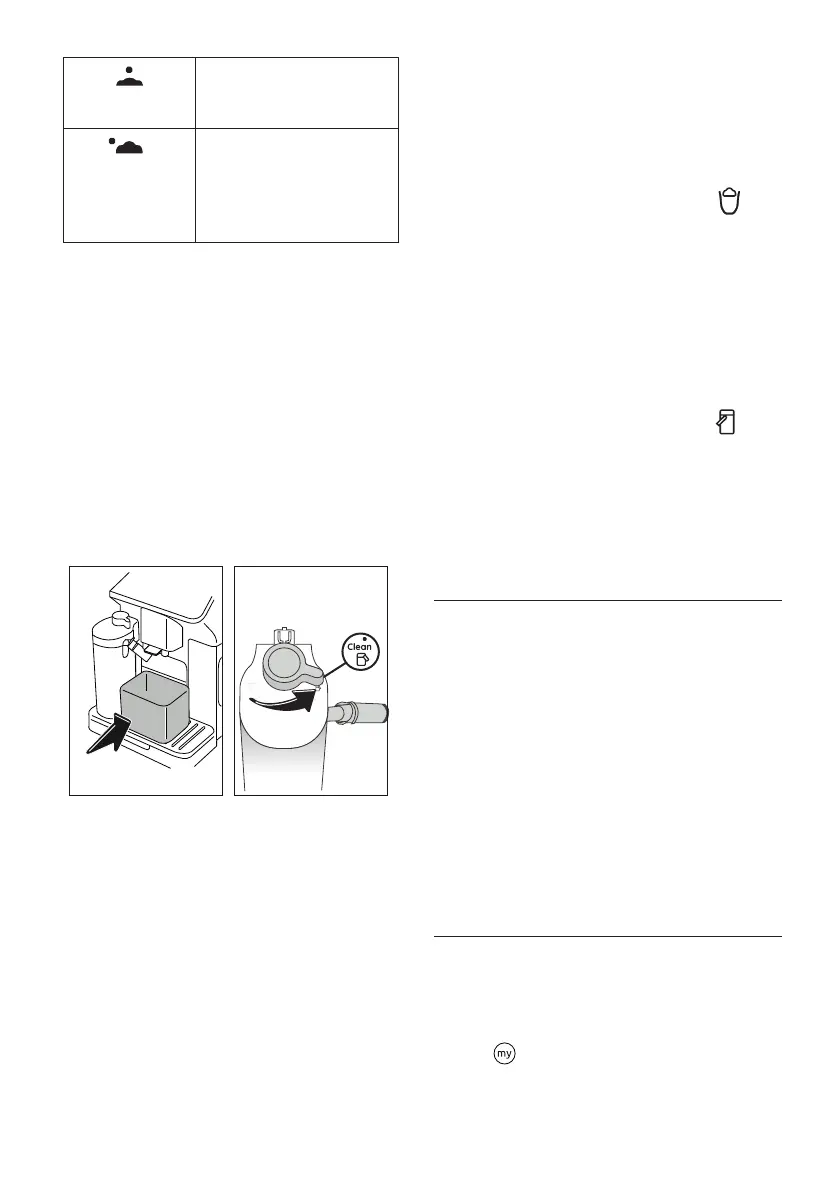
2. Place a cup or other recipient under the milk spout (E5)
(g. 25);
25 26
3. Turn the froth adjustment/clean dial (E3) to "Clean" (g.
26): hot water and steam are delivered from the milk
spout. Cleaning stops automatically;
4. Turn the dial back to one of the froth selections;
Where several drinks are prepared in succession:
• To proceed with further preparations, when the message
to clean the carafe appears (dial positioned on “Clean”),
press “Cancel”. Proceed with cleaning of the carafe after the
nal preparation.
After multiple preparations, the milk container is empty
or the milk that remains is not enough to make further
drinks
• Having run the cleaning operation on the milk carafe (dial
positioned on “Clean”), disassemble the milk carafe and
clean all components, proceeding as described in heading
“13.10 Cleaning the milk carafe (E)”
After multiple preparations, there is enough milk left in
the container to make further drinks
• run the cleaning operation on the milk carafe (dial po-
sitioned on “Clean”), remove the milk carafe and put it
straight in the refrigerator. The Hot Milk carafe can be
kept in the refrigerator for no more than 2 days, after which
time all components should be cleaned, proceeding as de-
scribed in the section “13.10 Cleaning the milk carafe (E)”.
Important:
If the milk carafe is left out of the refrigerator for more than 30
minutes, disassemble and clean all components, proceeding
as described in the section “13.10 Cleaning the milk carafe (E)”.
Following preparation of milk-based drinks — general
notes:
• If the milk carafe is not cleaned, the symbol appears
on the homepage as a reminder that cleaning is required.
• In certain cases, the machine will need to heat up before
cleaning can take place.
• To ensure correct cleaning, wait for the CLEAN function
to end. The function is automatic. It must not be stopped
while in progress.
10. PREPARING HOT WATER
1. Attach the hot water spout (D5) to the machine (g. 4);
2. Place a cup under the spout;
Direct selection:
3. On the homepage (C), press directly on the image cor-
responding to hot water: delivery begins, and will stop
automatically.
Customization of quantity:
3. Press the customization bar (C8) at the bottom of the
image corresponding to hot water: the display shows the
quantity to be selected;
4. Press“Deliver”: delivery begins and will stop automatically.
Please note:
Delivery can be interrupted by pressing “Stop” or “Cancel”.
11. “MY” FUNCTION hot drinks only)
Using the “my” function, drinks can be customized as follows:
1. Make certain the intended prole (C1) for customization of
the drink is active;
2. Press the customization bar (C8) at the bottom of the
image corresponding to the desired drink;
3. Press ;
4. Press "Start" and follow the guided procedure;
5. Select the desired intensity, if envisaged for the drink, and
press “Next";




 To Next Page