21
17. MESSAGES SHOWN ON THE DISPLAY
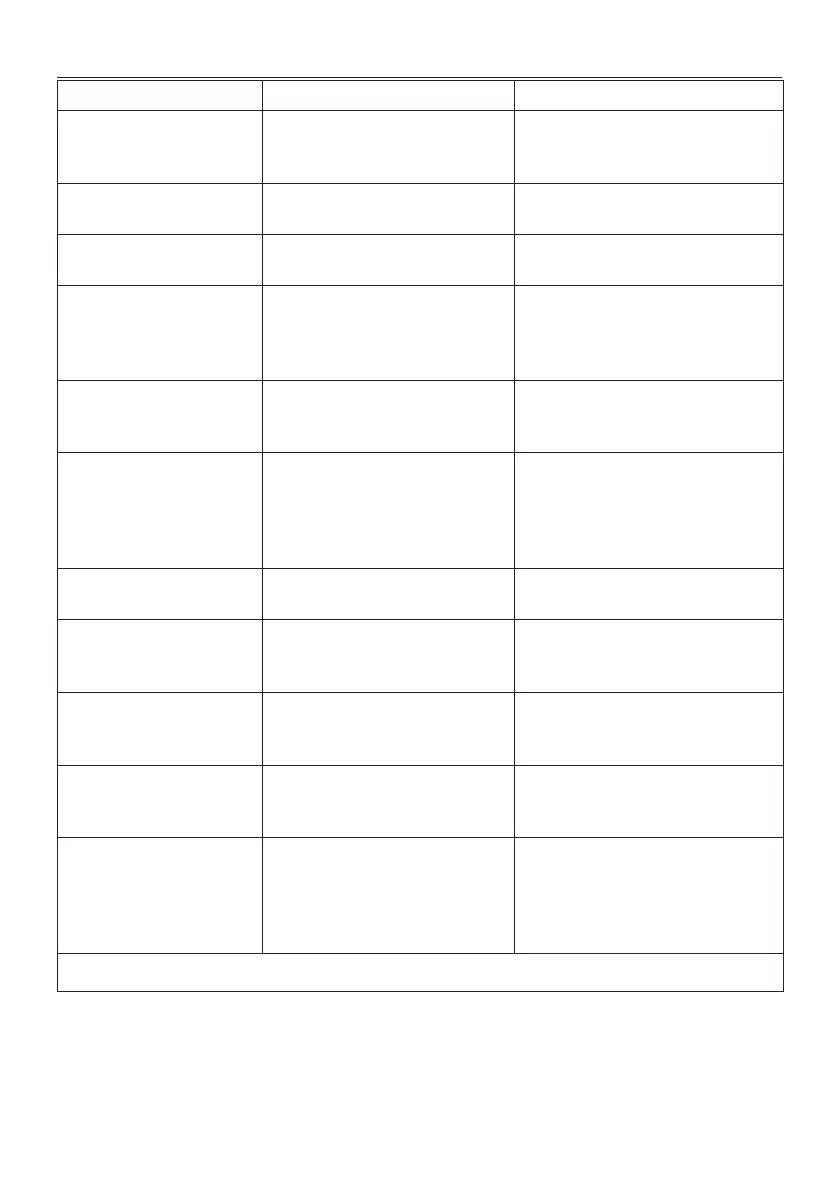
DISPLAYED MESSAGE MEANING REMEDY
The water tank needs lling with
fresh water.
Insucient water in the tank (A9). Extract the tank and ll with fresh water, then
put back in the appliance.
Can you t the water tank? The tank (A9) is not correctly in place. Reposition the tank correctly and press fully
home.
Can you t the infuser? The infuser (A6) has not been replaced after
cleaning.
Insert the infuser as described in section “13.8
Cleaning the infuser”
The grounds container and the
drip tray need emptying. Empty
them regularly, even if they are
not full
The grounds container (A10) is full. Clean as described in section “13.3 Cleaning
the coee grounds container”
Fit grounds container and drip
tray
Grounds container (A10) and/or drip tray
(A14) not correctly in place, or missing.
Ret the drip tray complete with grounds con-
tainer and press fully home.
Ok, let’s get started. Add the pre-
ground coee you prefer — no
more than one measure!
Preparation with pre-ground coee has
been selected.
Make certain the funnel (A3) is not blocked,
then add one level measure (D2) of pre-
ground coee, press "Next" on the display and
follow the instructions in section “8.4 Making
drinks using pre-ground coee”.
Fill the beans container The coee beans have run out. Fill the beans container (A4)and press OK to
resume delivery
Fit the water spout Spout (D5) not correctly in place, or
missing.
Fit the spout and push fully home (g. 5). The
machine emits a beep (if the beep function is
enabled).
Can you t the LatteCrema Hot
carafe?
Milk carafe (E) not positioned correctly,
or missing.
Position the milk carafe and push fully home:
the machine emits a beep (if the beep func-
tion is enabled).
Cleaning in progress.
Back in a moment
The appliance has detected impurities in its
internal circuits.
Wait until the appliance is ready for use again
and reselect the required drink. Contact an au-
thorized Service Centre if the problem persists.
The new settings have not been
saved
In the course of customizing a drink (see
section “11. “My” function (hot drinks
only)”), preparation has been deliberate-
ly interrupted by pressing "Cancel", or an
alarm has been tripped.
Press "OK" to go back to the homepage (C) and
view the alarm that has caused the interrup-
tion. Follow the instructions corresponding to
the alarm displayed (see section “17. Messag-
es shown on the display”)
→




 To Next Page