14
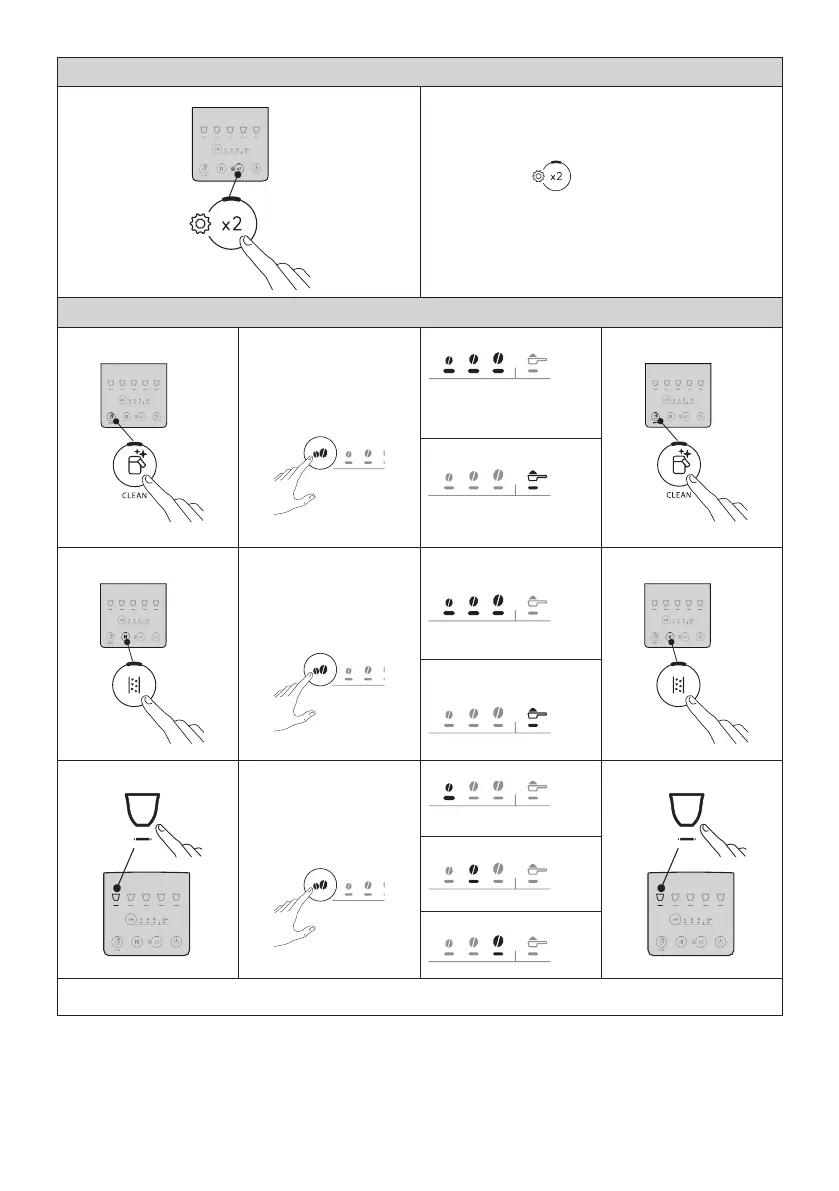
1. Access the menu:
1 2 3 4 5
x 5 sec
Press and hold the button for a few seconds:
the buttons used for selecting settings will light up.
Proceed by pressing the button for the setting to be changed.
2. Change the machine settings:
Water softener lter
1 2 3 4 5
Press the intensity button
repeatedly until the Leds
relative to the desired
setting light up
FILTER IN PLACE
(Ref: “4. Water softener lter”
and “4.1 Replacing the lter”)
Conrm selection
1 2 3 4 5
FILTER REMOVED
(Ref. “4.2 Removing the
lter”)
Beep
1 2 3 4 5
Press the intensity button
repeatedly until the Leds
relative to the desired
setting light up
ENABLED
Conrm selection
1 2 3 4 5
DISABLED
Coee temperature
1
1 2 3 4 5
Press the intensity button
repeatedly until the Leds
relative to the desired
setting light up
LOW
Conrm selection
1
1 2 3 4 5
MEDIUM
HIGH
→




 To Next Page