15
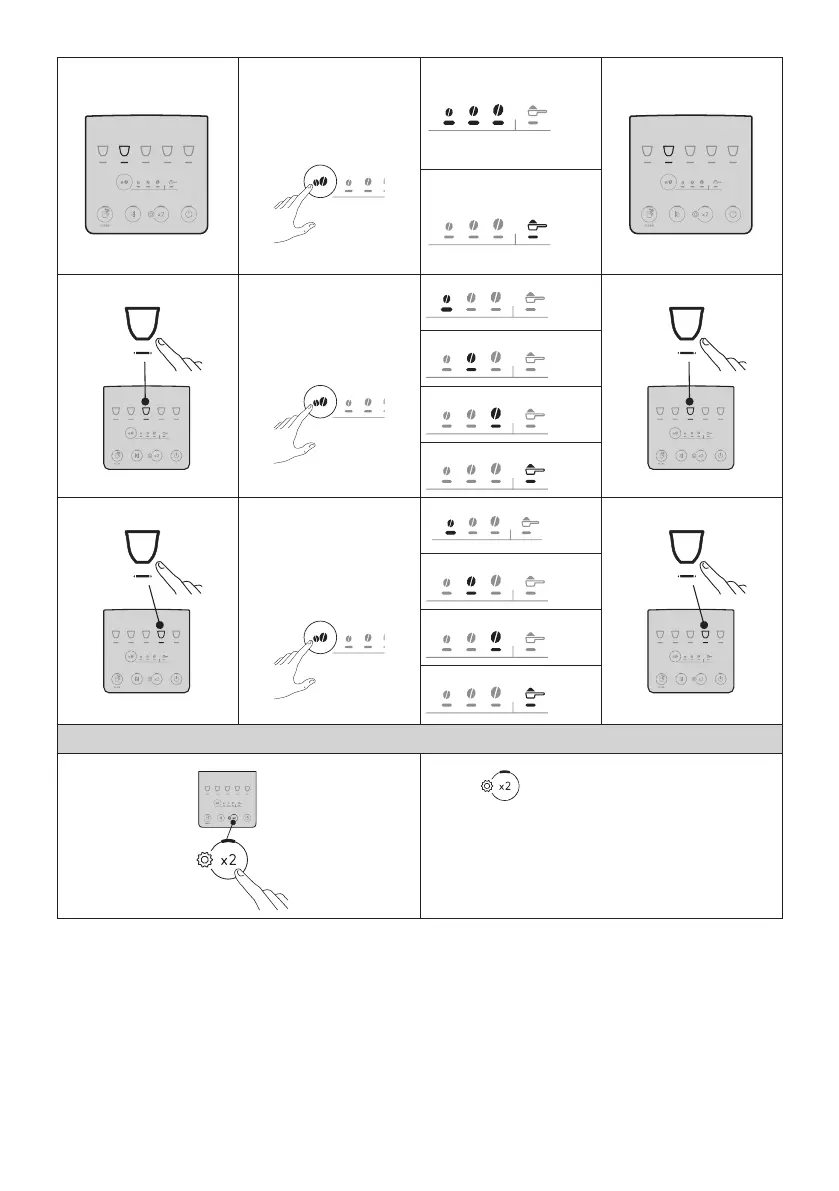
Energy saving
1 2 3 4 5
Press the intensity button
repeatedly until the Leds
relative to the desired
setting light up
ENABLED
Conrm selection
1 2 3 4 5
DISABLED
Water hardness
3
1 2 3 4 5
Press the intensity button
repeatedly until the Led
corresponding to the
required level lights up
LEVEL 1
Conrm selection
3
1 2 3 4 5
LEVEL 2
LEVEL 3
LEVEL 4
Auto-o
4
1 2 3 4 5
Press the intensity button
repeatedly until the Led
corresponding to the
required time setting
lights up
15 MINUTES
Conrm selection
4
1 2 3 4 5
30 MINUTES
1 HOUR
3 HOURS
3. Exit the menu:
1 2 3 4 5
Press the button:
The machine is ready for use again.
Please note!
After 30 seconds without a button being pressed, the machine exits
the settings menu automatically.




 To Next Page