18 Trigno Wireless System User’s Guide
TM
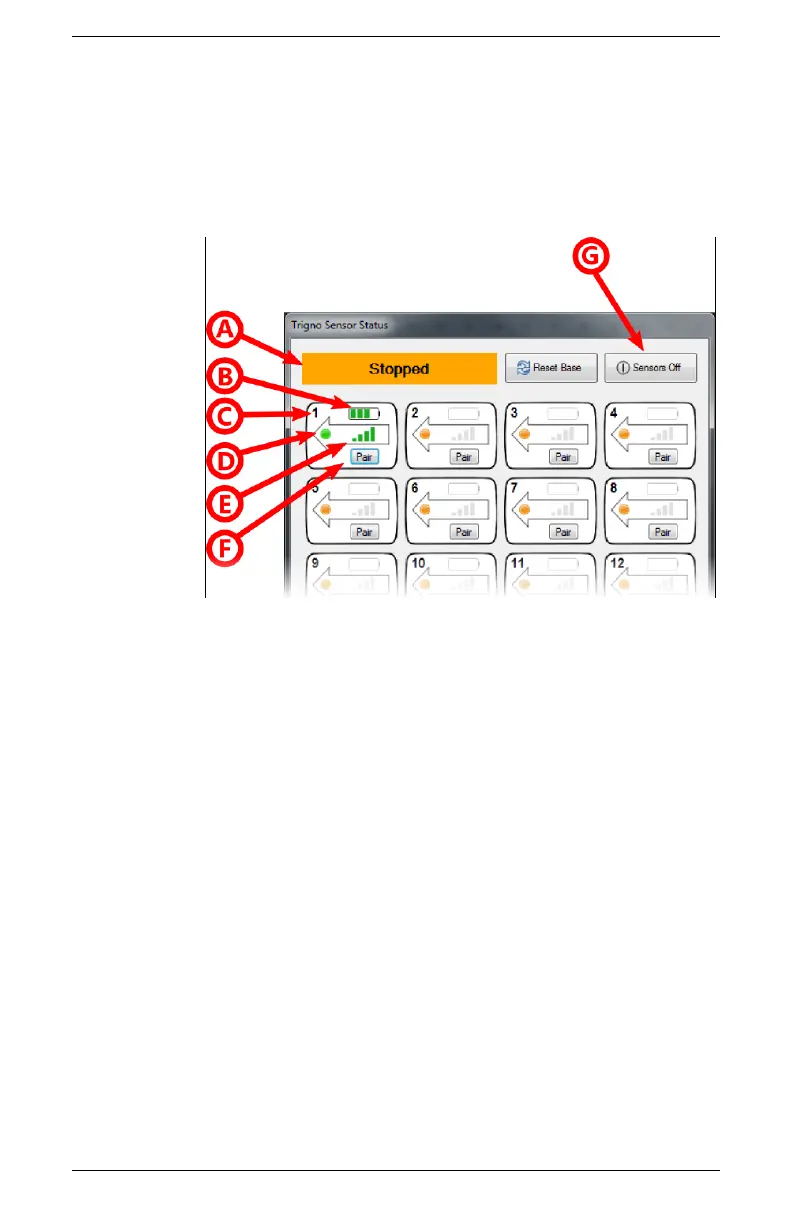
hosts the sensor pairing function and can send an “off” command
to all sensors.
A compact display of this information is accessible in EMGworks
by hovering over the notification area icon for the Trigno
hardware. The full dialog is displayed by double-slicking this icon.
Figure 8. The Trigno Sensor Status Console offers real-time sensor feedback.
A) data acquisition status, B) battery charge state, C) sensor number, D) sensor
power, E) wireless signal strength, F) sensor pairing, G) off command.
Turning the Sensors Off
There are several mechanisms for turning the Trigno sensors off,
described as follows:
• Send an “off” command via software
• Dock the sensor in an active charge cradle
• Hold sensor button for approximately 20 seconds
• 5 minute time-out if sensor is not communicating with base
station


 To Next Page