28 Trigno Wireless System User’s Guide
TM
Additional Sensor Information
Sensor Pairing
Trigno sensors communicate with a custom wireless protocol that
links each sensor to a unique Base Station. This linking process is
known as sensor “pairing”, and is initiated through the “Pair”
command.
Trigno systems are shipped with all sensors appropriately paired.
Sensor pairing is typically needed if sensors are being replaced
within the network group, when the communication frequency
sets are changed, and after a firmware upgrade is performed.
1. Initiate sensor pairing in software.
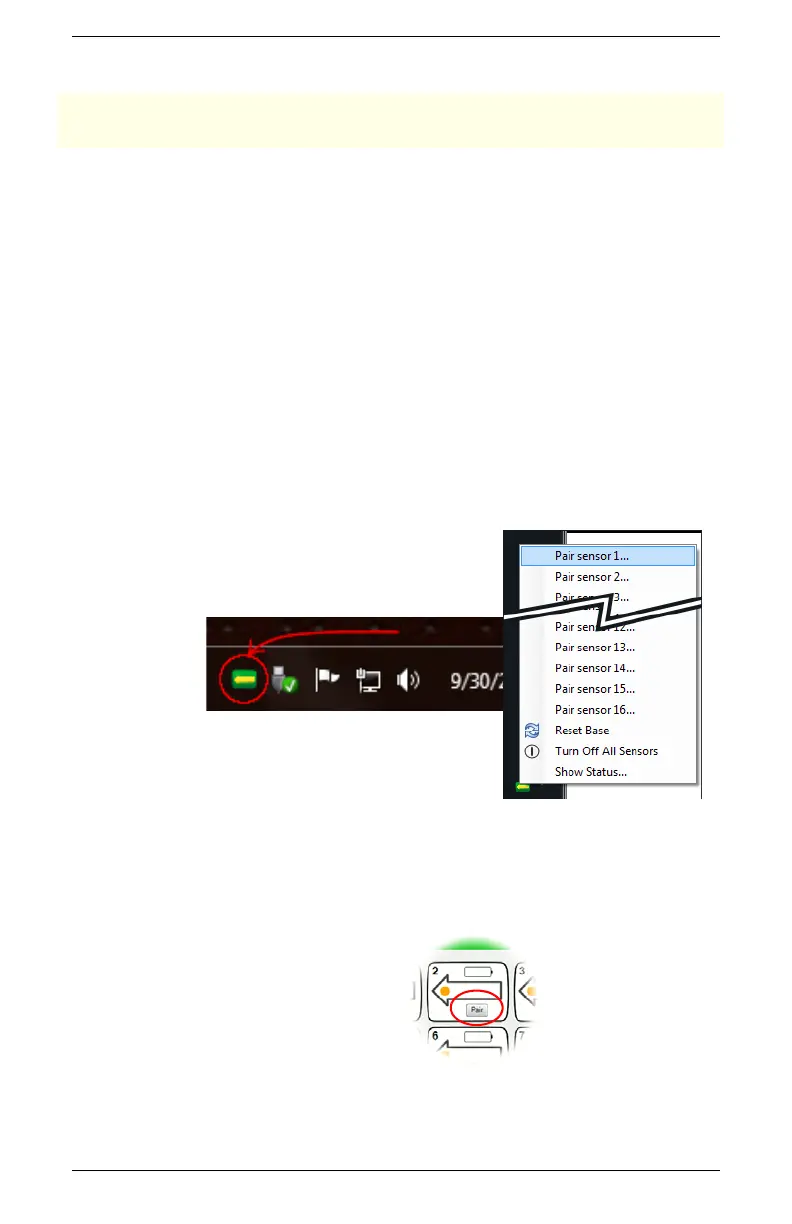
When using EMGworks, initiate pairing by right-clicking
the Trigno hardware icon in the system notification area,
and selecting the appropriate menu item.
Figure 19. Location of the Trigno hardware icon in the system notification
area, and the pairing menu item.
When using Trigno Control Utility, click the “Pair”
button on the Sensor Status Console.
Figure 20. Pair button in the Sensor Status Console.


 To Next Page