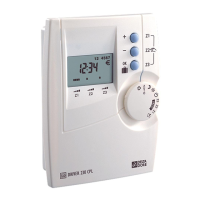
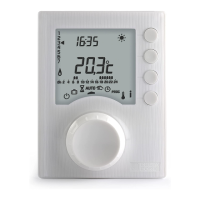
The CALYBOX is an energy manager designed to optimize the energy consumption of your home, primarily focusing on heating management. It comes in two main models: the CALYBOX 110 for single-zone heating control and the CALYBOX 120 for two-zone heating control. This device aims to provide comfort while also helping to reduce electricity costs and offer insights into your energy usage.
Function Description
The primary function of the CALYBOX is to manage your home's heating system by sending commands to heat emitters via a Pilot Wire. It supports various heating modes, allowing you to program your heating according to your daily or weekly schedule and personal comfort preferences.
- Comfort Mode: This mode maintains a comfortable room temperature, typically around 19°C, as set on the thermostat knob of your heat emitters.
- Economy Mode: Designed for energy saving, this mode sets the room temperature to a lower, more economical level, such as 16°C, or a Comfort -X°C setting, depending on the heat emitter model.
- Frost Protection Mode: When you are away for an extended period, this mode protects your home from freezing by maintaining a minimum temperature of 7°C or 8°C.
- Shutdown Mode: This mode completely turns off heating, resulting in no heating in the room.
The CALYBOX also includes features for load shedding, which helps prevent circuit-breakers from tripping due to excessive electricity consumption. This is particularly useful in homes with high energy demands, as it intelligently manages power distribution to avoid overloads. Furthermore, the device provides an indication of the total electricity consumption of your system, allowing you to monitor your energy usage.
Usage Features
The CALYBOX is operated through a selector knob and modification buttons, making it intuitive to navigate through its various modes and settings.
- Automatic Mode (AUTO): In this mode, the CALYBOX follows your programmed heating schedule. For the CALYBOX 110, it manages a single zone, while the CALYBOX 120 manages two zones independently according to their respective programs. The display shows the current time, day, and room temperature.
- Override Function: While in automatic mode, you can temporarily switch between Comfort and Economy modes until the next scheduled program change. This is useful for making quick adjustments to your heating without altering the entire program.
- Timer Mode: This feature allows you to select a specific heating mode (Comfort or Economy) for a given duration, ranging from 15 minutes to 72 hours, in 15-minute increments. This mode is applicable to one zone only, with the other zone following the automatic program. A countdown timer indicates the remaining duration of the selected mode.
- Continuous Mode: This mode enables you to set a continuous Comfort or Economy mode for each zone. You can select the desired mode for each zone using the modification buttons.
- Absence Mode (Frost Protection): If you plan to be away for several days, you can activate this mode to place your home under frost protection. You can adjust the number of days (1 to 365) for which the absence mode will be active. The water heater (DHW) is typically shut down during this mode, but specific installation guides or customer service can provide details on how to keep it in automatic mode if desired.
- Shutdown Mode: This mode allows you to completely shut down your heating system. In this case, the water heater usually remains in automatic mode.
- Information Button (i): Pressing this button repeatedly in AUTO or SHUTDOWN modes provides various information:
- Total electricity consumption of your installation.
- If equipped with the optional TYWATT 500, it displays electrical consumption in euros for heating, water heater (DHW), and other electrical appliances (lights, household appliances).
- The program of the current day per zone, showing Comfort and Economy periods.
- If equipped with the optional MINOR 500, it displays the temperature measured by each probe declared during installation.
- Time Setting: You can set the current day, hour, and minute using the selector knob and modification buttons. The device accounts for mains disruptions lasting more than 2 hours by entering time setting mode, but other settings remain unchanged.
- Programming (PROG): This mode allows you to create and customize your heating schedule.
- Create Your Program: You can define Comfort and Economy periods for each day, starting from day 1 at midnight. The default program is Comfort from 6:00 to 23:00.
- Confirm and Copy: After creating a program for one day, you can confirm it and copy it to the next day, or confirm it and continue to program the next day separately.
- Check Your Program: You can review your created Comfort and Economy periods to ensure accuracy.
- Zone 2 Programming (CALYBOX 120): Programming for the second zone becomes available after confirming day 7 of zone 1.
- MINOR 500 Option: Set Point Settings: If you have the MINOR 500 option, you can modify the Comfort and Economy set points for each probe (e.g., 19°C for Comfort, 16°C for Economy). After setting all probe points, you can also set the Frost Protection set point for all zones (e.g., 8°C).
- Tempo Tariff: For users on a tempo tariff, the CALYBOX can be configured to program specific modes for peak or off-peak days, depending on the installation settings. A flashing € symbol indicates a tariff reduction in progress, and a flashing sun symbol indicates Médio (1°C) or Modérato (-2°C) comfort mode.
Maintenance Features
The CALYBOX is designed for ease of use and generally requires minimal maintenance from the user.
-
Troubleshooting Guide: The manual includes a comprehensive troubleshooting section to help users quickly resolve common issues. This covers scenarios such as:
- No display on the screen: Indicates a power supply issue, suggesting checking the circuit breaker.
- Flashing "i" symbol: Signifies a fault in the system, prompting the user to press the "i" button for more details.
- Displaying "dEF" and a number: Indicates a fault on the unit or installation, requiring contact with an installer or customer service.
- Displaying "----" instead of temperature: Suggests a communication problem with MINOR 500 probes, requiring professional assistance.
- Unit in time setting mode: Occurs after a mains disruption lasting over 2 hours, requiring the user to reset the time.
- Flashing "€" symbol and sun symbol: Indicates tariff reduction mode or Médio/Modérato comfort mode for tempo tariff users.
- No day setting option: Occurs in daily programming configurations, with instructions to refer to the installation guide for weekly programming.
- Consumption discrepancy: Clarifies that the displayed consumption is an indication and not a contractual value, advising to check kWh price settings or contact support.
- Heating elements in Frost Protection mode: Explains that this occurs in programming, absence, or time setting modes, and advises turning the knob to select another mode.
- "Pb ----" displayed: Indicates a problem with the connection of a heating element, requiring contact with an installer or customer service.
- Unit displays "HEAT": Signifies the underfloor heating or radiant ceiling heating system is in "gradual heating" mode, with the "i" button providing remaining days.
- Temperature mismatch: Suggests that the displayed temperature can be corrected, referring to the installation guide or customer service.
-
Professional Service: The manual explicitly states that users should not attempt to repair the unit themselves and that after-sales service is available. This ensures that any complex issues or repairs are handled by qualified professionals, maintaining the device's integrity and safety.
-
Installation Guide Reference: For advanced settings, configuration changes (e.g., weekly vs. daily programming, time increments), or specific details regarding optional accessories like the TYWATT 500 or MINOR 500, the manual frequently directs users to consult the "installation guide" or contact their installer or customer service department. This ensures that the device is correctly configured and maintained according to its specific setup.

 Need help?
 General








 To Next Page