EasyManua.ls Logo

DELTA DORE DRIVER 230 CPL - User Manual

DELTA DORE DRIVER 230 CPL
8 pages
Print Icon
To Next Page IconTo Next Page
Loading...
DRIVER 230 CPL
User guide
3 zone weekly programmer using power
line carriers
*2702030_rev1*
DELTA DORE - Bonnemain
35270 COMBOURG - FRANCE
E-mail : deltadore@deltadore.com
Device complying with the requirements of the directives:
2004/108/EEC (electromagnetic compatibility) and
2006/95/EEC (low voltage safety).
Question and Answer IconNeed help?

Do you have a question about the DELTA DORE DRIVER 230 CPL and is the answer not in the manual?

Summary

Product Description

Time Setting

The Pilot Wire

Explains pilot wire principle for selecting operating mode for the heating element.

Operational Modes

Comfort, Economy or Continuous Frost Protection

Details on setting permanent comfort, continuous economy, or frost protection modes.

Automatic Mode

Explains how the unit follows the programmed schedule for all zones.

Change the programming

Step-by-step guide to modifying the daily heating schedule for each zone.

Override with automatic return

How to temporarily override Comfort or Economy mode with automatic return.

Adjustable frost protection

Setting the absence mode for a duration of 1 to 99 days.

Heating shutdown

Instructions for activating the heating shutdown mode.

Remote Controlled Absence Mode

Domotic Functions

Operation with a door;window magnetic contact

How door/window contacts can trigger Frost Protection mode on the DRIVER CPL.

Operation with a TYXIA Transmitter

Using TYXIA transmitter for Comfort or Economy overrides in automatic mode.

Operation with a Tydom 200 remote control

Shutting down or overriding operation using the Tydom 200 remote control.

Operation with a TYDOM 300 telephone transmitter

Controlling the heating system status via the TYDOM 300 telephone transmitter.

Operation with a TYXAL alarm control unit

Receiving and displaying technical fault information from a TYXAL alarm control unit.

Override according to the alarm status

How alarm status can trigger Economy or Comfort modes automatically.

Maintenance and Diagnosis

Diagnosis;Solutions

Provides solutions for common issues and error displays on the unit.

Overview

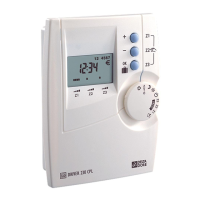
The DRIVER 230 CPL is a 3-zone weekly programmer that utilizes power line carriers for communication. It is designed to manage heating systems, offering various operating modes and programming options to optimize energy consumption and comfort.

Function Description:

The core function of the DRIVER 230 CPL is heating programming. It allows for 1 customizable program per day per zone, enabling users to set specific comfort and economy periods throughout the week. The device supports automatic mode, where it follows the programmed schedule, and also offers override capabilities for temporary changes to the operating mode. For instance, users can temporarily switch to a different mode (Comfort, Economy, etc.) until the next program change. An "Absence" mode is available, which can be constant or timed (from 1 to 99 days), setting the installation to frost protection mode when the user is away.

Communication within the heating system is achieved through power line carriers (PLC), specifically the X2D PLC range. This method ensures no damage to existing installations and is compatible with energy managers like GECPL1 and GP4 CPL. The system is upgradeable, allowing for future enhancements.

The DRIVER 230 CPL also integrates tariff management, especially when linked with a CPL X2D energy manager (e.g., GECPL1 or GP4 CPL). This feature allows the device to reduce energy consumption based on the current tariff period, and it is compatible with all tariffs.

An optional radio module, the TYDOM 520, expands the device's capabilities to include domotic functions. With this option, up to 16 domotics products can be associated, such as door/window magnetic contacts, alarm control units, and remote controls.

Important Technical Specifications:

The device complies with the requirements of the directives: 2004/108/EEC (electromagnetic compatibility) and 2006/95/EEC (low voltage safety).

Usage Features:

  • Time Setting: The time can be adjusted using a selector knob. Pressing and releasing the knob allows for slow forward adjustment, while pressing and holding enables fast forward adjustment. Each time 0.00 is passed, the day changes.
  • Pilot Wire Control: The DRIVER 230 CPL sends commands via a pilot wire to select the desired operating mode for heating elements. The corresponding temperature is set directly by the heating element thermostat. Commands include Comfort (thermostat knob setting), Economy (Comfort setting minus 2°C or 3°C), Frost Protection (7°C or 8°C), and Shutdown (heating shutdown).
  • Operating Modes:
    • Permanent Comfort: Sets the heating to comfort mode continuously.
    • Continuous Economy: Sets the heating to economy mode continuously.
    • Continuous Frost Protection: Sets the heating to frost protection mode continuously.
    • Automatic Mode: The unit follows the programmed schedule for all three zones.
  • Programming: Programming is done by turning the selector to PROG Z1 (or Z2, Z3). The first time slot flashes, and users can set hourly slots to Comfort or Economy using dedicated buttons. Holding down the "OK" button allows copying the program of the previously programmed day to the following day.
  • Override with Automatic Return: When in AUTO mode, users can temporarily override the program for a specific zone (e.g., switch to Economy) until the next program change. For 6-order pilot wire systems, overrides can select between Comfort, Comfort -2°C, Economy, and Comfort -1°C.
  • Adjustable Frost Protection (Absence Mode): From AUTO mode, pressing the suitcase symbol button for approximately 3 seconds activates continuous absence mode. The number of absence days (1 to 99) can be set using the +/- buttons. The countdown begins, and automatic operation resumes at 0:00 a.m. on the return day.
  • Heating Shutdown: A dedicated selector position allows for complete heating shutdown.
  • Remote Controlled Absence Mode (Frost Protection): The DRIVER 230 CPL can be linked with a power line carrier telephone remote control (e.g., TYPHONE 2 CPL) or a GECPL1 connected to a TYPHONE 2. This enables remote selection between absence mode and automatic operation. "tELE" is displayed when absence is set.
  • Domotic Functions (with TYDOM 520 radio option):
    • Door/Window Magnetic Contact: Up to 16 contacts can be associated. If a contact is opened, the DRIVER 230 CPL sets the installation to Frost Protection mode.
    • TYXIA Transmitter: In automatic mode, pressing specific buttons on a TYXIA transmitter can trigger comfort or economy overrides with automatic return.
    • TYDOM 200 Remote Control: Allows for system shutdown. Overrides can also be initiated from AUTO mode.
    • TYDOM 300 Telephone Transmitter: Users can call the transmitter to determine or modify the heating system status via synthetic voice guidance.
    • TYXAL Alarm Control Unit: The DRIVER 230 CPL receives and displays "technical fault" information from the alarm unit, flashing alternately with the current program for 2 minutes and indicating fault types (e.g., intruder alarm, tamper alarm, battery, mains fault).
  • Override According to Alarm Status: In AUTO mode, if the function is activated, starting the control unit (ON) sets all 3 zones to Economy mode, while shutting it down (OFF) sets them to Comfort mode, until the next program change. This override can be cancelled by zone or for all 3 zones.

Maintenance Features:

The device includes a diagnosis/solutions section to help identify and resolve common issues:

  • Nothing displayed on screen: Indicates the unit has just been switched on or there is no power supply (check circuit breaker).
  • Symbol displayed: An economy period interrupts automatic operation. The reduced tariff operating mode can be modified, and overrides are permitted.
  • Cannot access Comfort, -1°C, and -2°C operating modes: Indicates 4-order pilot wire heating or that it has been defined as such (refer to installation guide for receiver allocation).
  • Equipment displays "dEF6": Communication fault with GECPL1 or GP4 CPL (check power supply or reconfigure units).
  • Equipment displays "dEF7": Communication fault with electronic meter (check connection between meter and energy manager or contact installer).
  • Equipment displays "dEF8": Communication fault with TYPHONE 2 CPL (check power supply or reconfigure units).

DELTA DORE DRIVER 230 CPL Specifications

General IconGeneral
BrandDELTA DORE
ModelDRIVER 230 CPL
CategoryThermostat
LanguageEnglish

Related product manuals