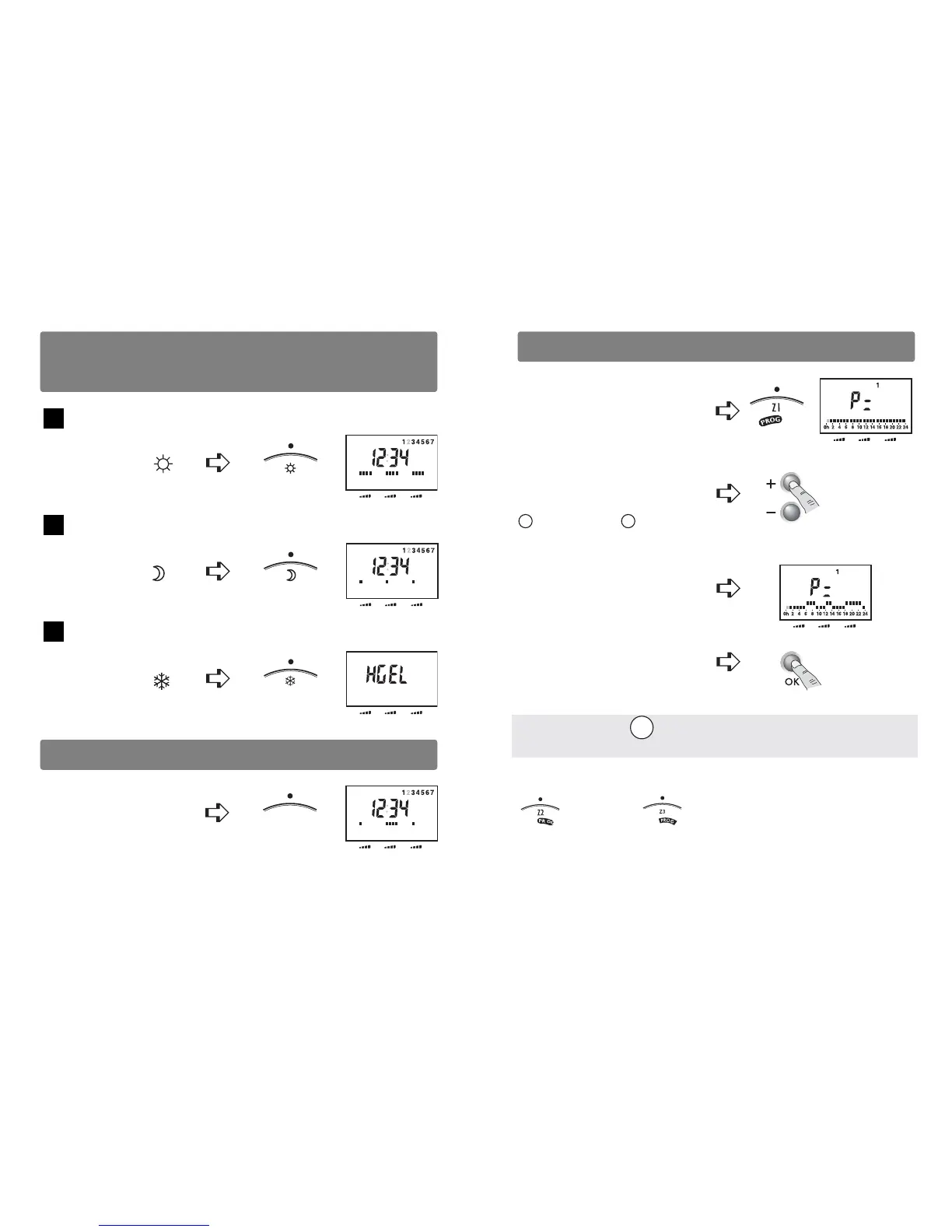
Permanent comfort
Continuous Economy mode
Continuous Frost Protection
- 7 -- 6 -
Change the programmingComfort, Economy or Continuous Frost
Protection
Automatic Mode
Turn
the selector to
Z2 Z3Z1
Turn
the selector to
Z2 Z3Z1
Turn
the selector to
Z2 Z3Z1
Turn
the selector to AUTO
The unit follows the program for the three zones.
A
U
T
O
Z2 Z3Z1
Turn the selector
to PROG Z1.
The 1st time slot flashes on and off.
E.g. Comfort from 6.00 am to 9.00 am
from 12am to 2pm,
from 6pm to 11pm.
The programming uses
slots of one hour.
Press the buttons
+ (comfort) or - (economy)
to set each time slot.
Confirm and go to
the next day.
Repeat for each day.
Change the position selector to exit the mode.
Comfort for
1 hour
Economy for
1 hour
Holding down the OK button lets you allocate the same
program as the previously programmed day to the following day.
To modify the program of zones 2 or 3 , turn the knob to PROG Z2
or PROG Z3 and repeat the steps above.
Z2 Z3Z1
Z2 Z3Z1











 To Next Page