8
2-6 Rear Panel
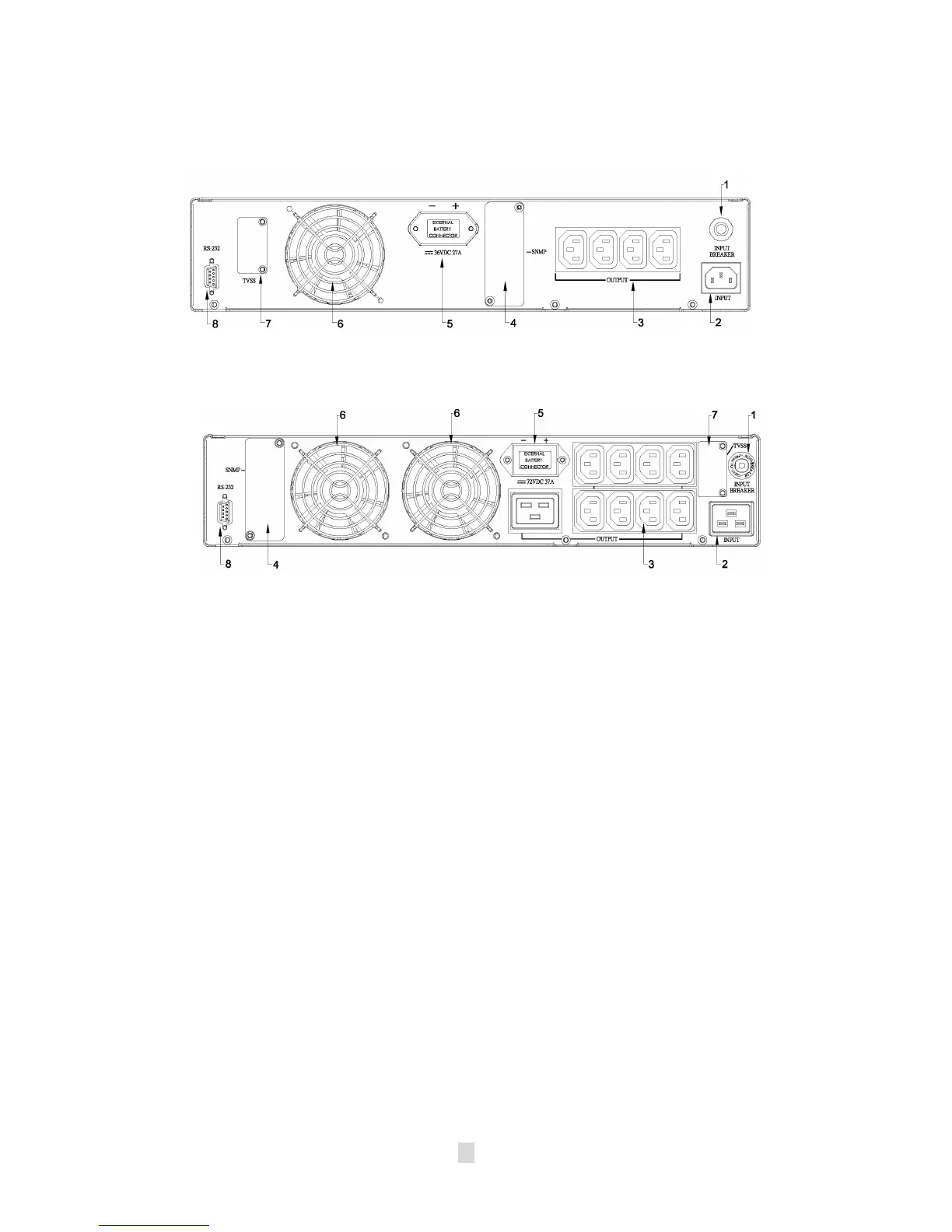
The rear panel is explained as follows: (Please refer to fig 2-6.1, 2-6.2)
Fig 2-6.1 (1KVA Rear Panel)
Fig 2-6.2 (2KVA &3KVA Rear Panel)
1. I/P BREAKER
: This is used to prevent high input current from the UPS.
2. INPUT SOCKET: AC input utility power supplies to the UPS via the
socket.
3. OUTPUT RECEPTACLES: The UPS supplies AC power to the load via
these receptacles.
4. SNMP SLOT:
SNMP adapter can be inserted into this port for monitoring
UPS status via network.
5. External Batteries Connector: Used for connecting external battery
cabinets to extend back up time.
6. Fan: DC fans for cooling purpose.
7. TVSS (Transient Voltage Surge Suppressor) (RJ-45/RJ-11 SURGE
PROTECTOR): These connectors are used to prevent damage from
surge, noise and spike traveling form telephone or network line.
8. COMMUNICATION INTERFACE (RS-232):
The communication port is
used to communicate PC and UPS. Please refer to section 8 for more
information.












 To Next Page