15
4-3 Turning “OFF” the UPS
Push the “OFF” button for turning off the UPS, when a “bee” is heard release
your press. After a few seconds the UPS is off.
The UPS will keep charging when UPS is in “STANDBY mode” even though
the“OFF” button has been pressed. To fully turn off the UPS, it is advised to
unplug the power cord.
4-4 UPS self-test
If press the “ON TEST” button when the UPS is in “ON-LINE mode”, it will
make the UPS shift to
【
ON-BATTERY mode
】
and automatically perform a
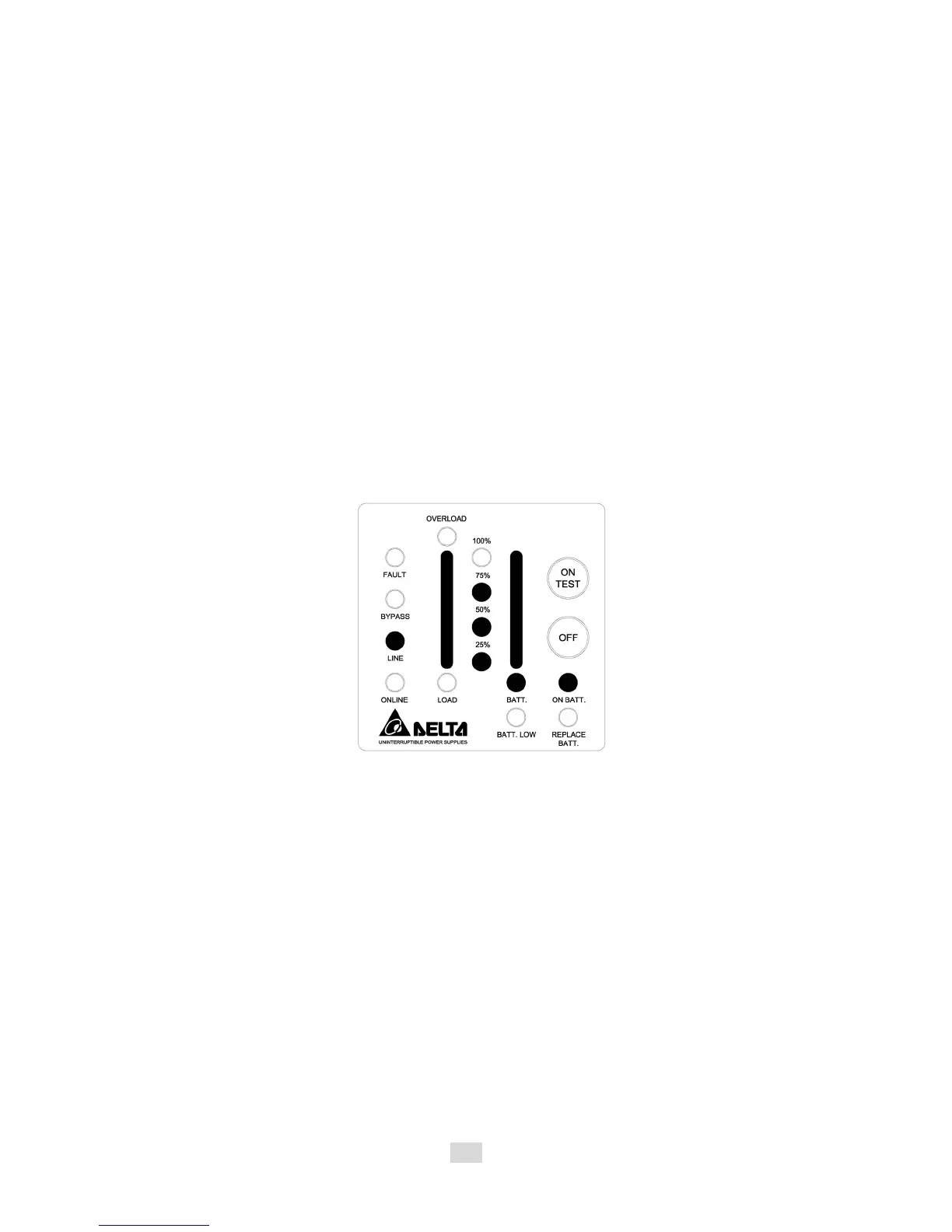
self-test for about 10 seconds. (Shown as fig 4-3.) The self-test function will
check the condition of the battery. After self-test is finished and test is O.K,
the UPS will return to
【
ON- LINE mode
】
.
Fig 4-3 UPS Self-Test
4-5 Silence function
The buzzer can be turned “On” or “Off” by toggling the “ON TEST” button when
the UPS is in
【
ON-BATTERY mode
】
.
4-6 Abnormal condition
If certain abnormal condition occurs, the UPS will send the following messages:
ON-BATTERY mode: When the UPS is in
【
ON-BATTERY mode
】
, the on-
battery LED will light on, buzzer beep half second every 2 seconds and then the
UPS will start supplying power to load through batteries. Shown as fig 4-4.












 To Next Page