EasyManua.ls Logo

Delta 2000 Series - Adjusting Belt Tension; Adjusting Spindle Return Spring; Quill Adjustments; Drilling Holes to Depth

Delta 2000 Series
8 pages
Print Icon
To Next Page IconTo Next Page
To Previous Page IconTo Previous Page
Loading...
ADJUSTING
BELT
TENSION
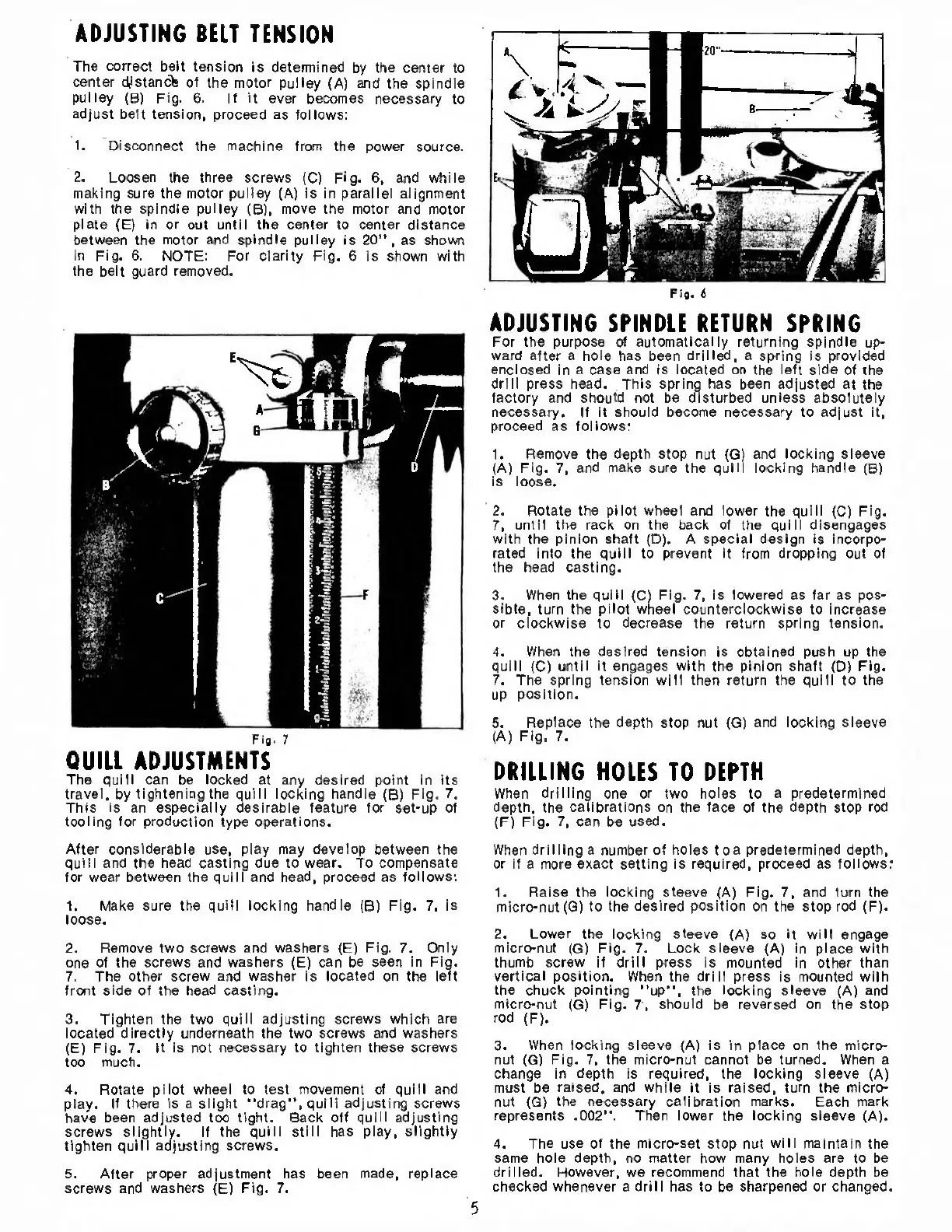
The
correct
belt
tension
is
determined
by
the
center
to
center
dlstancfe
of
the
motor
pulley
(A)
and
the
spindle
pulley
(B)
Fig.
6.
If
it
ever
becomes
necessary
to
adjust
belt
tension,
proceed
as
follows:
1.
Disconnect
the
machine
from
the
power
source.
2.
Loosen
the
three
screws
(C)
Fig.
6,
and
while
making
sure
the
motor
pulley
(A)
is
in
parallel
alignment
with
the
spindle
pulley
(B),
move
the
motor
and
motor
plate
(E)
in
or
out
until
the
center
to
center
distance
between
the
motor
and
spindle
pulley
is
20”,
as
shown
in
Fig.
6.
NOTE:
For
clarity
Fig.
6
is
shown
with
the
belt
guard
removed.
Fig.
6
QUILL
ADJUSTMENTS
The
quill
can
be
locked
at
any
desired
point
in
Its
travel,
by
tightening
the
quill
locking
handle
(B)
Fig.
7.
This
is
an
especially
desirable
feature
for
set-up
of
tooling
for
production
type
operations.
ADJUSTING
SPINDLE
RETURN
SPRING
For
the
purpose
of
automatically
returning
spindle
up¬
ward
after
a
hole
has
been
drilled,
a
spring
is
provided
enclosed
in
a
case
and
is
located
on
the
left
side
of
the
drill
press
head.
This
spring
has
been
adjusted
at
the
factory
and
should
not
be
disturbed
unless
absolutely
necessary.
If
it
should
become
necessary
to
adjust
it,
proceed
as
follows:
1.
Remove
the
depth
stop
nut
(G)
and
locking
sleeve
(A)
Fig.
7,
and
make
sure
the
quill
locking
handle
(B)
is
loose.
2.
Rotate
the
pilot
wheel
and
lower
the
quill
(C)
Fig.
7,
until
the
rack
on
the
back
of
the
quill
disengages
with
the
pinion
shaft
(D).
A
special
design
is
incorpo¬
rated
into
the
quill
to
prevent
it
from
dropping
out
of
the
head
casting.
3.
When
the
quill
(C)
Fig.
7,
is
lowered
as
far
as
pos¬
sible,
turn
the
pilot
wheel
counterclockwise
to
increase
or
clockwise
to
decrease
the
return
spring
tension.
4.
When
the
desired
tension
is
obtained
push
up
the
quill
(C)
until
it
engages
with
the
pinion
shaft
(D)
Fig.
7.
The
spring
tension
will
then
return
the
quill
to
the
up
position.
5.
Replace
the
depth
stop
nut
(G)
and
locking
sleeve
(A)
Fig.
7.
DRILLING
HOLES
TO
DEPTH
When
drilling
one
or
two
holes
to
a
predetermined
depth,
the
calibrations
on
the
face
of
the
depth
stop
rod
(F)
Fig.
7,
can
be
used.
After
considerable
use,
play
may
develop
between
the
quill
and
the
head
casting
due
to
wear.
To
compensate
for
wear
between
the
quill
and
head,
proceed
as
follows:
1.
Make
sure
the
quill
locking
handle
(B)
Fig.
7.
is
loose.
2.
Remove
two
screws
and
washers
(E)
Fig.
7.
Only
one
of
the
screws
and
washers
(E)
can
be
seen
in
Fig.
7.
The
other
screw
and
washer
is
located
on
the
left
front
side
of
the
head
casting.
3.
Tighten
the
two
quill
adjusting
screws
which
are
located
directly
underneath
the
two
screws
and
washers
(E)
Fig.
7.
It
is
not
necessary
to
tighten
these
screws
too
much.
4.
Rotate
pilot
wheel
to
test
movement
of
quill
and
play.
If
there
is
a
slight
''drag”,
quill
adjusting
screws
have
been
adjusted
too
tight.
Back
off
quill
adjusting
screws
slightly.
If
the
quill
still
has
play,
slightly
tighten
quill
adjusting
screws.
5.
After
proper
adjustment
has
been
made,
replace
screws
and
washers
(E)
Fig.
7.
When
drilling
a
number
of
holes
toa
predetermined
depth,
or
if
a
more
exact
setting
is
required,
proceed
as
follows:
1.
Raise
the
locking
sleeve
(A)
Fig.
7,
and
turn
the
micro-nut
(G)
to
the
desired
position
on
the
stop
rod
(F).
2.
Lower
the
locking
sleeve
(A)
so
it
will
engage
micro-nut
(G)
Fig.
7.
Lock
sleeve
(A)
in
place
with
thumb
screw
if
drill
press
is
mounted
in
other
than
vertical
position.
When
the
drill
press
is
mounted
with
the
chuck
pointing
"up”,
the
locking
sleeve
(A)
and
micro-nut
(G)
Fig.
7,
should
be
reversed
on
the
stop
rod
(F).
3.
When
locking
sleeve
(A)
is
in
place
on
the
micro¬
nut
(G)
Fig.
7,
the
micro-nut
cannot
be
turned.
When
a
change
in
depth
is
required,
the
locking
sleeve
(A)
must
be
raised,
and
while
it
is
raised,
turn
the
micro¬
nut
(G)
the
necessary
calibration
marks.
Each
mark
represents
.002”.
Then
lower
the
locking
sleeve
(A).
4.
The
use
of
the
micro-set
stop
nut
will
maintain
the
same
hole
depth,
no
matter
how
many
holes
are
to
be
drilled.
However,
we
recommend
that
the
hole
depth
be
checked
whenever
a
drill
has
to
be
sharpened
or
changed.
5

Related product manuals