Ethernet Communication Module DVPEN01-SL
DVP-PLC Operation Manual
26
receiving register
In data exchange, DVPEN01-SL will execute Write (Æ) first before Read (Å).
Quantity: A slave is able to send and receive at the same time maximum 100 consecutive data.
f For data exchange, D register is parted into 2 sections, D0000 ~ D4095 and D4096 ~ D9999.
Please DO NOT use different sections for the consecutive sent and received data (start
address + number of data).
5. See “Application Examples Section 6.11” for more details.
5.6 RTU
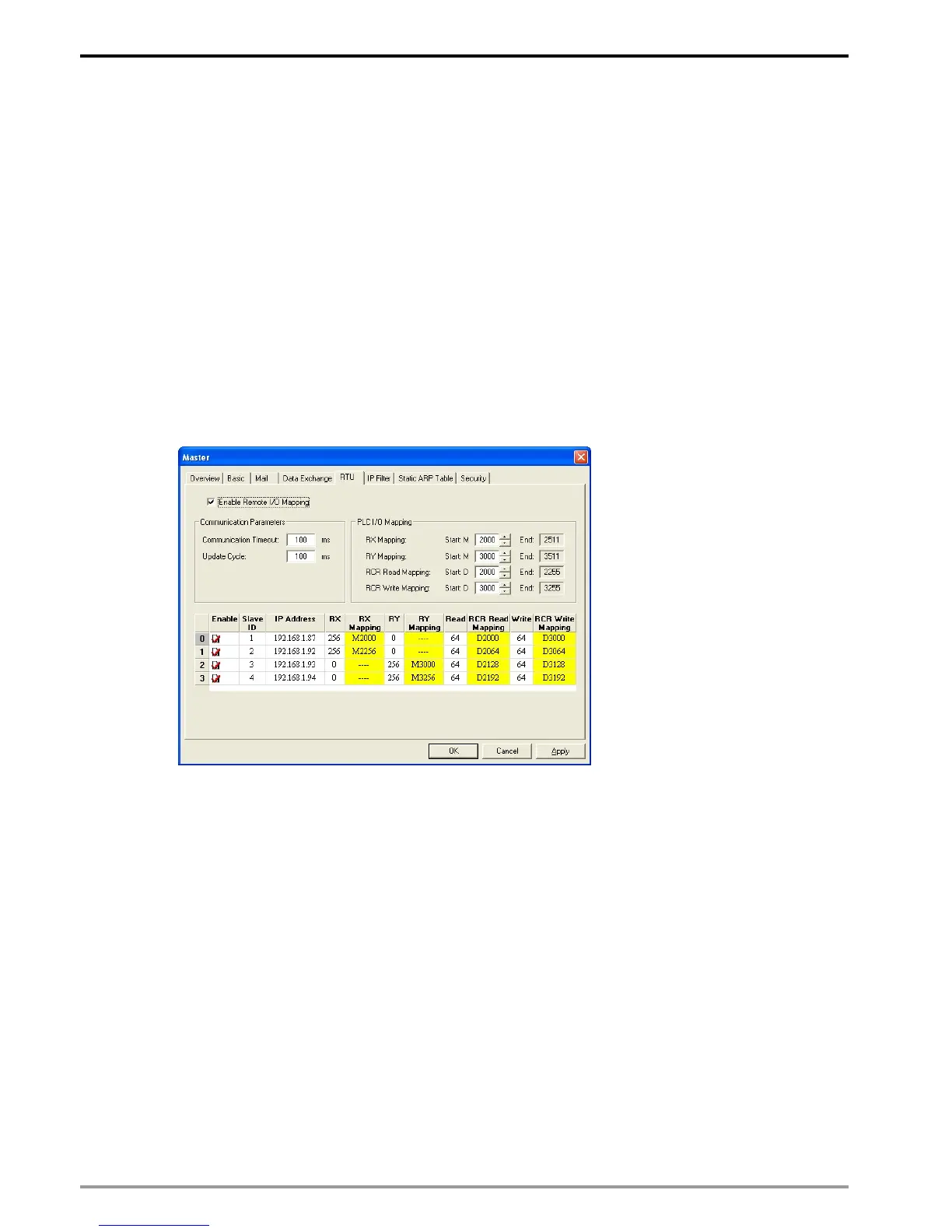
Use the “RTU” function to conduct mapping between Delta’s network modules DVPEN01-SL and
RTU-EN01.Set up the mapping information first, and you will be able to use WPLSoft in DVPEN01-SL to save
and retrieve the mapped bit (M) and register (D) in order to operate the remote RTU-EN01.
The settings
1. Enable Remote I/O Mapping:
Check the box to enable the remote I/O mapping. The mapping with remote RTU-EN01 will be
enabled according to the settings.
2. Communication Parameters:
Set up “Communication Timeout” (ms) and “Update Cycle” (ms) here.
3. PLC I/O Mapping:
Set up the start address of the mapped bit and analog register (RCR) of digital input (X) and
digital output (Y) on remoter RTU-EN01. The bit starts from M2000, and read/write register starts
from D2000/D3000. The software will automatically calculate the end address according to the
settings below.
4. Remote Device Mapping:
Check “Enable” and enter the remote RTU-EN01 ID (Slave ID), IP Address, number of digital
input points (RX), number of digital output points (RY), number of mapped read registers (Read)
and write register (Write).
DVPEN01-SL offers 4 slaves for mapping. Max. number of digital and analog points for mapping


 To Next Page