27
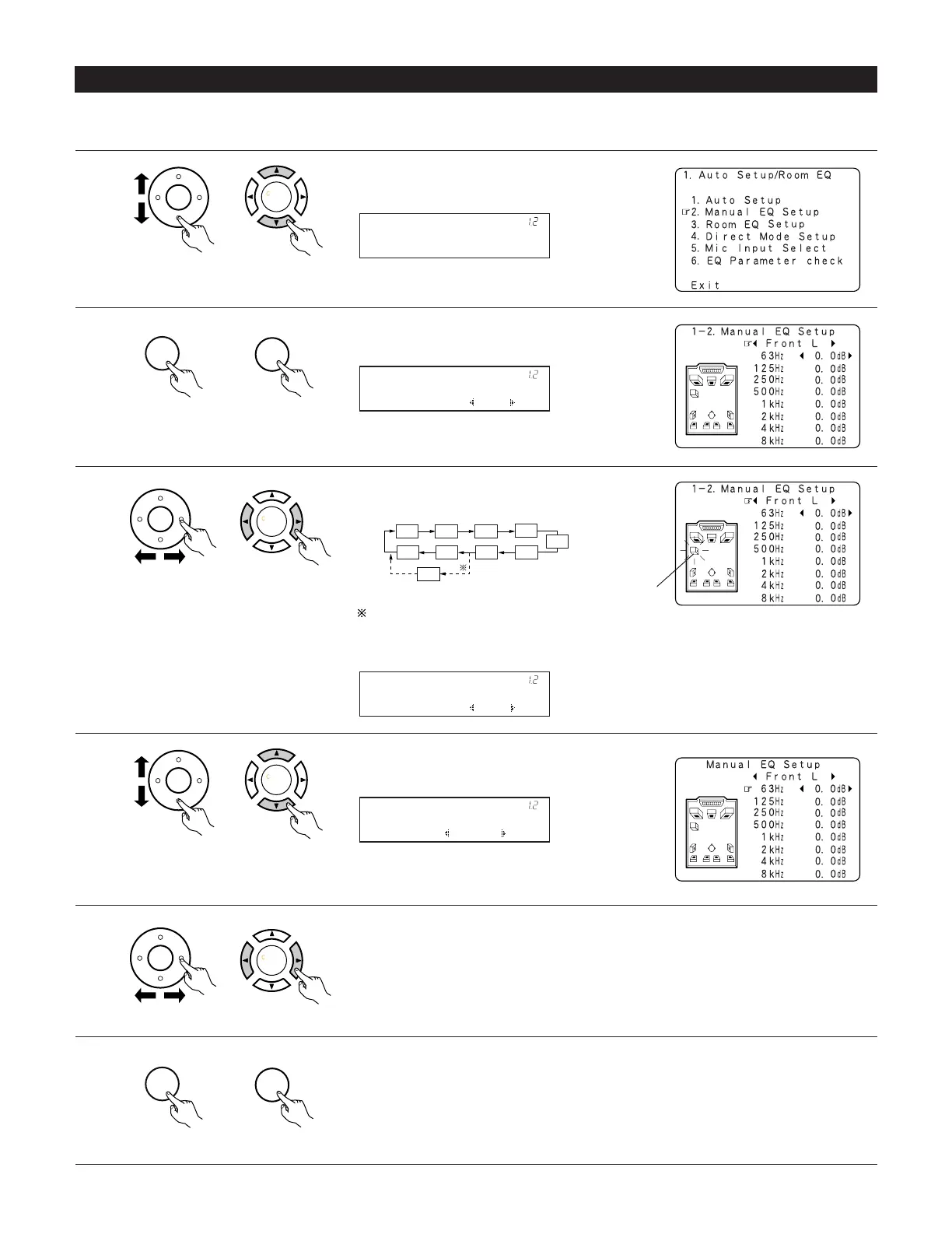
1-2 Setting the Manual EQ Setup
1
Select “Manual EQ Setup” at the Auto Setup / Room
EQ Menu.
(Main unit)
(Remote control unit)
Channel : FL
*ManualEQ Setup
Adjust the tone of the various speakers except subwoofer speaker while listening to the sound (music).
2
Display the Manual EQ Setup screen.
(Main unit)
(Remote control unit)
3
Select the speaker to be set.
The display changes as follows.
(Main unit)
(Remote control unit)
4
Select the frequency
(Main unit)
(Remote control unit)
5
Use the cursor left and right buttons to adjust the
Gain level.
• Each frequency can be adjusted the range from
–6dB to +6dB in 0.5dB step.
(Main unit)
(Remote control unit)
6
Enter the setting.
The Auto Setup / Room EQ Menu reappears.
(Main unit)
(Remote control unit)
Manual EQ Setup
*AutoSet/RoomEQ
63Hz : 0.0dB
*ManualEQ Setup
SB
FL
FR C
SLA
SLBSRB
SBL
SBR
1spkr
SRA
When the surround back speaker setting is set to
“1spkr” at “Speaker Configuration”, this is set to
“SB”.
Flashing
Channel : FL
*ManualEQ Setup


 To Next Page
 Loading...