Magnify schematic / printed circuit board
diagrams - 2
(Pan & Zoom function)
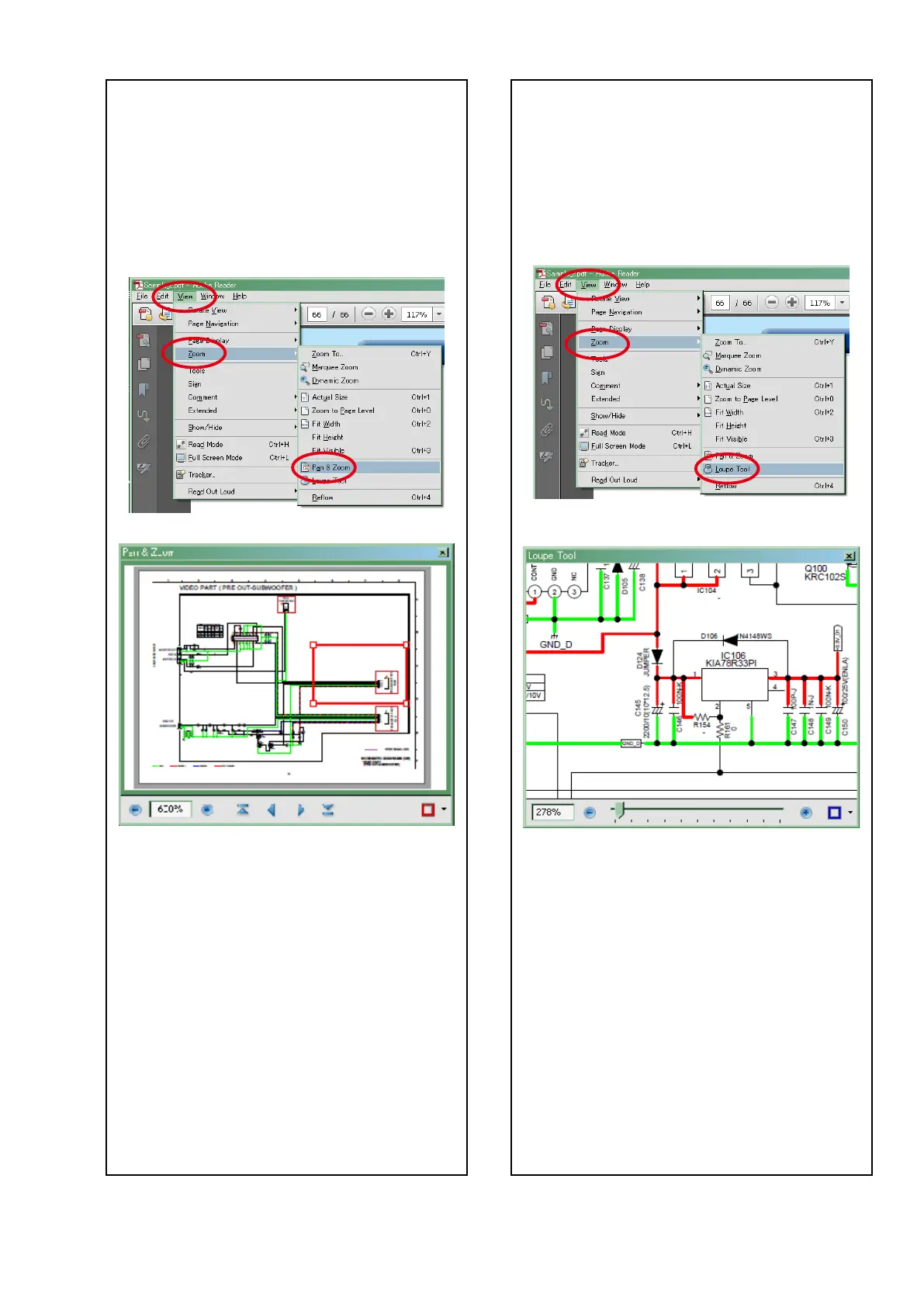
ThePan&Zoomfunctionletsyouseewhichpartof
amagnieddiagramisbeingshowninaseparate
window.
[Example using Adobe Reader X]
Onthe"View"menu,pointto"Zoom",andthenclick
"Pan & Zoom".
• ThePan&Zoomwindowappearsonthescreen.
[Example using Adobe Reader 9]
Onthe"Tools"menu,pointto "Select & Zoom",and
thenclick"Pan & Zoom Window".
Magnify schematic / printed circuit board
diagrams - 3
(Loupe Tool function)
TheLoupeToolfunctionletsyoumagnifyaspecic
partofadiagraminaseparatewindow.
[ExampleusingAdobeReaderX]
Onthe"View"menu,pointto"Zoom",andthenclick
"Loupe Tool".
• TheLoupeToolwindowappearsonthescreen.
[Example using Adobe Reader 9]
Onthe"Tools"menu,pointto"Select & Zoom",and
thenclick"Loupe Tool Window".
5


 To Next Page
 Loading...