EasyManua.ls Logo

Denon DCD-710AE - Step 17: Device Power On and Reset; Step 18: Confirm Data Erase Dialog; Step 19: Start Programming

Denon DCD-710AE
76 pages
Print Icon
To Next Page IconTo Next Page
To Previous Page IconTo Previous Page
Loading...
28
DCD-710AE
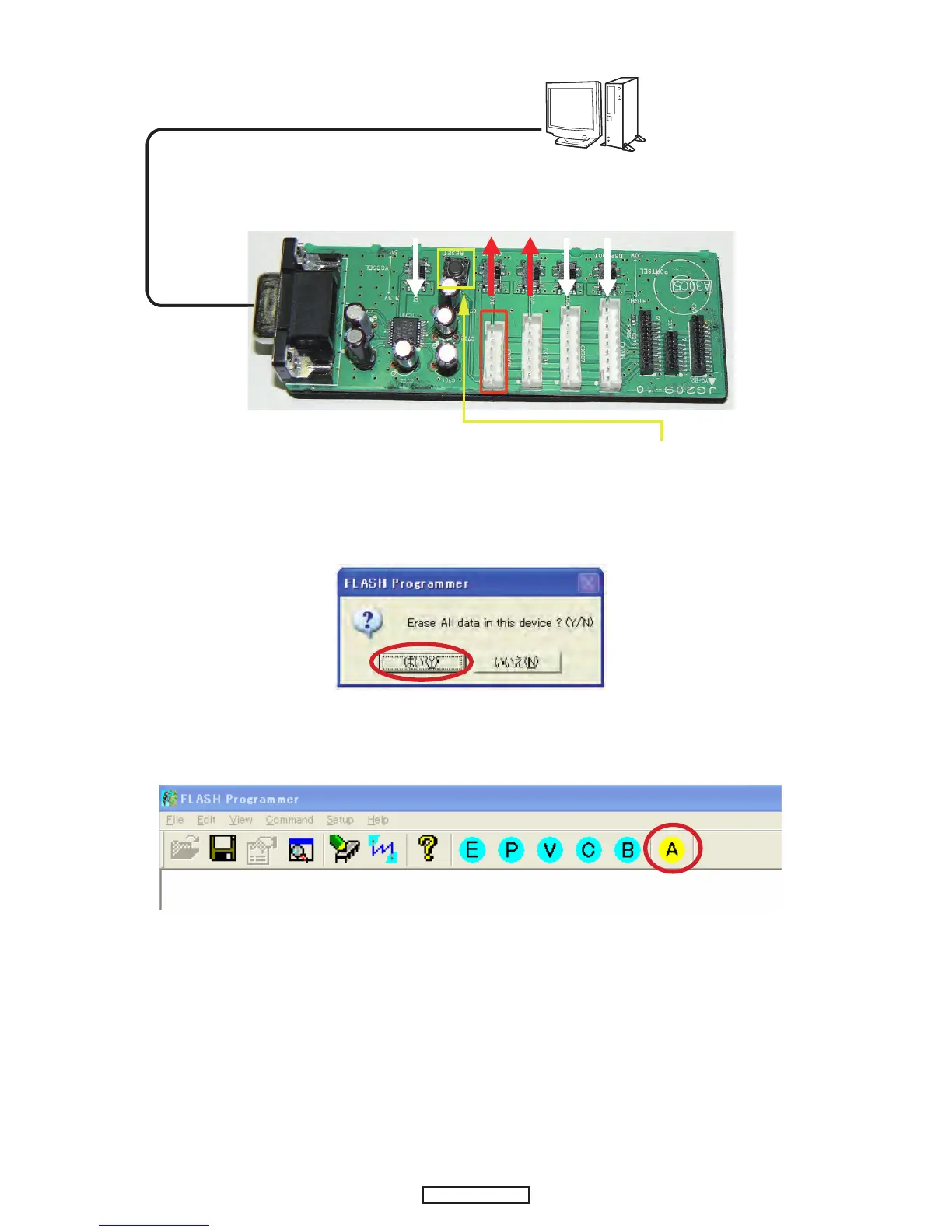
(17) Turn on DCD-710AE, and press the RESET button.
(18) If the connection with the Flash Programmer is successfully made, a dialogue box saying "Erase All data in this
devise? (Y/N)" appears automatically. If the connection fails, error message will appear. (Ex.: E000)
Click Yes.
(19) Click A (Auto Programing) to start writing.
(20) Turn off DCD-710AE.
(21) Remove the SPK-581 from DCD-710AE.

PC
Turn on DCD-710AE.
(Check connection CN53 on CUP12202Z-1.)
Press the RESET button.
CX709
PC
Turn on DCD-710AE.
(Check connection CN53 on CUP12202Z-1.)
Press the RESET button.
CX709

Other manuals for Denon DCD-710AE

Related product manuals