19
Getting started Troubleshooting Specifications Index
Others Preset
Playback
Connection
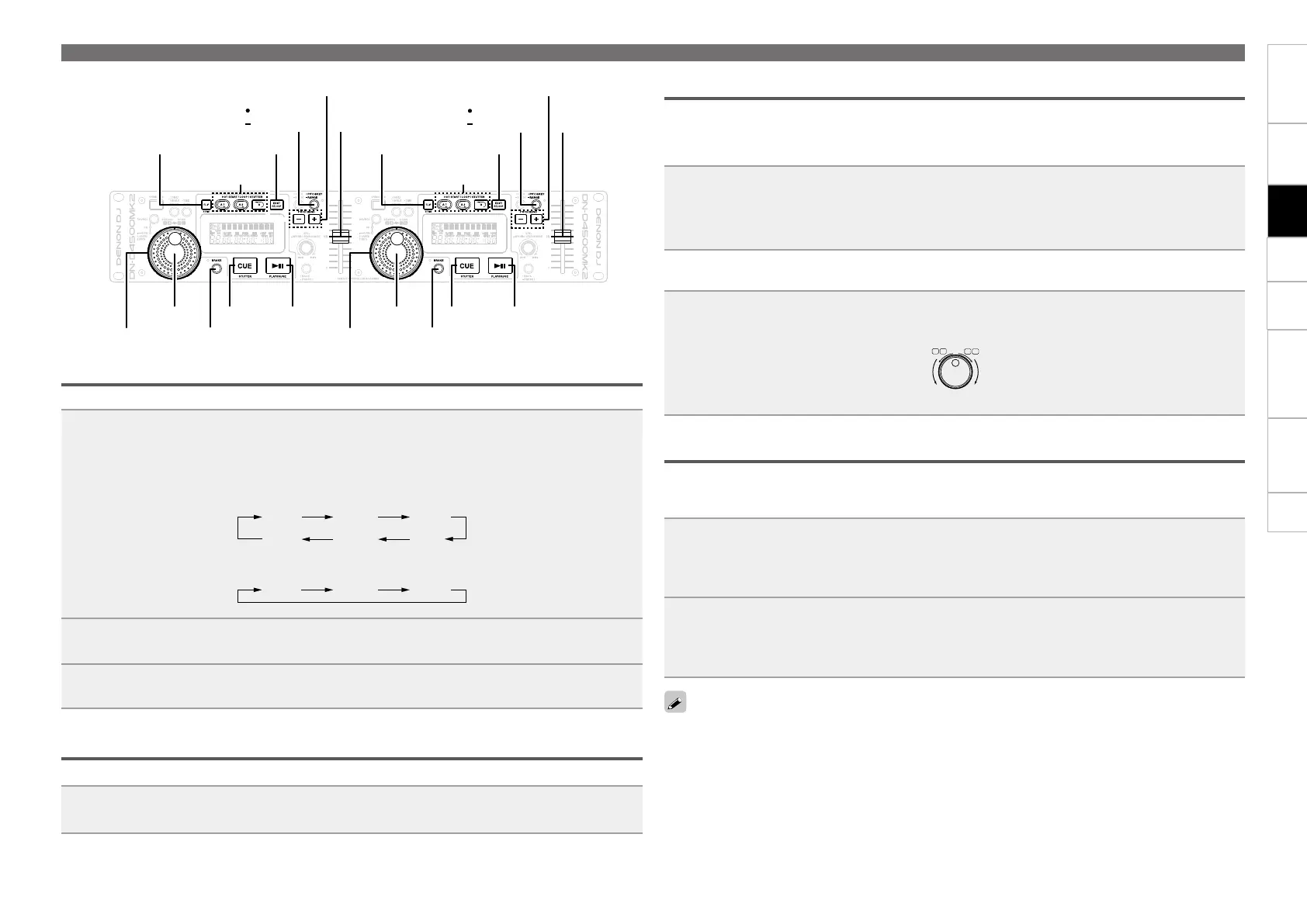
Adjusting the playback speed
Use the pitch slider to adjust the playback speed (pitch).
1
Press and hold PITCH/KEY - RANGE.
Range **% is displayed.
Each time SEL. is turned, the range in which the playback speed can be adjusted switches as
shown below. Turn SEL. to select the pitch range, and press SEL. to select the playback speed.
4 % 10 % 16 %
24%
100 % 50 %
4 % 10 % 16 %
GFor MP3 DISCH
2
Press PITCH/KEY - RANGE.
TheLEDlightsgreen.
3
Move the pitch slider, and adjust to the desired playback speed.
Adjusting the playback speed without changing the pitch
When the playback speed is adjusted, the pitch is not changed.
Press PITCH/KEY - RANGE.
TheLEDlightsorange.
Operations during playback
CUE PLAY/PAUSECUE PLAY/PAUSE
BRAKEBRAKE
PITCH/KEY
RANGE
PITCH BEND -/+PITCH BEND -/+
EXIT/RELOOPFILP/BTRIMEXIT/RELOOP
A1,A2,B
A1,A2,B
FILP/BTRIM
PITCH/KEY
RANGE
Shuttle ring
Jog wheel Jog wheel
Shuttle ring
Pitch slider
Pitch slider
Changing the playback speed temporarily (pitch bend function)
This function temporarily changes the playback speed.
There are 2 methods for changing the playback speed.
n Using the PITCH BEND buttons
Press PITCH BEND +/–.
PITCH BEND +
PITCH BEND –
Playback speed is increased while the button is being pressed.
Playback speed is decreased while the button is being pressed.
n During playback, turn the jog wheel
If turned in the FWD direction, playback speed is increased.
If turned in the RVS direction, playback speed is decreased.
11
ENGLISH
DN-D4500 has six pitch ranges,
4%, 10%, *16%, 24%, 50% and
100%.
(*Max MP3) When the
RANGE button !4 is pushed
for more than 1 sec, the pitch
range can be selected by turning
the TRACK SELECT knob o.
• When the TRACK SELECT
knob o is pushed down the
pitch range is entered and
the pitch range selection
mode is completed.
6
PITCH/BRAKE
(1) Pitch
• There are two ways to change the playing speed.
• Adjust the Pitch using the pitch slider !3.
• The PITCH BEND button !2 or jog wheel y can be used to temporarily change the pitch.
• The playing speed can be changed greatly to achieve effect similar to those achievable with analog vinyl.
• If you wish to preserve the original key of sound, set the Key Adjust function to ON.
1-1
[Pitch slider]
Set the variable speed mode.
Push the PITCH button !4 to light
the PITCH LED.
•
PITCH → KEY (key adjust) → OFF
(Green) (Orange) (Off) (LED color)
The Pitch decreases
when the pitch slider !3
is moved upwards,
increases when the pitch
slider !3 is moved
downwards.
1-2
2-1
[PITCH BEND button]
Push the PITCH BEND + (or
PITCH BEND –) button !2.
• The Pitch increases or
decreases temporarily while the
PITCH BEND + or PITCH BEND
– button !2 is pushed.
• The extent to which the PITCH BEND button
!2 changes the Pitch is proportionate to the
amount of time the button is pushed. The
longer the button is held down, the greater
the percentage of change.
2-2
Set the jog wheel to the pitch bend mode.
During playback, pitch bend is setting for the
Jog wheel.
• The playing speed increases
gradually when the jog wheel
y is turned clockwise and
decreases gradually when the jog
wheel y is turned
counterclockwise. When you stop turning
the jog wheel y, the playing speed returns
to the previous speed.
• When playback is stopped, the jog/shuttle
wheel is set to the search mode.
Pitch
decreases
Pitch
increases
1-3
• When the track is selected with the TRACK SELECT knob o and the PLAY/PAUSE button !1 is pushed,
playback starts from the beginning of that track. If you wish to start from a different position, use the
procedure described below to search for the desired position.
(2) Starting playback from the Middle of a track (Manual Search)
1
Find the play start position.
Turn the shuttle ring !7 to change the
playback position quickly. (Search for the
approximate playback position.)
The fast forward/reverse mode
is set when the shuttle ring
(outer side) !7 is turned.
The speed changes according to
the angle at which the ring is
turned.
• When operated during playback, playback
resumes after the operation.
•When playback is started, the jog wheel is
set to the bend mode.
• When turned fully in either direction, the
playback position jumps about 10 seconds.
The jump time can be selected in the preset
mode from 10, 20, 30 or 60 sec.
2
Turn the jog wheel y. (Search for the precise
playback position.)
When the jog wheel (inner side)
y is turned, the frame move
mode is set.
The playback position can be
moved in units of one frame.
Listen to the sound and find the desired play
start position.
§
SEARCH
SCAN
6
7
I
I
I
Shockproof memory
•A maximum of approximately 20 seconds
uncompressed audio data is stored into memory
(per drive). This guards audible interruptions due
to external mechanical shocks such as bumps
or other hard vibrations.
• If advanced data reading is not possible due to
scratches or dirt on the disc, playback stops
once the data stored up to that point is read.
RVS FWD
NOTE:
• For MP3 discs, frames are not displayed,
however frame resolution is audible by turning
the jog wheel (inner side) y.
(2) BRAKE
• Use this function to achieve effect similar to analog players.
1
Push the BRAKE button i to light
the BRAKE LED.
• The effect sound is similar to
a DJ turntable coming to a
quick stop. This effect can
be achieved by pushing the
PLAY/PAUSE button !1
during playback.
RVS FWD
Manual loop playback
Setthestartingpoint(Apoint)andendpoint(Bpoint),andplaybackisrepeatedseamlesslybetweenthe
two points.
Twoloopranges(A1andB1points,A2andB2points)canbeset.
1
During playback or pause, press A1 at the position where you want to start
playback.
TheAindicatorlightsinthedisplay,andplaybackstartsfromthesetApoint.
2
Press B at the position where you want to end playback.
TheBindicatorlightsinthedisplay,andmanualloopplaybackrepeatsbetweenAandB.
A2andB2pointscanbesetinthesameway.


 To Next Page