14
ENGLISH
✽ Set the “AUDIO SETUP” default setting as shown below (see page 25).
• “DIGITAL OUT” → “PCM”
“96k LPCM OUT” → “96k>48k”
Playing DVDs with incorrect settings may result noise that could damage your ears or the speakers.
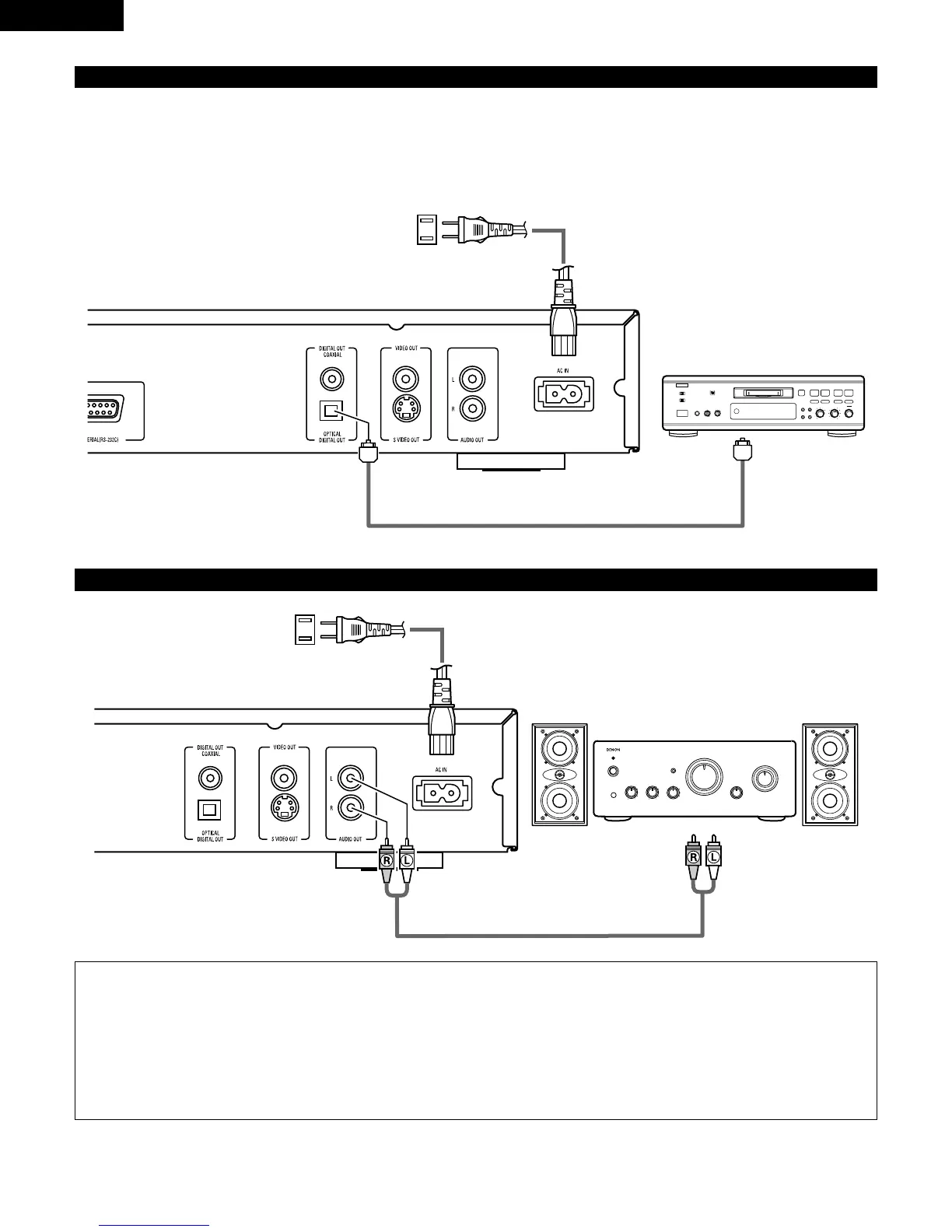
(4) Connecting to a Digital Recorder (MD Recorder, DAT Deck, etc.)
Optical fiber cable
DN-V200/DN-V300
(5) Connecting to a Stereo Component
DN-V200/DN-V300
Stereo component
NOTES:
• When connecting to a stereo device with 2 audio channels
q After setting “SETUP MENU MODE” at “SYSTEM SETUP” to “EXPERT”, set “DOWNMIX” under “AUDIO SETUP” to either
“STEREO” or “LT/RT” (see page 25).
For sources recorded in multiple channels, analog signals downmixed into two channels are output. (For sources for which
downmixing is prohibited, only the FL and FR channels are output.)
w Set “96kLPCM OUT” at “AUDIO SETUP” under “SETUP” to “96k>48k” (see pages 25). (When set to “96k>48k”, analog audio
signals converted to 48 kHz or less are output for linear PCM sources.)
Digital audio
input connector
(OPTICAL)
To power outlet
To power outlet



 To Next Page