EasyManua.ls Logo

Denon DN-V200 - Using the Menus

Denon DN-V200
120 pages
Print Icon
To Next Page IconTo Next Page
To Previous Page IconTo Previous Page
Loading...
44
ENGLISH
15
USING THE MENUS
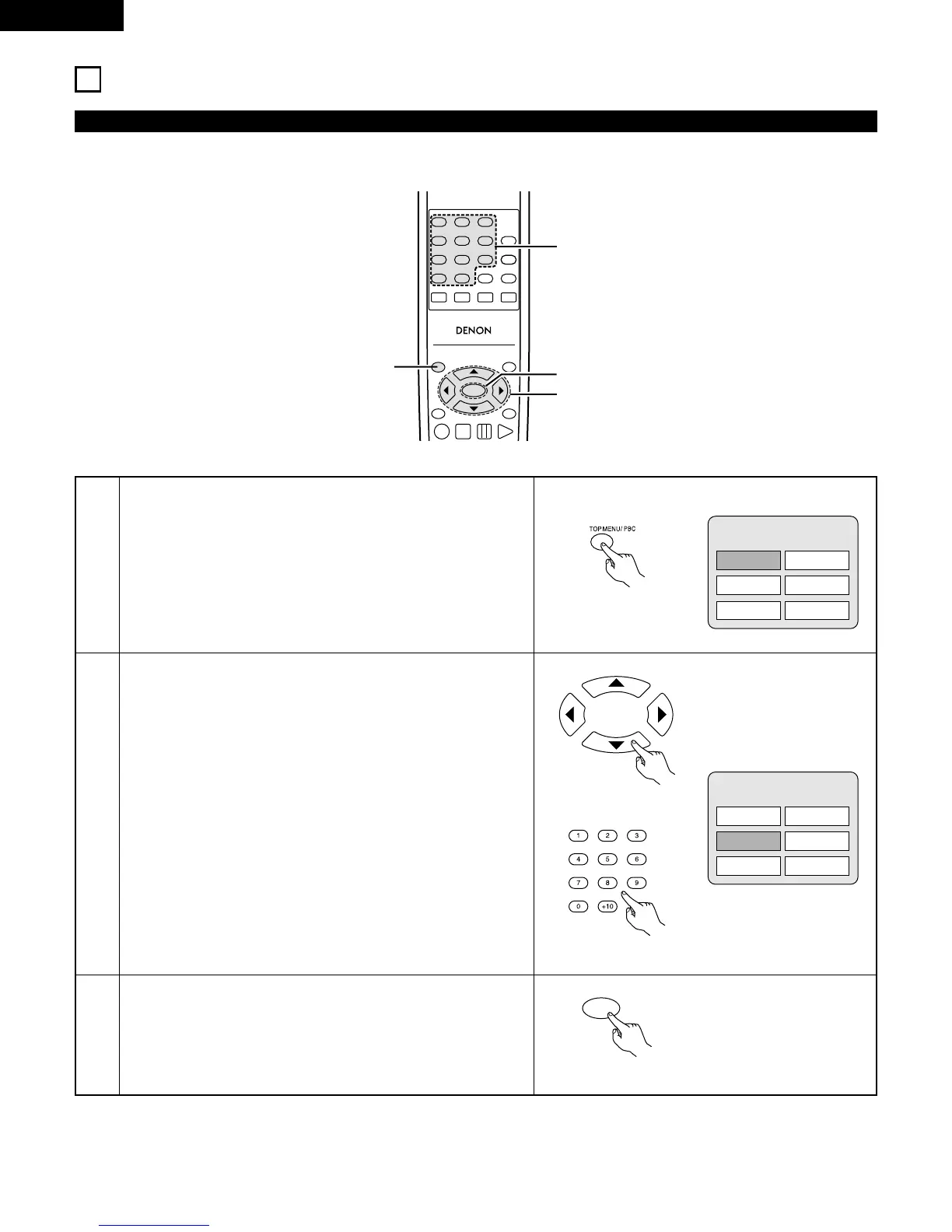
2 For DVDs containing multiple titles, the desired title can be selected and played from the top menu.
1
2
During playback, press the TOP MENU/PBC button.
The top menu appears.
Use the cursor or number buttons to select the desired title.
Press the ENTER button.
Playback starts.
Playback also starts if the PLAY button is pressed.
TOP MENU
Apple
Orange
Peach
Banana
Strawberry
Pineapple
Using the Top Menu
3
Example:
Example:
When Orange is selected
TOP MENU
Apple
Orange
Peach
Banana
Strawberry
Pineapple
TOP MENU
/PBC
MENU
RETURN
ANGLE
DISPLAY
STOP
STILL/PAUSE
PLAY
RC-963
123
456
789
0 +10
A-B REPEAT
REPEAT
AUDIO
SUBTITLE
ENTER
CALL
RANDOM
CLEAR
PROG /
DIRECT
2
2
3
1
Remote control unit
Remote control unit
ENTER
Remote control unit
Remote control unit

Related product manuals