KEY LOCK
2 Operation of the buttons on the front panel (aside from the POWER button) is disabled to prevent accidental operation.
1
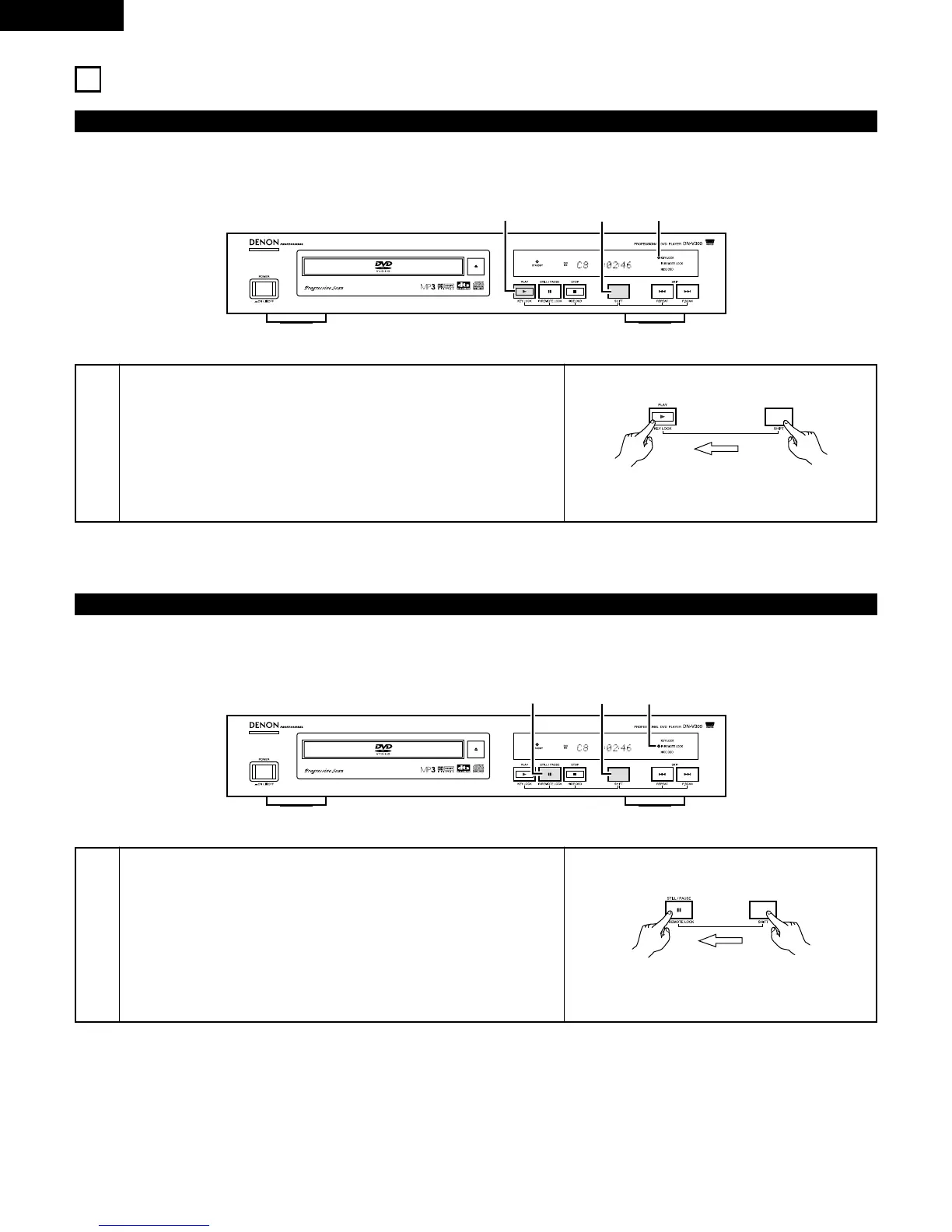
Press the SHIFT and PLAY buttons simultaneously for 3 seconds.
The KEY LOCK indicator lights (green) and the KEY LOCK mode is
turned on.
• When the KEY LOCK mode is turned on, the KEY LOCK indicator
flashes (green) if one of the buttons on the front panel (aside from the
POWER button) is operated.
• To turn the KEY LOCK mode off, press the SHIFT and PLAY buttons
again simultaneously for 3 seconds.
KEY LOCK indicator
Main unit
IR REMOTE LOCK
2 Operation of the buttons on the remote controller is disabled to prevent accidental operation.
1
Press the SHIFT and STILL/PAUSE buttons simultaneously for 3
seconds.
The IR REMOTE LOCK indicator lights (green) and the IR REMOTE
LOCK mode is turned on.
• When the IR REMOTE LOCK mode is turned on, the IR REMOTE
LOCK indicator flashes (green) if one of the buttons on the remote
controller is operated.
• To turn the IR REMOTE LOCK mode off, press the SHIFT and
STILL/PAUSE buttons again simultaneously for 3 seconds.
IR REMOTE LOCK indicator
Main unit



 To Next Page