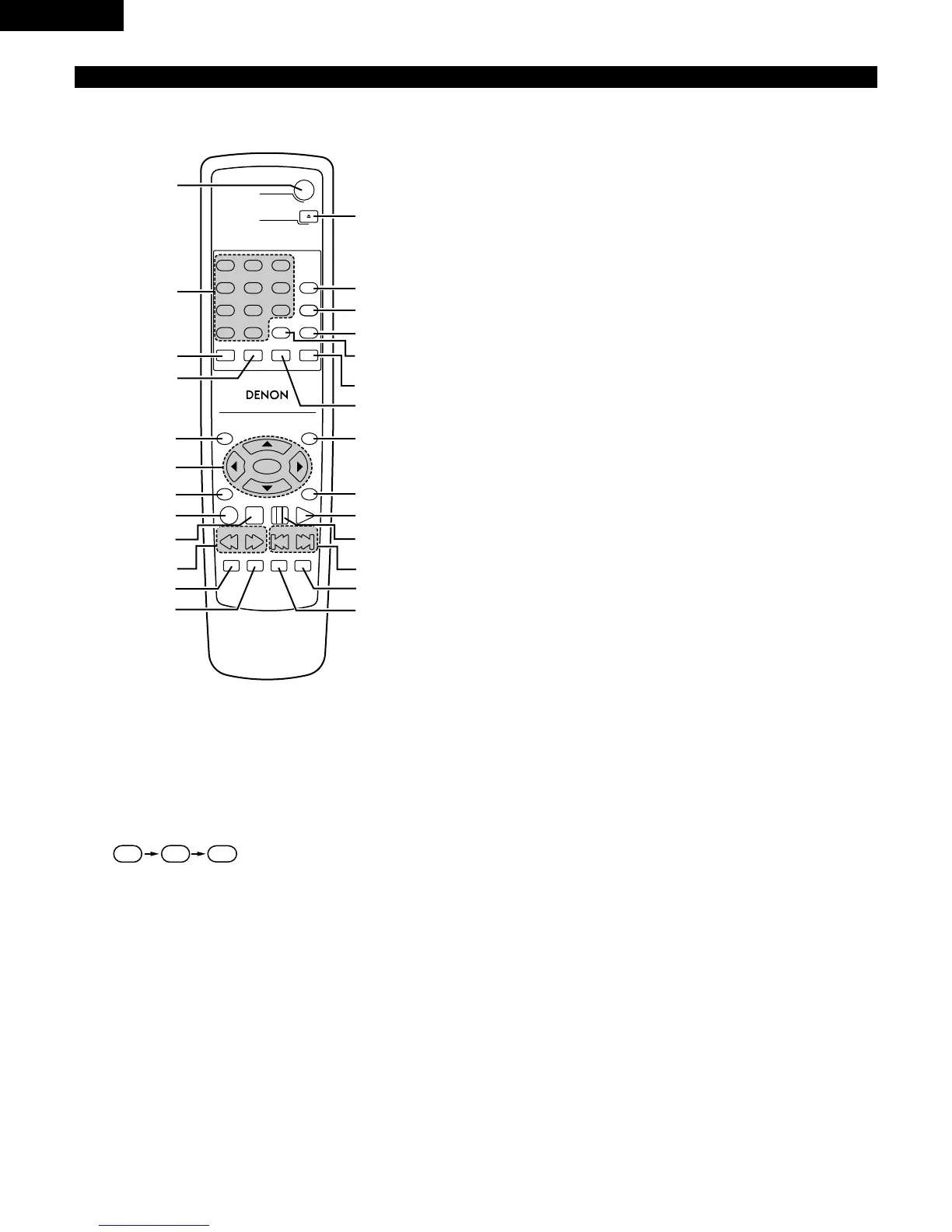
2 Button not explained here function in the same way as the corresponding buttons on the main unit.
q
DVD POWER button
• Press this to switch the power between on and standby.
w
Number buttons
• Use these to input numbers.
• Use the +10 button to input numbers of 10 or over.
• Example: To input 25
e
SUBTITLE button
• Press this to switch the DVD’s subtitle language.
r
AUDIO button
• For DVDs, press this to switch the audio language. For
video CDs, press this to switch the channel between
“LR”, “L” and “R”.
t
TOP MENU/PBC button
• The top menu stored on the disc is displayed.
y
Cursor buttons / ENTER button
• Use the • and ª buttons to select in the vertical direction.
• Use the
0 and 1 buttons to select in the horizontal direction.
• Press the ENTER button to select the item selected with the
cursor buttons.
u
ANGLE button
• Press this to switch the angle.
i
DISPLAY button
• Press this to display the ON-SCREEN.
o
STOP button (2)
!0
SLOW/SEARCH buttons (67)
!1
SETUP button
• Press this to display the default setting screen.
!2
NTSC/PAL button
• Use this to switch the set’s video output format (NTSC/PAL).
!3
OPEN/CLOSE button (5)
!4
PROG/DIRECT button
• Press this to switch between the normal play, programmed
play.
!5
CALL button
• Press this to check the program contents.
!6
RANDOM button
• Press this to play the tracks on the video or music CD in
random order.
!7
CLEAR button
• Press this to clear numbers that you have input.
!8
A-B REPEAT button
• Use this to repeat sections between two specific points.
!9
REPEAT button
• Press this to play tracks repeatedly.
@0
MENU button
• The DVD menu stored on the disc is displayed.
@1
RETURN button
• Press this to return to the previous menu screen.
@2
PLAY button (1)
@3
STILL/PAUSE button (3)
@4
SKIP buttons (89)
@5
SLIDE SHOW button
• The way of switching to the next image during continuous
JPEG image playback (SLIDE SHOW) can be selected.
@6
ZOOM button
• Press this to enlarge the image.



 To Next Page