EasyManua.ls Logo

Denon DVD-5000 - Traverse Unit Removal

Denon DVD-5000
64 pages
Print Icon
To Next Page IconTo Next Page
To Previous Page IconTo Previous Page
Loading...
fa
OVD-5000
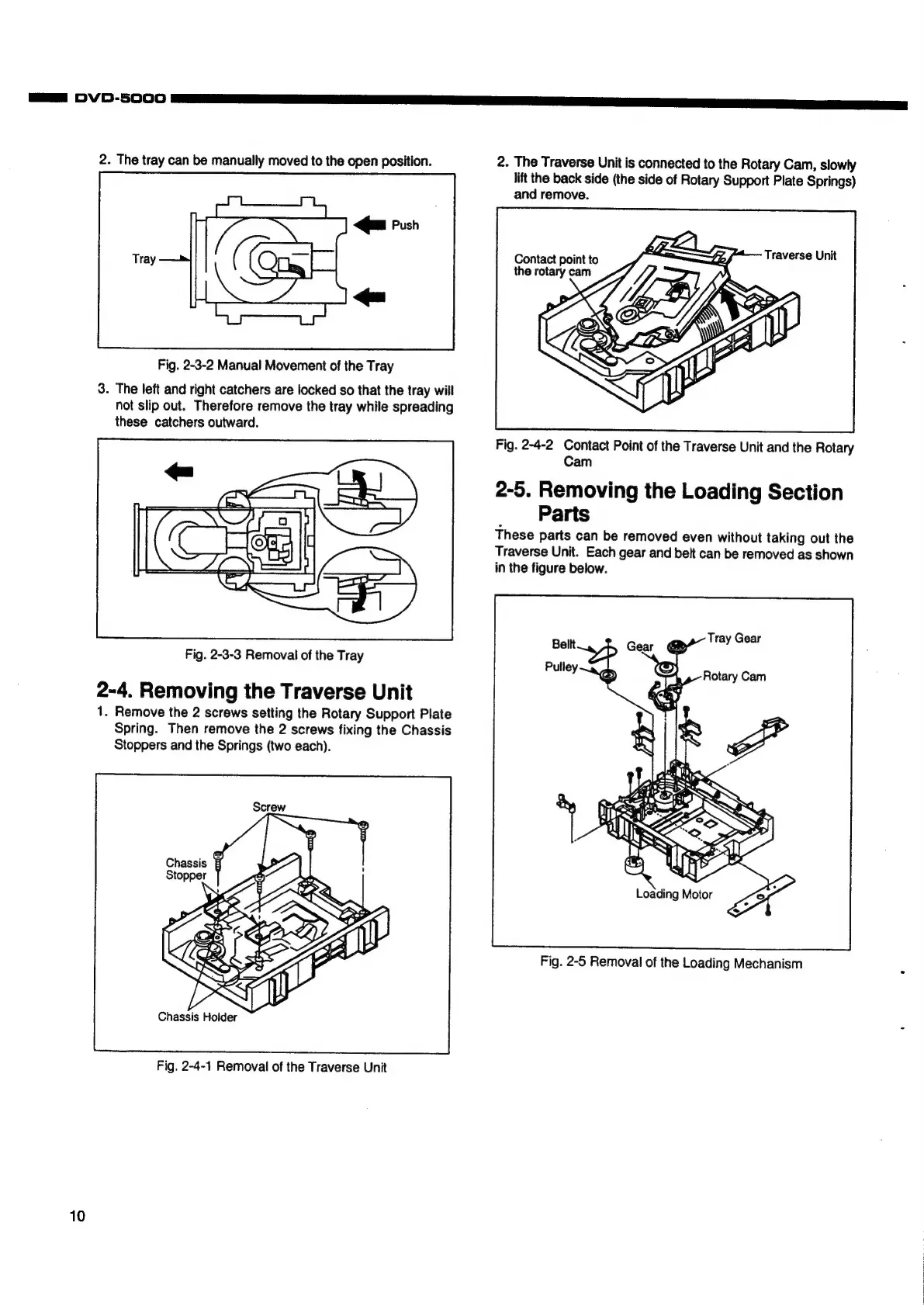
2.
The
tray
can
be
manually
moved
to
the
open
position.
<]m
Push
Tray
=
Fig.
2-3-2
Manual
Movement
of
the
Tray
3.
The
left
and
right
catchers
are
locked
so
that
the
tray
will
not
slip
out.
Therefore
remove
the
tray
while
spreading
these
catchers
outward.
Fig.
2-3-3
Removal
of
the
Tray
2-4.
Removing
the
Traverse
Unit
1.
Remove
the
2
screws
setting
the
Rotary
Support
Plate
Spring.
Then
remove
the
2
screws
fixing
the
Chassis
Stoppers
and
the
Springs
(two
each).
Chassis
Stopper
Fig.
2-4-1
Removal
of
the
Traverse
Unit
10
2.
The
Traverse
Unit
is
connected
to
the
Rotary
Cam,
slowly
lift
the
back
side
(the
side
of
Rotary
Support
Plate
Springs)
and
remove.
Fig.
2-4-2
Contact
Point
of
the
Traverse
Unit
and
the
Rotary
Cam
2-5.
Removing
the
Loading
Section
Parts
These
parts
can
be
removed
even
without
taking
out
the
Traverse
Unit.
Each
gear
and
belt
can
be
removed
as
shown
in
the
figure
below.
Loading
Motor
Fig.
2-5
Removal
of
the
Loading
Mechanism