14
ENGLISH
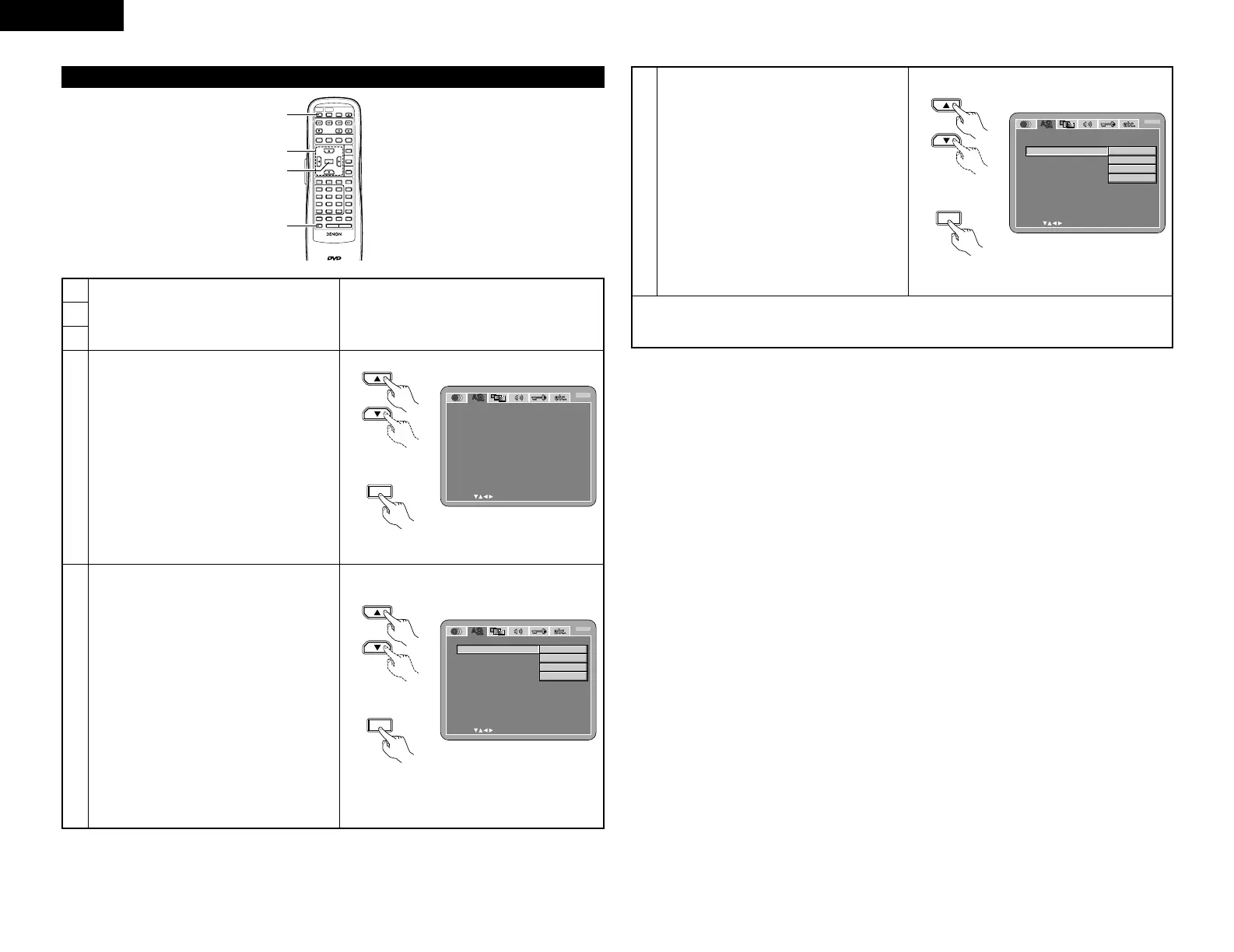
When “OSD SETUP” is selected
REMOTE CONTROL UNIT
RC-552
POWER
ON
POWER
OFF
OPEN
/
CLOSE
NTSC
/
PAL
DISPLAY SUBTITLE
ANGLE
SKIP
SLOW / SEARCH
MENU
RETURN
PURE DIRECT
MEMORY
PICTURE
ADJUST
DIMMER
ZOOM
PROG/DIR
CLEAR
CALL
MARKER
REPEAT A-B RANDOM V.S.S.
SETUP PAGE
-
PAGE
+
123
4
5
6
7
8
9
0
SEARCH MODE
AUDIO
STOP
PLAYSTILL / PAUSE
TOP MENU
+
10
ENTER
2
1
3, 4, 5
3, 4, 5
4
Use the • and ª cursor buttons to select the
desired setting, then press the ENTER button.
OSD LANGUAGE
Use this to set the language for the default
setting screen and messages displayed on the
TV screen (“PLAY”, etc.)
WALL PAPER
Use this to select the image to be shown on the
screen in the stop mode and CD play mode.
1
2
3
See page 12.
OSD SETUP
SELECT: DECISION:ENTER BUTTON
OSD L ANGUAGE
EXIT SETUP
W
AL L PAPE R
ENGL ISH
BUL E
B
Remote control unit
5
Use the • and ª cursor buttons to select the
desired setting, then press the ENTER button.
q When “OSD LANGUAGE” is selected:
ENGLISH (Factory default)
Select this to set the OSD language to
English.
FRANÇAIS
Select this to set the OSD language to
French.
ESPAÑOL
Select this to set the OSD language to
Spanish.
DEUTSCH
Select this to set the OSD language to
German.
OSD SETUP
SELECT: DECISION:ENTER BUTTON
OSD L ANGUAGE
EXIT SETUP
W
AL L PAPE R
B
ENGL ISH
FRANÇAIS
ESPAÑOL
DEUTSCH
OSD SETUP
SELECT: DECISION:ENTER BUTTON
OSD L ANGUAGE
EXIT SETUP
W
AL L PAPE R
B
BUL E
GRAY
BLACK
PICTURE
Remote control unit
5
Use the • and ª cursor buttons to select the
desired setting, then press the ENTER button.
w When “WALL PAPER” is selected:
BLUE (Factory default)
Select this to display a blue background on
the TV display.
GRAY
Select this to display a gray background on
the TV display.
BLACK
Select this to display a black background on
the TV display.
PICTURE
Select this to display the wallpaper on the TV
display.
✽ To exit the setup mode
Use the ª cursor button to select “EXIT SETUP”, then press the ENTER button. It is also possible to quit
by pressing the SETUP button on the remote control unit.


 To Next Page
 Loading...