1
2
3
4
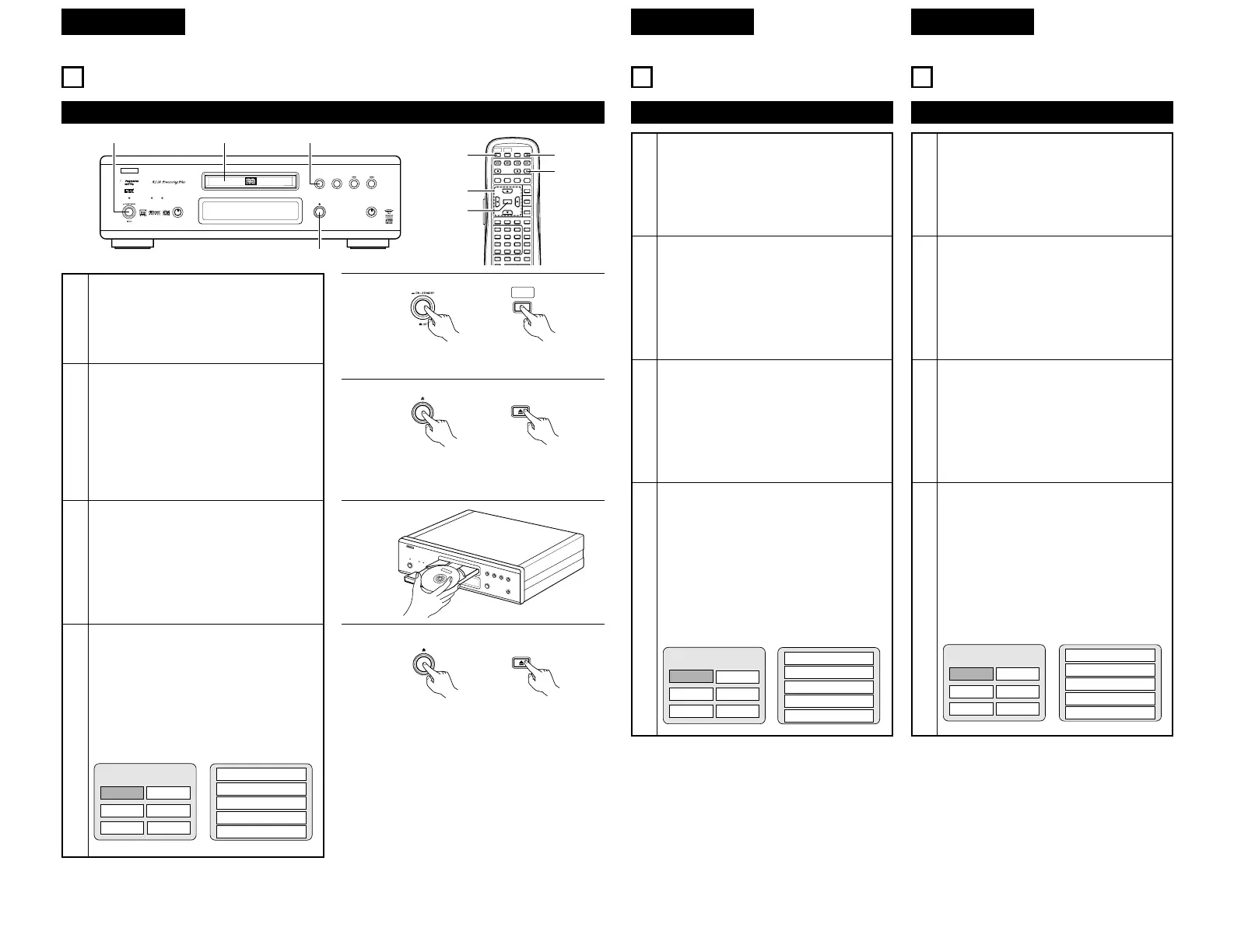
Schalten Sie das Gerät ein.
• Drücken Sie die Netztaste. Die Netzanzeige
leuchtet und das Gerät schaltet sich ein.
• Drücken Sie im Standby-Modus die
POWER ON-Taste auf dem
Fernbedienungsgerät.
Drücken Sie die OPEN/CLOSE-Taste, um das
Disc-Fach zu öffnen.
Legen Sie die Disc in das Disc-Fach ein.
Drücken Sie die OPEN/CLOSE-Taste.
• Für viele interaktive DVDs und Video-CDs
mit Wiedergabesteuerung erscheint ein
Menüschirm. Wählen Sie die gewünschte
Funktion in einem derartigen Fall wie in
Schritt 6 beschrieben aus.
✽ Interaktive DVDs sind DVDs mit mehreren
Blickwinkeln, Geschichten usw..
Apfel
Banane
Orange Erdbeere
Pfirsich Ananas
TOP-MENÜ
1. Öffnen
2. 1. Bewegung
3. 2. Bewegung
4. 3. Bewegung
5. Beenden
9
LECTURE
(1) Lecture
1
2
3
4
Mettre sous tension.
• Appuyer sur la touche d’alimentation. Le
voyant d’alimentation s’allume et l’appareil
se met sous tension.
• En mode veille, appuyer sur la touche
d’alimentation “POWER ON” de la
télécommande.
Appuyer sur la touche ouverture/fermeture
(OPEN/CLOSE) pour ouvrir le tiroir de disque.
Placer le disque dans le tiroir de disque.
Appuyer sur la touche ouverture/fermeture
(OPEN/CLOSE).
• Pour un grand nombre de DVD et CD vidéo
interactifs avec commande de lecture, un
écran menu s’affiche. Dans ce cas, utiliser
la procédure de l’étape 6 pour sélectionner
le paramètre souhaité.
✽ Les DVD interactifs sont des DVD
comprenant les angles multiples, histoires,
etc.
Exemple: Pour les DVD avec
des écrans menu
Exemple: Pour les CD vidéo avec
commande de lecture
Pomme
Banane
Orange Fraise
Pêche Ananas
1. Ouverture
2. 1er mouvement
3. 2e mouvement
4. 3e mouvement
5. Final
BARRE DE MENU
9
RIPRODUZIONE
(1) Riproduzione
1
2
3
4
Accendete la corrente.
• Premete il tasto di corrente, l'indicatore si
illumina e la corrente si spegne.
• Nel modo stand by, premete il tasto
POWER ON dell'unità telecomando.
Premete il tasto OPEN/CLOSE per aprire il
piatto portadisco.
Posizionate il disco sul piatto portadischi.
Premete il tasto OPEN/CLOSE.
• Per molti DVD interattivi e CD video con
controllo di riproduzione appare uno
schermo menù. In tal caso, usate la
procedura della fase 6 per selezionare la
voce desiderata.
✽ I DVD interattivi sono dei DVD che
includono degli angoli multipli, storie, ecc.
Esempio: Per i DVD con degli
schermi menù
Esempio:
Per i CD video con
controllo di riproduzione
Mela
Banana
Arancio Fragola
Pesca Ananas
MENÚ SUPERIORE
1. Inizio
2.
1° movimento
3.
2° movimento
4.
3° movimento
5.
Fine



 To Next Page