22
ENGLISH
8
LOADING DISCS
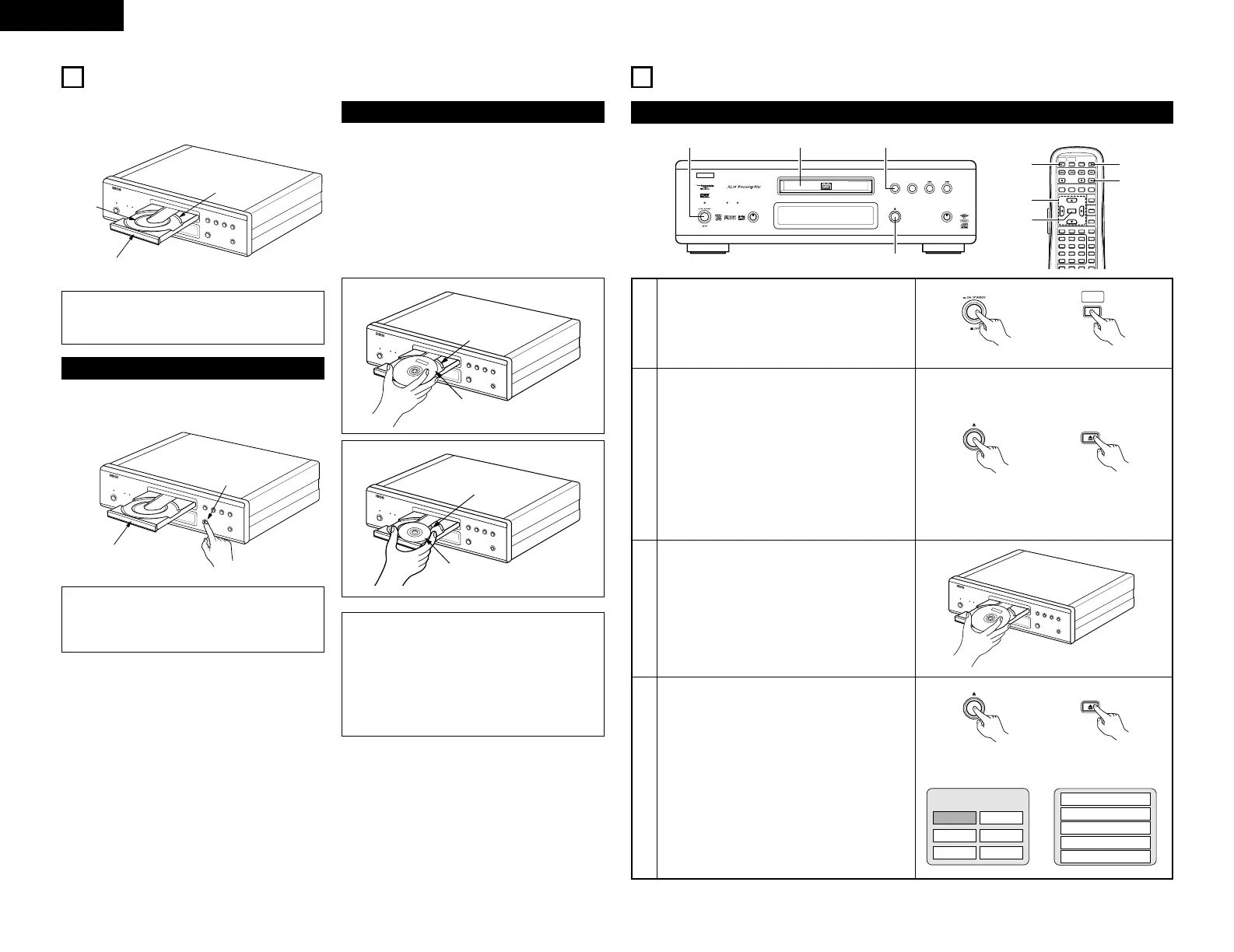
2 Set discs in the disc tray with the labeled (printed)
side facing up.
8 cm disc
guide
12 cm disc guide
Disc tray
NOTE:
• Do not move the DVD-A1 while a disc is playing.
Doing so may scratch the disc.
(1) Opening and Closing the Disc Tray
q Turn on the power.
w Press the OPEN/CLOSE button.
Disc tray
OPEN/CLOSE button
NOTES:
• Be sure to turn on the power before opening
and closing the disc tray.
• Do not strike on the button with a pencil, etc.
(2) Loading Discs
Figure 1
Outer disc tray
12 cm disc
Figure 2
Inner disc tray
8 cm disc
NOTES:
• If your foreign object is caught in the disc tray
during closing, simply press the OPEN/CLOSE
button again and the tray will open.
• Do not press the disc tray in by hand when the
power is off. Doing so will damage it.
• Do not place foreign objects in the disc tray.
Doing so will damage it.
• Pick up the disc carefully so as not to touch the
signal surface and hold it with the labeled side
facing up.
• With the disc tray fully open, set the disc in the disc
tray.
• Set 12 cm discs in the outer tray guide (Figure 1), 8
cm discs in the inner tray guide (Figure 2).
• Press the OPEN/CLOSE button. The disc is
automatically loaded.
• The disc tray can also be closed automatically to
load the disc by pressing the PLAY button.
9
PLAYBACK
(1) Playback
1
2
3
4
Turn on the power.
• Press the power button, the power indicator
lights and the power turn on.
• When standby mode, press the POWER ON
button of remote control unit.
Press the OPEN/CLOSE button to open the disc
tray.
Set the disc in the disc tray.
Press the OPEN/CLOSE button.
• For many interactive DVDs and video CDs with
playback control, a menu screen appears. In
this case use the procedure in step 6 to select
the desired item.
✽ Interactive DVDs are DVDs including multiple
angles, stories, etc.



 To Next Page