35
ENGLISH
21
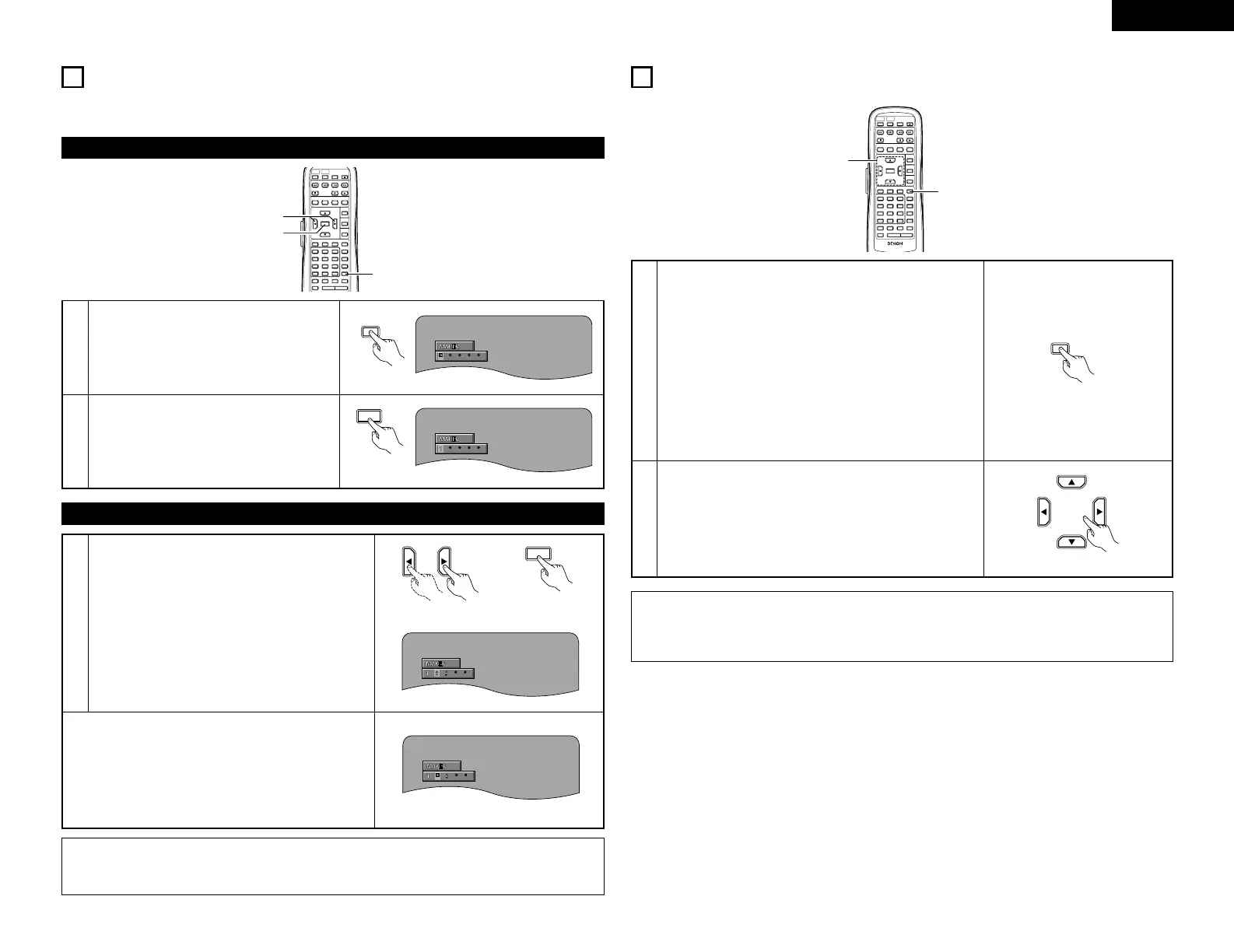
MARKING SCENES YOU WANT TO SEE AGAIN
2 Set marks at scenes you want to see again so that you can start playback from the marked position
whenever you want.
1
During playback, press the MARKER button.
• Use the
0 and 1 cursor buttons to select the
“*” marks.
• The marker screen appears.
•“*” is displayed if the mark is not set.
Remote
control unit
2
Press the ENTER button at the scene you want
to mark.
• A number is displayed.
• Up to five marks can be set.
(To select another marker, use the cursor
buttons (
0, 1).)
3
Use the 0 and 1 cursor buttons to select the marker
number and press the ENTER button.
• If the marker screen is not displayed during playback,
press the MARKER button to display it.
✽
To clear the marker display:
Press the MAKER button.
✽
To clear a marker:
Use the
0 and 1 cursor buttons to select a marker
number and press the CLEAR button.
• You can clear existing markers, but they are restored
when you open the disc tray or switch the unit to
standby.
Remote control unit Remote control unit
NOTE:
• All the markers added with this unit are cleard when the unit is switched to standby or the disc tray is
opened.
1
In the play or pause mode, press the ZOOM button.
• The zoom rate increases each time the ZOOM button is
pressed.
For DVD video discs and video CDs:
OFF Æ x1.5 Æ x2 Æ x4 Æ OFF
For DVD audio discs:
OFF Æ x2 Æ x4 Æ OFF
• When “PLAYER MODE” at “OTHER SETTING” in
“SETUP” is set to “AUDIO”, zooming is not possible at
the top menu or with still pictures.
• When “PLAYER MODE” at “OTHER SETTING” in
“SETUP” is set to “VIDEO”, zooming is not possible at
the top menu.
Remote control unit
Remote control unit
NOTES:
• Zooming is not possible with some discs.
• The zoom function may not work properly at some scenes.
• Zooming is not possible at the top menu or the menu screen.



 To Next Page