3.2 RS-232C Interface Specifications
[ 1 ] Interface Connector and Pin Assignment
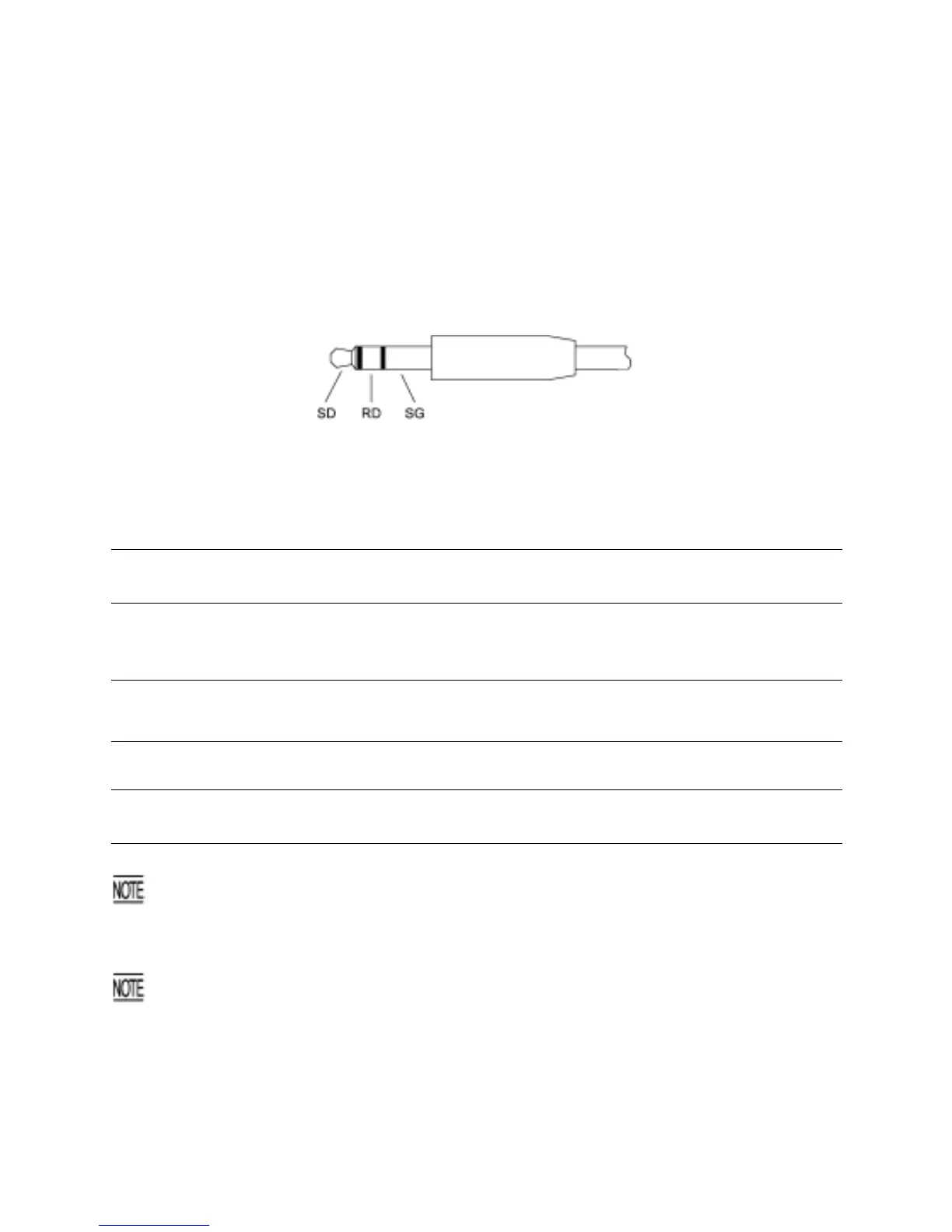
The BHT has a direct-connect interface port which is connectable to the 3-pole mini stereo plug (φ2.5
mm or 0.1") and supports a subset of the RS-232C interface as shown below.
Using a direct-connect interface cable having the mini stereo plugs makes it possible to connect the BHT
to a host PC (or another BHT) directly without any routing through the CU-300.
3-pole Mini Stereo Plug (ø2.5 mm or 0.1")
The poles of the plug are assigned as listed below.
Signal Input/Output
Signal Name Function
BHT External device
SD Send data →
RD Receive data ←
SG Signal ground -
The input/output voltage threshold for the logical valued signal is listed below.
Logical Value
Input Voltage Threshold
(RD)
Output Voltage Threshold
(SD)
0 3V min. 5V min.
1 -3V max. -5V max.
The direct-connect interface port is not designed to stand frequent connecting/disconnecting. Do not
plug and unplug basically more than one time a day; otherwise, the service life of the plug will
shorten. To connect the BHT to a host PC having no IrDA port (or another BHT) frequently, use the
CU-300.
Allow the specified signals only to enter the direct-connect interface port. Entry of other signals will
result in a failure or malfunction of the BHT.
122



 To Next Page