Chapter 2 Getting Started the BHT and System Mode
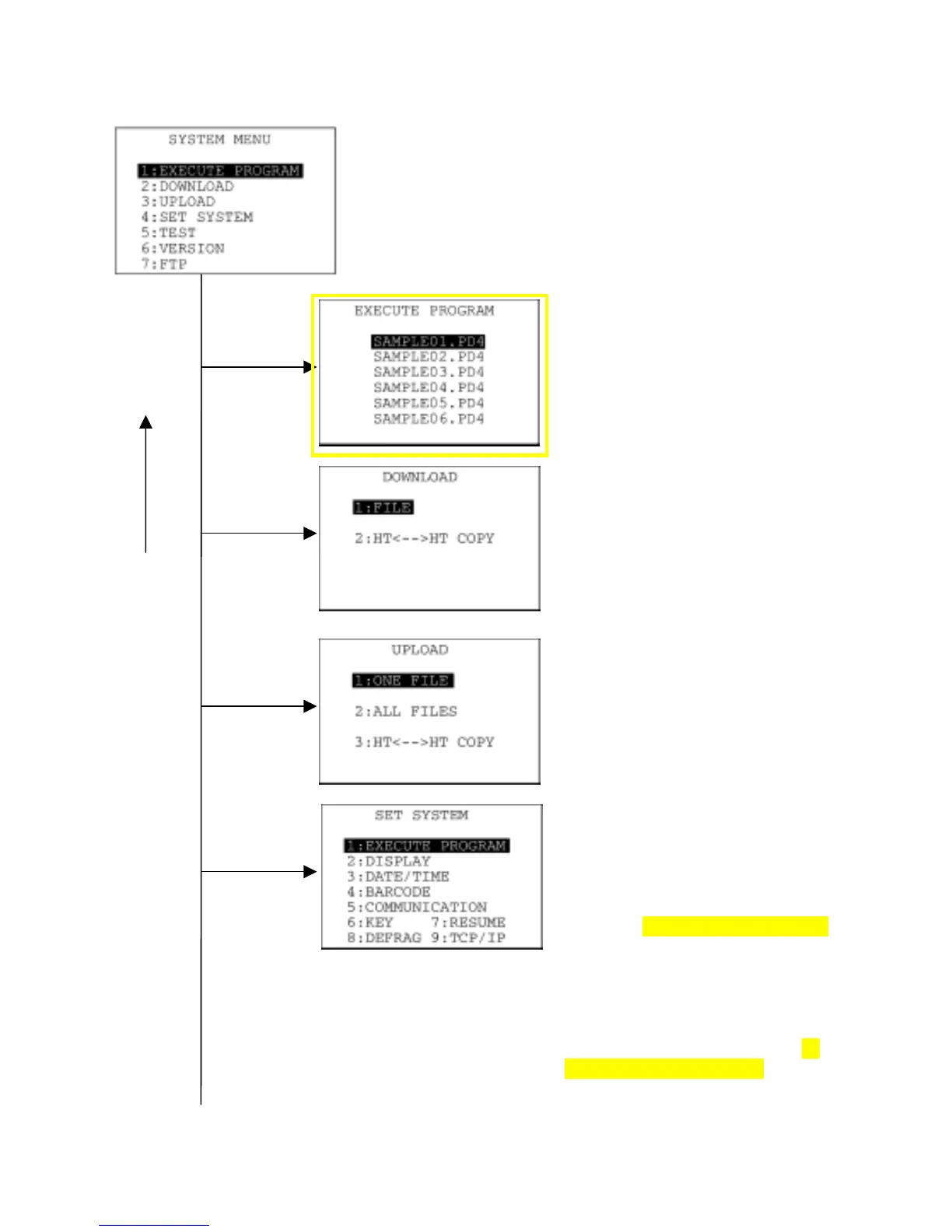
Structure of System Mode
SYSTEM MENU ← Press the PW key while holding down the SF
and 1 keys.
Program Execution
Allows you to select a desired user
program to be executed immediately.
(Refer to Section 2.5.3, [ 1 ].)
Downloading
Transfers user program files or data
files from the host PC to the memory
integrated in the BHT. Downloading
between the BHTs is also possible.
(Refer to Section 2.5.3, [ 2 ].)
Uploading
Transfers user program files and data
files stored in the memory of the BHT to
the host PC.
(Refer to Section 2.5.3, [ 3 ].)
System Environment Setting
Sets a variety of environmental
conditions--an execution program,
message version (English or
Japanese), system status indication,
BHT-5000 screen compatibility mode,
calendar clock, special bar-code
scanning parameters, interface port,
communications parameters, shift key
& magic key functions, resume
function, drive defragmentation, and
TCP/IP, FTP and DHCP settings (in
LAN-support software only).
(Refer to Section 2.5.3, [ 4 ].)
1 and ENT
keys
2 and ENT
ke



 To Next Page