Chapter 2 Getting Started the BHT and System Mode
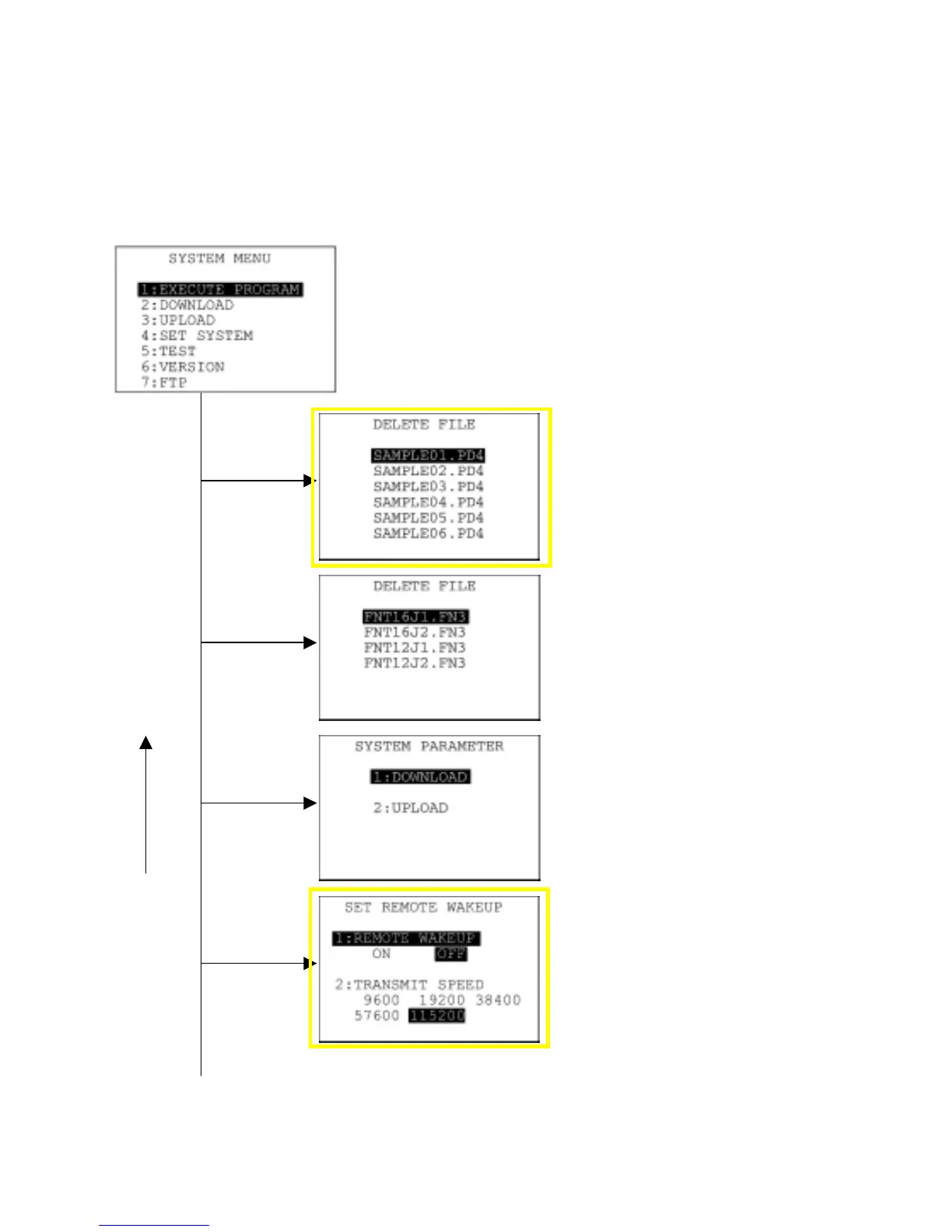
In addition to the functions given on the preceding pages, System Mode has these six functions:
Deleting program/data files, Deleting font files, Downloading/uploading the BHT system parameter file,
Setting the remote wakeup parameters, Downloading/uploading the system message file, and Updating
the systems.
To call up these functions, press the 0, 2, 3, 4, 6 or, period (.) key, respectively, while holding down the
SF key when the SYSTEM MENU is displayed.
SYSTEM MENU ← Press the PW key while holding down the SF
and 1 keys.
Deleting program/data files
Deletes a program file or data file
stored in the memory.
(Refer to Section 2.5.3, [ 8 ].)
Deleting font files
Deletes a font file stored in the
memory.
(Refer to Section 2.5.3, [ 9 ].)
Downloading/uploading the BHT
system parameter file
Downloads or uploads the system
parameter file.
(Refer to Section 2.5.3, [ 10 ].)
Setting the remote wakeup
Sets the remote wakeup parameters.
(Refer to Section 2.5.3, [ 11 ].)
4 with SF
held down
3 with SF
held down
C key
0 with SF
held down
2 with SF
held down
39



 To Next Page