Rev 07/04/2015
28
1.3.3 Temperature Probes Display
To check the reading of the unit’s temperature sensing probes, first make sure
the unit is in the OFF mode.
1. Press the NEDLE PROBE key and the DOWN arrow key together and hold
for five (5) seconds.
2. T o scroll through the reading use the UP or DOWN arrow key.
Tab 2
Pr1 Cabinet Probe
Pr2 Needle Probe
Pr3 Evaporator Probe
Valuable information can be obtained by checking the evaporator probe when
the unit is struggling to reach the cabinet temperature setpoint, (i.e. -40°F).
This may indicate that the evaporator coil is not being supplied with sufficient
refrigerant. With a cabinet setpoint of -40°F the actual evaporator temperature is
approximately -45°C at 0 Barg. In this case, the controller evaporator probe
reading MUST BE at least -42°C, which is the minimum readable temperature.
HACCP PRINTER
Blast Chillers can be ordered with an optional printer, or one can be installed as
a retrofit. The printer has its own power supply connection (110VAC – 240VAC
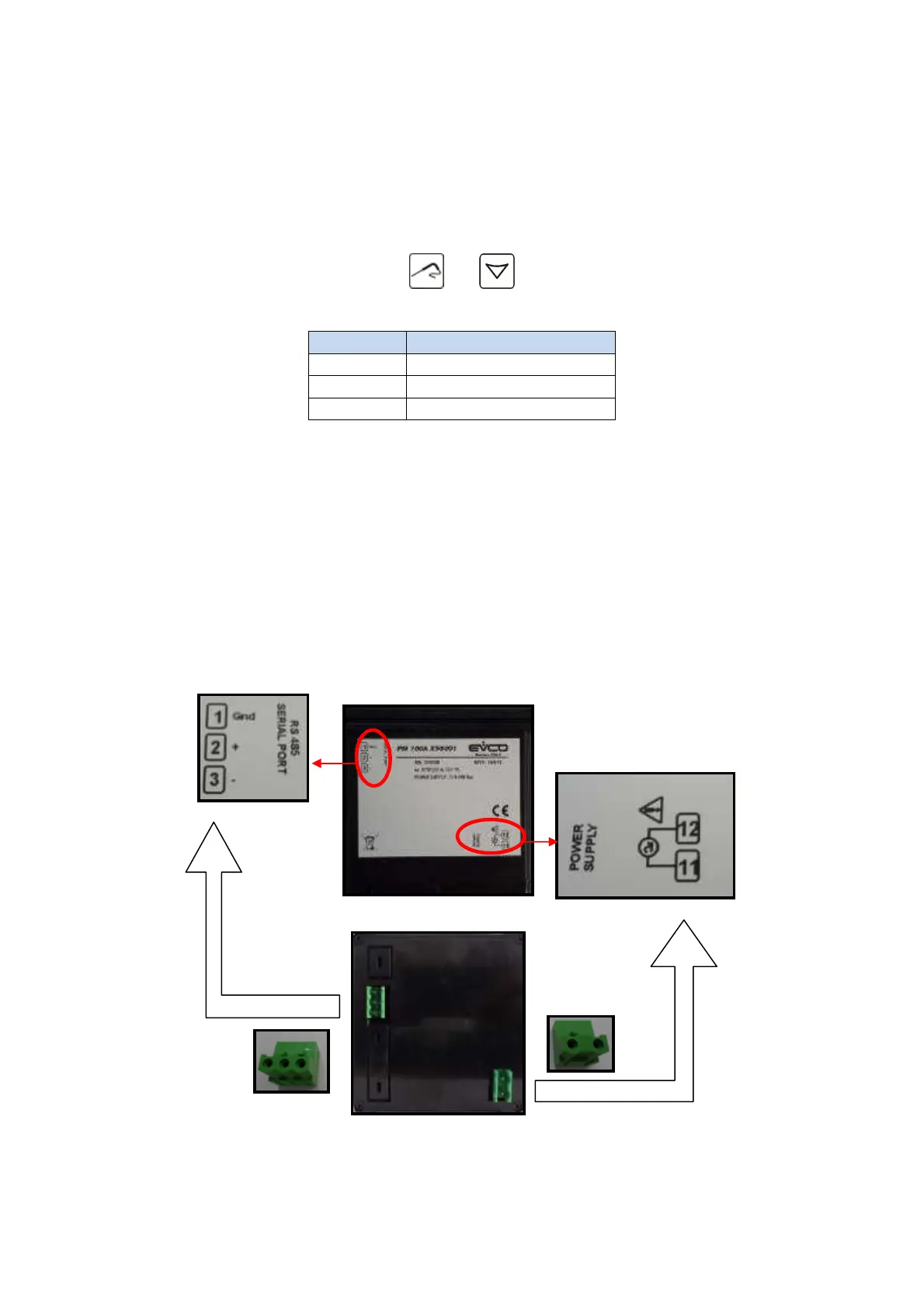
50/60 Hz). The printer is connected to the Main Board at the second RS 485
connection port (shown).



 To Next Page