65 Aleksandar Stamboliyski Str., 8000 Bourgas, Bulgaria
Tel: +359 56 820027, Fax: +359 56 836700
E-mail: oce@devabroadcast.com ,Web: www.devabroadcast.com
- 39 -
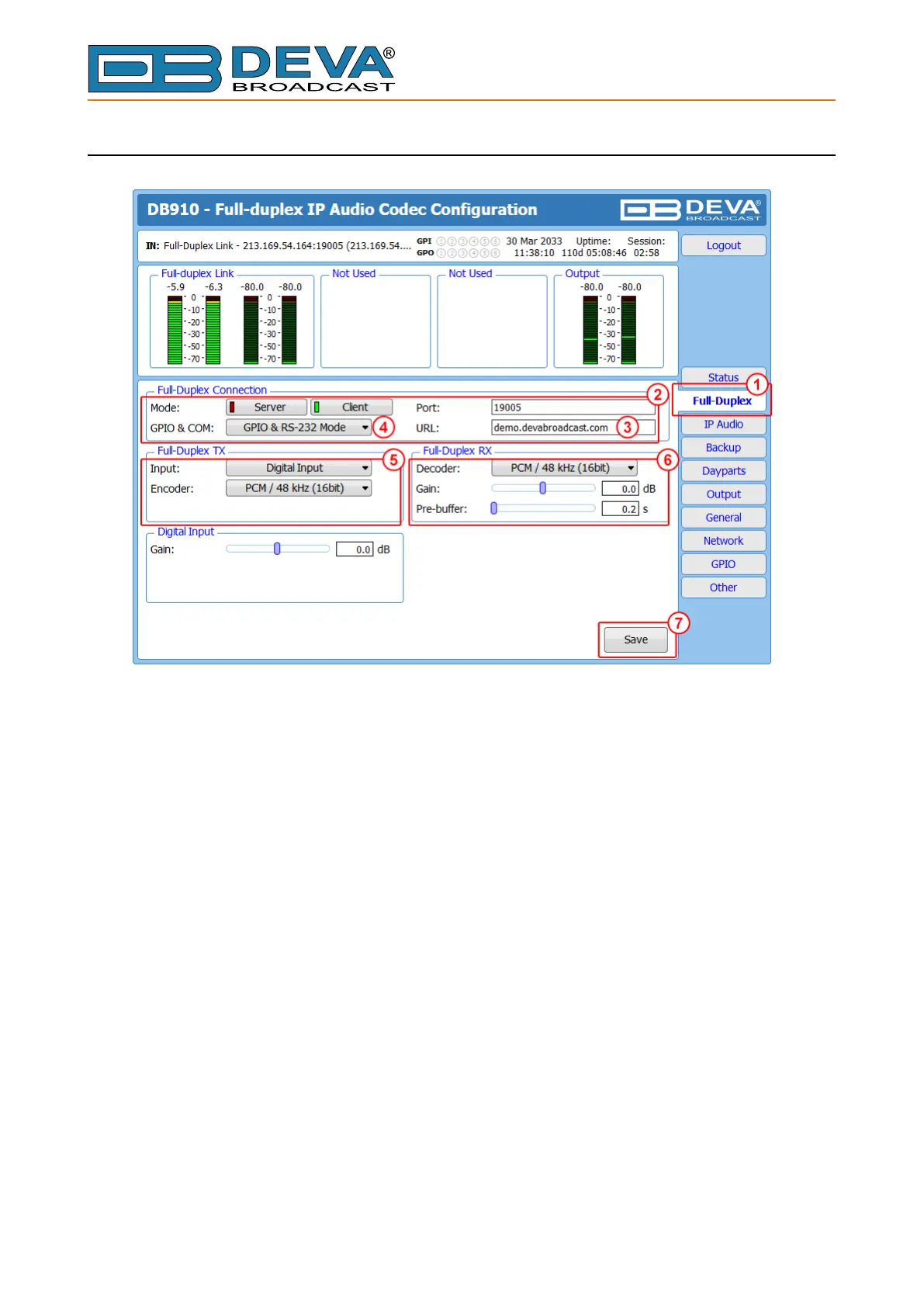
CLIENT DB910 SET-UP
1. Go to “Full-duplex” tab;
2. In section “Full-duplex Connection” set Mode to Client;
3. Enter the IP address (or URL) of DB910 Server in the URL eld;
4. If GPIO and COM Port are to be used set the appropriate mode in the same section;
5. In section “Full-duplex TX” set the desired Input, Encoder and Quality. The same CODEC
must be set as Decoder in Server DB910’s Full-Duplex RX section;
6. In section “Full-duplex RX” set the desired Decoder and Pre-buer. The same CODEC
must be set as Encoder in Server DB910’s Full-Duplex TX section;
7. Press [Save] to save the applied changes.



 To Next Page