ineo+ 220/280/360 (Version 3) 7-15
7.5 Changing finishing settings for saved data before printing
7
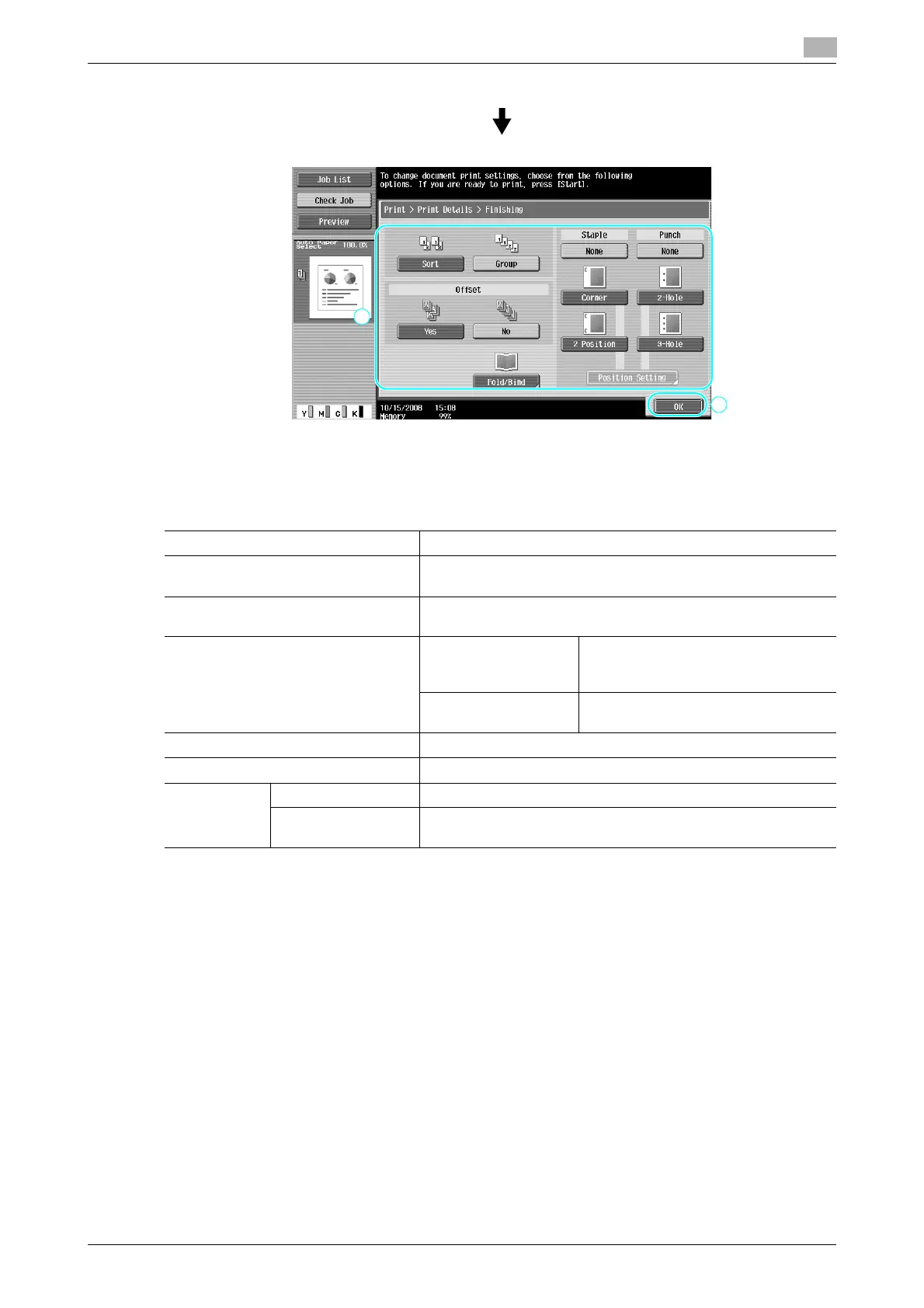
Available Finishing settings
The Finishing settings that are available differ depending on the installed options. For details, refer to chapter
5 of the [User’s Guide Copy Operations].
d Reference
For details, refer to chapter 7 of the [User’s Guide Box Operations].
Setting Description
Sort Select this setting to separate each set of a multi-page docu-
ment.
Group Select this setting to separate the copies of each page in a multi-
page document.
Offset When a finisher is not
installed
If the sorting conditions are met, cop-
ies are fed out and sorted in an alter-
nating crisscross pattern.
When a finisher is in-
stalled
The copies are fed out shifted to sep-
arate them.
Staple Copies can be stapled in the corner or at two locations.
Punch Holes for filing can be punched in the copies
Fold/Center
Staple & Fold
Half-Fold Select this setting to fold copies in half before feeding them out.
Center Staple & Fold Select this setting to staple copies at two locations along the
center, then fold the copies in half before feeding them out.











 To Next Page