15 Introduction
devolo dLAN WiFi Outdoor
* Information about the web interface can be
found in Chapter 4 Network configuration.
** Information on improving the transmission rate
can be found in Chapter 5.3 Bandwidth optimi-
zation.
***A dLAN adapter switches to standby mode
after approximately 10 minutes if no active
network device (e.g. computer) is connected to the
network interface and the WiFi is switched off. In
this mode, the dLAN adapter cannot be accessed
over the electrical wiring. As soon as the network
device (e.g. computer) connected to the network
interface is switched on again, your dLAN adapter
can also be accessed over the electrical wiring
again.
Check whether the adapter is connected to the
mains supply correctly and whether the pairing
operation has been carried out successfully. For
more information about this, refer to 3.3
Connecting the dLAN WiFi Outdoor
2.4.2WiFi button
The WiFi button controls the following WiFi
functions:
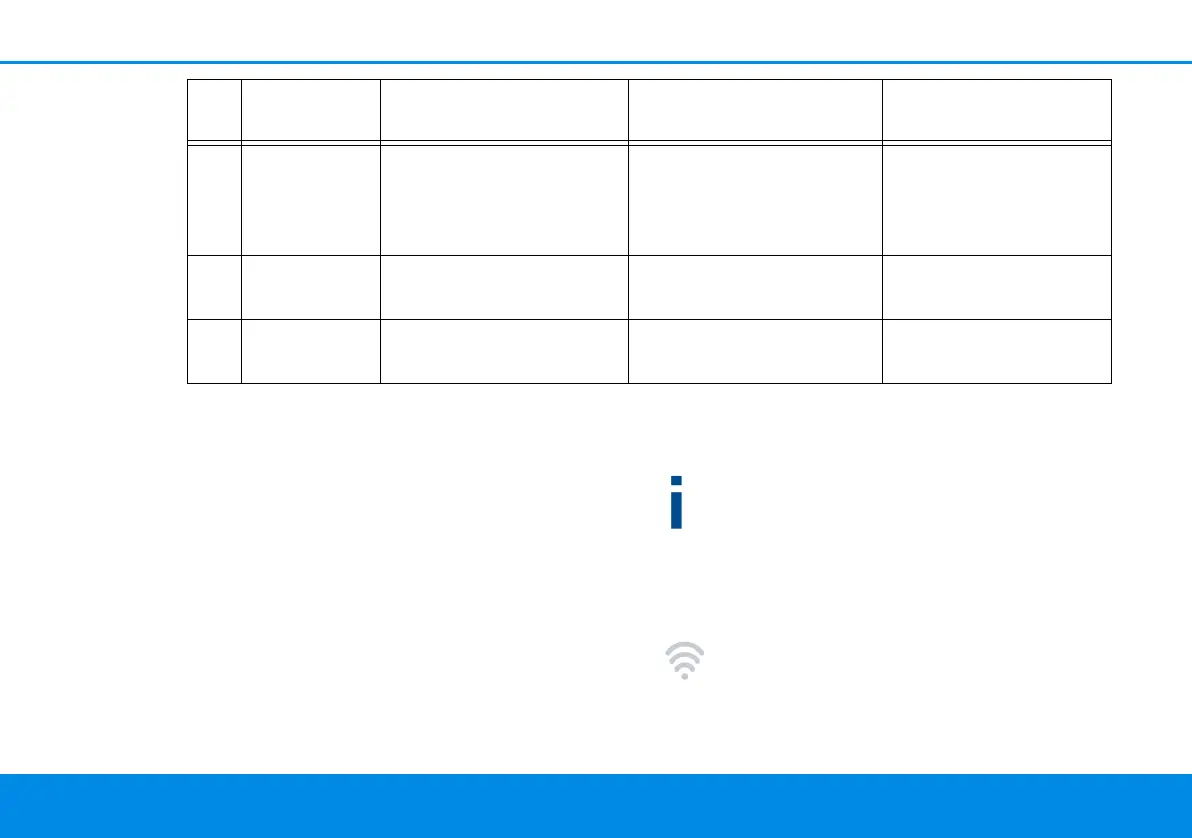
4 White LED Lights up steady An encrypted dLAN
connection exists and the
adapter is ready to opera-
te
Can be disabled
5 White LED Flashes at intervals of 0.5
sec. (on/off)
dLAN encryption being
established
Can be disabled
6 White LED Flashing at intervals of
0.5/50-60 sec. (On/off)
Adapter is in Standby
mode
Can be disabled
PLC LED Flashing behaviour Meaning LED status display
(web interface*)
dLAN WiFi Outdoor.book Seite 15 Mittwoch, 30. Oktober 2019 10:47 10



 To Next Page