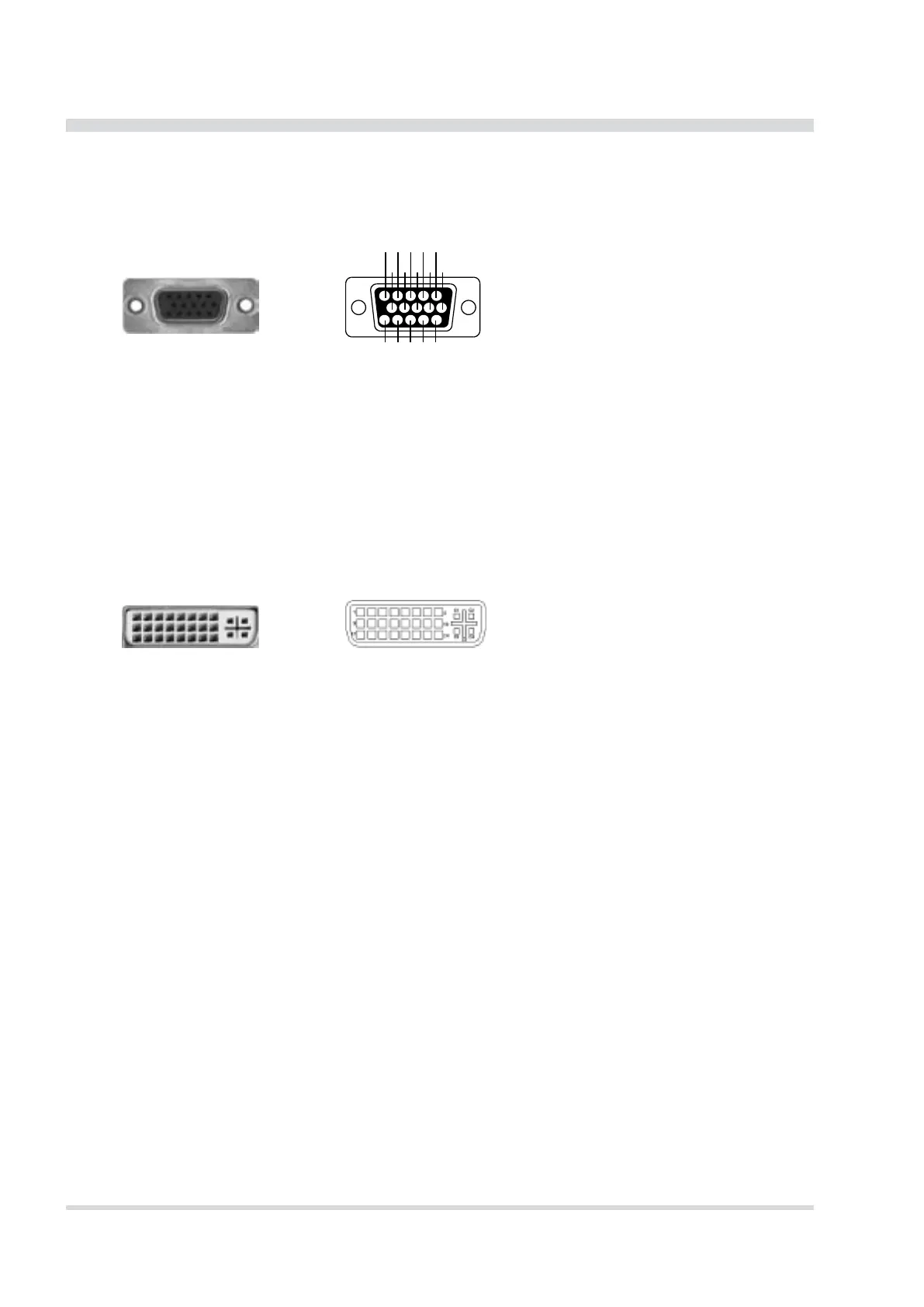
VGA connector
The VGA connector offers the possibility to connect an external CRT or other standard VGA displays to the
system.
54321
15 14 13 12 1 1
10 9876
Pin assignment
1: Red video
2: Green video / Sync on green
3: Blue video
4: -
5: -
6: Red video ground
7: Green video ground
8: Blue video ground
9: -
10: Ground
11: Ground
12: Data line
13: H-Sync / HV-Sync
14: V-Sync
15: Clock line
15-pin mini-SUB-D connector (male) Schematic
Some systems have a DVI connector instead or additionally to the VGA.
15-pin mini-SUB-D connector (male) Schematic
Pin assignment
1: TDMS-data 2-
2: TDMS-data 2+
3: Shield TDMS-data 2,4
4: TDMS-data 4-
5: TDMS-data 4+
6: DDC clock
7: DDC data
8: Analog: V-Sync
9: TDMS-data 1-
10: TDMS-data 1+
11: Shield TDMS-Daten 1,3
12: TDMS-data 3-
13: TDMS-data 3+
14: +5 volt
15: Ground for +5 volt
16: Hotplug-Detect
17: TDMS-data 0-
18: TDMS-data 0+
19: Shield TDMS-data 0,5
20: TDMS-data 5-
21: TDMS-data 5+
22: Shield TDMS-Takt
23: TDMS-clock+
24: TDMS-clock -
C1: Analog: red
C2: Analog: green
C3: Analog: blue
C4: Analog: H-Sync
C5: Analog: ground
Ethernet connector
The DEWE-5000 system supports 10/100 BaseT Ethernet with standard RJ45 connector.
Power-on button
The power-on button has to be used to switch on the system. It only works when the main power switch is
on.


 To Next Page