9
Set up receiver
Step 1: Set up the optional
Dexcom ONE receiver
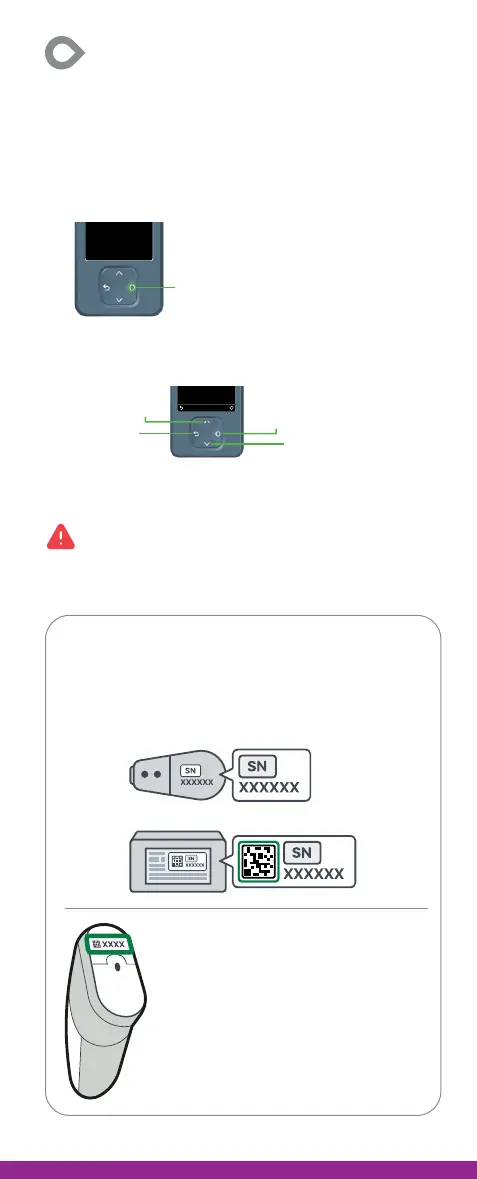
1. Press the Select button for 3-5 seconds to turn
on receiver.
2. Use buttons to navigate. The screen will tell you
which button to use.
3. Follow onscreen instructions to set up receiver,
including instructions to turn on alerts.
No glucose alerts unless you turn them on.
Turn on alerts when prompted to get glucose and
system alerts after sensor warmup is complete.
Select button
Save
Back
Scroll up
Scroll down
Select
During setup, the receiver will prompt you to:
Enter the transmitter serial number (SN).
Find the SN on the transmitter
or the transmitter box.
Enter the sensor code from the
sensor you are inserting. Do not
use the code from a different
sensor.
Sensor code is on the applicator.



 To Next Page